
Get business pricing on monitors, keyboards and dev gear
- Business-only prices and quantity discounts
- Tax-exempt purchasing
- Multiple users, one account, clear invoices
At a Glance
| Criteria | Selenium | TestComplete | Winner |
|---|---|---|---|
| Ease of Use | Requires programming knowledge, steeper learning curve | User-friendly interface, minimal coding | B |
| Customization & Flexibility | Highly customizable through scripting | Limited customization compared to open-source tools | A |
| Supported Platforms | Supports multiple browsers and platforms via WebDriver | Supports Windows, Android, and iOS through built-in features | A |
| Pricing & Cost | Free and open-source, but costs for infrastructure | Paid license, with different tiers, upfront cost | A |
| Integration & Ecosystem | Supports integration with various CI/CD tools via WebDriver | Built-in integrations with popular CI tools and APIs | B |
| Community & Support | Large, active community, extensive online resources | Smaller support community, but official support included | A |
| Test Automation Features | Supports complex test scenarios, scripting required | Rich set of built-in testing features, record-and-playback | B |
| Learning Curve | Moderate; depends on developer experience | Lower; designed for ease of use | B |
Hands-On Automated Testing with Playwright: Create Fast, Reliable, and Scalable Tests for Modern Web Apps with Microsoft’s Automa…

This book stands out for its practical guidance on using Playwright, a powerful automation framework tailored for modern web applications. Compared to traditional tools, Playwright offers fast, reliable, and scalable testing, making it ideal for teams focused on web performance. Its comprehensive coverage helps testers create resilient tests, but it may be dense for absolute beginners or those unfamiliar with JavaScript or modern web development. The lack of specific prerequisites means some readers might need additional foundational knowledge. Overall, this resource excels for professionals aiming to streamline their web testing pipelines with cutting-edge tools.
Hands-On Automated Testing with Playwright: Create Fast, Reliable, and Scalable Tests for Modern Web Apps with Microsoft’s Automa…
- ✔ Focus: Web application testing
- ✔ Framework: Playwright
- ✔ Learning curve: Moderate

AI Testing with Python: Build Intelligent Test Automation Using Python, Selenium, APIs, PyTest, LLMs & AI-Powered Testing Tools
- ✔ Focus: AI-powered test automation
- ✔ Languages: Python
- ✔ Tools Covered: Selenium, APIs, LLMs
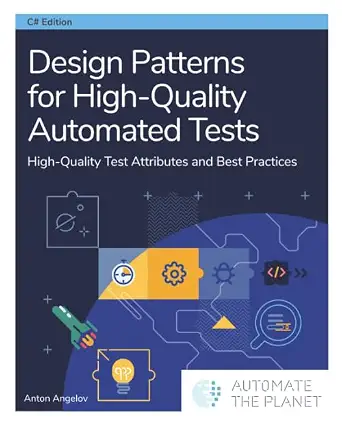
Design Patterns for High-Quality Automated Tests: High-Quality Test Attributes and Best Practices
- ✔ Focus: Test design patterns
- ✔ Approach: Best practices, attributes
- ✔ Audience: Developers, experienced testers
Pros:
- Comprehensive guide to Playwright automation
- Focus on creating reliable and scalable tests
- Suitable for testing complex, modern web apps
Cons:
- No specific technical prerequisites mentioned
- Content may be dense for beginners
- Requires some familiarity with JavaScript or web tech
Best for: Testers and developers working on modern web applications who want scalable, reliable automation.
Not ideal for: Beginners with limited programming background or teams mainly testing legacy applications.
Bottom line: An excellent, in-depth resource for modern web app testing using Playwright, best suited for users with some technical background.
“An excellent, in-depth resource for modern web app testing using Playwright, best suited for users with some technical background.”
AI Testing with Python: Build Intelligent Test Automation Using Python, Selenium, APIs, PyTest, LLMs & AI-Powered Testing Tools
This book makes a compelling case for integrating AI into test automation, covering a broad spectrum of tools like Selenium, APIs, and machine learning models. Compared with traditional automation books, it emphasizes building intelligent, adaptive tests that can evolve with software changes. While it offers practical examples with Python, Selenium, and AI, it is quite technical and assumes a solid background in programming and AI concepts. For teams interested in cutting-edge, AI-powered QA, this resource provides valuable insights, but less experienced testers might find it overwhelming.
Pros:
- Covers a wide range of AI-powered testing techniques
- Includes practical Python and Selenium examples
- Focus on building intelligent, adaptive tests
Cons:
- Highly technical, may be challenging for beginners
- No specific price or rating info available
- Requires prior knowledge of AI and programming
Best for: Developers and testers seeking to incorporate AI and machine learning into automated testing.
Not ideal for: Beginners or teams solely focused on basic web or API testing without AI integration experience.
Bottom line: A forward-looking guide ideal for those ready to leverage AI in testing, though steep learning curve limits its accessibility for novices.
“A forward-looking guide ideal for those ready to leverage AI in testing, though steep learning curve limits its accessibility for novices.”
Design Patterns for High-Quality Automated Tests: High-Quality Test Attributes and Best Practices
This book offers deep insights into test design patterns essential for creating maintainable, reliable automated tests. Unlike the other two options, it emphasizes best practices and high-level attributes that improve test robustness over time. While invaluable for experienced developers and testers, its technical depth and focus on design principles may be daunting for beginners. Compared to tool-specific guides, this resource provides a conceptual framework that can be applied across various automation frameworks, making it highly versatile but less hands-on.
Pros:
- Comprehensive coverage of test design patterns
- Focus on reliability and maintainability
- Applicable across multiple testing frameworks
Cons:
- No specific product features or tools listed
- Content may be overly technical for beginners
- Requires existing knowledge of testing concepts
Best for: Experienced developers and testers aiming to improve test quality through best practices.
Not ideal for: Beginners or those looking for step-by-step tutorials on specific tools.
Bottom line: A highly valuable resource for elevating test quality, best suited for practitioners focused on long-term maintainability.
“A highly valuable resource for elevating test quality, best suited for practitioners focused on long-term maintainability.”
As an Amazon Associate we earn from qualifying purchases.
Key Differences
The primary distinction between Selenium and TestComplete lies in their approach to usability and customization. Selenium offers unmatched flexibility for teams comfortable with scripting and technical setup, making it ideal for highly tailored testing environments. However, it demands a steeper learning curve and more development effort. TestComplete prioritizes ease of use with its intuitive interface, record-and-playback features, and integrated environment, making it accessible for teams with limited coding skills or who prefer a more straightforward setup. These differences influence not just initial adoption but also ongoing maintenance and scalability of test automation efforts.Detailed Comparison
Ease of Use (TestComplete wins — major)
Selenium requires familiarity with programming languages like Java, Python, or C#, and setting up WebDriver environments. Its interface is minimal, relying heavily on code, which can be challenging for non-developers. TestComplete provides a visual interface with drag-and-drop test creation, record-and-playback, and minimal coding, making it far more accessible for testers with limited coding experience. The gap is major—TestComplete significantly reduces the barrier to entry, enabling faster onboarding and easier test creation.Customization & Flexibility (Selenium wins — moderate)
Selenium’s open-source nature allows deep customization via scripting, supporting complex, tailored test scenarios. It can be extended with custom libraries and supports integration with a wide range of tools. TestComplete offers customization but within a more limited scope and primarily through its scripting environment, which is easier but less flexible. For teams needing highly specialized tests, Selenium’s flexibility is a major advantage.Supported Platforms (Selenium wins — moderate)
Selenium supports testing across multiple browsers (Chrome, Firefox, Edge, Safari) and operating systems (Windows, macOS, Linux) via WebDriver. TestComplete supports Windows, Android, and iOS, but its cross-platform capabilities are more limited and often tied to specific features or licenses. Selenium’s broad platform support makes it more suitable for teams targeting diverse environments.Pricing & Cost (Selenium wins — major)
Selenium is free, with costs only related to infrastructure and maintenance. TestComplete requires a paid license, with pricing varying based on licensing tiers and volume. While TestComplete incurs higher upfront costs, it often reduces the time needed for test creation and maintenance, which can offset expenses in larger teams or projects.Integration & Ecosystem (Selenium wins — moderate)
Selenium integrates seamlessly with numerous CI/CD tools, testing frameworks, and reporting utilities due to its open standards. TestComplete also offers integrations but is more limited and may require additional plugins or licenses. For teams invested in custom integrations, Selenium’s openness is a key benefit.Community & Support (Selenium wins — moderate)
Selenium boasts a large, active community with extensive online resources, tutorials, and forums. It benefits from widespread industry adoption. TestComplete provides official support and documentation but has a smaller community, which might limit peer support for complex issues. Larger community support can accelerate troubleshooting and learning.Test Automation Features (TestComplete wins — moderate)
TestComplete offers a rich set of built-in features including visual testing, keyword-driven testing, and record-and-playback, reducing scripting needs. Selenium focuses on browser automation via scripting, requiring additional tools for advanced testing features. For teams valuing quick setup and rich features, TestComplete has an edge.Learning Curve (TestComplete wins — major)
Selenium’s learning curve is steeper, especially for non-developers, since it relies heavily on programming skills. TestComplete’s visual interface and record-and-playback significantly lower the learning curve, enabling quicker proficiency for testers without coding backgrounds. This can impact deployment timelines and ongoing team skill development.Selenium: Pros and Cons
Pros:
- Cost-effective (free open-source)
- Highly customizable and extendable
- Supports multiple browsers and platforms
- Large community and extensive online resources
Cons:
- Requires programming skills and setup time
- Steeper learning curve for non-developers
- Less integrated out-of-the-box features
- Maintenance can be complex for large test suites
TestComplete: Pros and Cons
Pros:
- User-friendly with visual test creation
- Minimal coding required, faster onboarding
- Rich built-in features for various testing needs
- Official support included in licensing
Cons:
- Higher upfront licensing costs
- Less flexible for highly customized tests
- Limited platform support compared to Selenium
- Smaller community for peer support
Who Should Choose What
Choose Selenium if:
- You have a skilled development team comfortable with scripting
- Your project requires highly customized, scalable testing across multiple platforms
- Cost sensitivity is high, and you prefer open-source solutions
- You want maximum flexibility and integration with existing tools
Choose TestComplete if:
- Your team includes testers with limited coding experience
- You prefer a quick setup with minimal scripting
- You need a comprehensive set of built-in testing features
- Support and ease of use are more critical than cost
Value for Money
For teams with technical expertise and flexibility needs, Selenium’s free, customizable nature offers excellent value, especially for complex or large-scale projects. TestComplete, with its ease of use and rich features, justifies its higher cost primarily for smaller teams or those with limited programming skills. Consider your team’s skills and project scope when evaluating whether paying more for TestComplete delivers enough efficiency gains to justify the expense.Final Verdict
Choose Selenium if you prioritize flexibility, platform support, and cost-effectiveness and have the technical resources to manage setup and maintenance. Opt for TestComplete if ease of use, faster deployment, and built-in features are more important, especially for teams with limited coding skills or smaller budgets. The key decision factor is your team’s technical capacity versus your need for quick, feature-rich testing solutions.Frequently Asked Questions
Is Selenium suitable for non-developers?
Selenium primarily requires programming skills, making it less suitable for non-developers unless combined with additional tools or scripts. TestComplete offers a more accessible option for testers with limited coding experience.Can Selenium be used for mobile testing?
Yes, Selenium can support mobile testing through integrations with Appium, but it requires additional setup and scripting. TestComplete includes built-in support for mobile testing, simplifying the process.Which tool is better for continuous integration?
Both tools integrate well with CI/CD pipelines. Selenium’s open standards make it highly adaptable, while TestComplete offers built-in integrations and easier setup for CI environments.Is the initial cost a dealbreaker?
Selenium’s free nature makes it highly attractive for budget-conscious teams. TestComplete’s licensing costs are justified for teams prioritizing ease of use and faster deployment, especially in smaller projects or teams lacking deep scripting skills.Halloween Picks
halloween
As an affiliate, we earn on qualifying purchases.