
Choosing the best sit stand desk converter for large monitors involves balancing stability, height adjustability, and workspace size. The VIVO 48 inch Desk Converter stands out as the best overall for its spacious surface and sturdy build. The FLEXISPOT 36-inch Converter offers excellent value with smooth electric adjustments, while the Victor DC475 excels for multi-monitor setups with its triple display capacity. Buyers often face tradeoffs between size, ease of use, and price, making it important to clarify priorities. Continue reading for a detailed breakdown of each option and what makes them suitable for different needs.

Get business pricing on monitors, keyboards and dev gear
- Business-only prices and quantity discounts
- Tax-exempt purchasing
- Multiple users, one account, clear invoices
Key Takeaways
- Size matters: larger converters like the VIVO 48 inch model provide ample space for big monitors but may be less portable.
- Electric adjustment models like FLEXISPOT offer smoother, more precise height changes compared to manual options, though often at a higher cost.
- Stability is key: top picks feature wide bases and quality construction to prevent wobbling, especially with larger screens.
- Workspace versatility varies: some converters accommodate dual or triple monitors, while others focus on single large displays.
- Price ranges reflect build quality and features: premium models tend to have better motorized systems and larger surfaces, but good budget options exist.

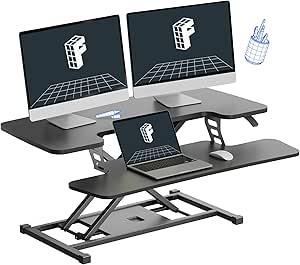


More Details on Our Top Picks
VIVO 48 inch Desk Converter, K Series, Height Adjustable Sit to Stand Riser, Dual Monitor and Laptop Workstation with Wide Keyboard Tray, Black
The VIVO 48-inch desk converter stands out for its generous surface, accommodating dual large monitors and a laptop with ease. Compared to the FLEXISPOT 36-inch model, it offers a wider workspace that better suits users with multiple large screens, though its maximum height of 20 inches may limit taller users. Its sturdy steel frame ensures stability even with heavier setups, and smooth height adjustment promotes ergonomic transitions throughout the day. However, the keyboard tray’s limited weight capacity and the surface’s size may not suit very small desks or extremely heavy equipment. This model makes the most sense for professionals needing a spacious, reliable workstation without sacrificing stability.
Pros:- Large surface comfortably fits dual monitors and laptops
- Smooth, easy height adjustment enhances ergonomics
- Sturdy steel frame for long-term durability
- Minimal assembly required
Cons:- Maximum height limited to 20 inches, which may be insufficient for taller users
- Keyboard tray weight capacity is relatively low at 4 lbs
Best for: Users with dual large monitors and a need for a spacious, stable workspace
Not ideal for: Small desks or users requiring heights above 20 inches for standing comfort
- Surface Dimensions:47.6” x 15.7”
- Keyboard Tray Dimensions:47.6” x 11.8” (10.2” in center)
- Max Desktop Load:33 lbs
- Max Keyboard Tray Load:4 lbs
- Adjustment Range:4.5” to 20”
Bottom line: This converter is ideal for professionals needing a broad, stable platform for large monitors and dual setups on a standard desk.
FLEXISPOT 36-inch Standing Desk Converter Height Adjustable Sit to Stand Up Workstation, Dual Monitor and Laptop Riser with Wide Keyboard Tray, Black
The FLEXISPOT 36-inch converter offers a more compact solution for users with limited desk space, compared to larger options like the VIVO. Its height range of 4.7 to 16.6 inches makes it suitable for users who only need a moderate standing height, but it may not satisfy taller users or those who prefer higher standing positions. Its sturdy construction and wide keyboard tray support dual monitors and laptops, though the height adjustment is manual and less precise than electric models. Assembly is quick, but the limited height range narrows its appeal for those seeking full ergonomic flexibility. It’s ideal for smaller desks or users new to sit-stand setups.
Pros:- Compact size fits smaller desks
- Easy manual height adjustment
- Sturdy construction supports dual monitors
- Quick assembly process
Cons:- Limited to 16.6 inches maximum height, restricting standing comfort
- Manual adjustment less precise than electric options
Best for: Users with limited desk space or those new to sit-stand desks
Not ideal for: Tall users or those needing taller standing positions for comfort
- Height Range:4.7 to 16.6 inches
- Monitor/Desktop Capacity:Up to 33 pounds
- Keyboard Tray Capacity:6.6 pounds
- Width:36 inches
- Color:Black
Bottom line: This converter suits small spaces and beginners but may fall short for taller users or those seeking higher standing heights.
FLEXISPOT 35 inch Electric Standing Desk Converter, Motorized Stand up Desk Riser, Monitor and Laptop Workstation with Wide Keyboard Tray, Black
The FLEXISPOT 35-inch electric desk converter combines quiet electric adjustment with a large work surface, making it ideal for users who prioritize smooth, effortless height changes. Its 5.7 to 19.7-inch height adjustment range covers most ergonomic needs, and the motorized operation allows for quick transitions—comparable to the Mount-It! model but with a slightly larger desktop. The sturdy build supports up to 55 lbs, making it suitable for heavy setups, and its near-fully assembled state reduces setup time. The main tradeoff is its size and higher price point, which may be less appealing for users with limited space or budget constraints. This model is perfect for professionals seeking a luxurious, effortless sit-stand experience.
Pros:- Quiet, smooth electric height adjustment
- Supports up to 55 lbs for heavy dual monitor setups
- Large desktop and wide keyboard tray
- Almost fully assembled for quick setup
Cons:- Higher price point compared to manual models
- Larger footprint may not suit very small spaces
Best for: Those seeking a premium, motorized solution with a large, stable work surface
Not ideal for: Users with very tight budgets or limited space who prefer manual adjustments
- Height Adjustment Range:5.7”–19.7”
- Support Weight:Up to 55 lbs
- Desktop Size:Large
- Assembly:Nearly fully assembled
- Control:Electric, one-touch
Bottom line: This electric converter is best for users who want effortless, precise height control and a spacious workspace at a premium price.
Mount-It! 48.5″ Electric Standing Desk Converter for Dual Monitors
The Mount-It! 48.5-inch electric converter offers a spacious surface with integrated USB charging ports and a full ergonomic keyboard tray. Its 6 to 19.25-inch height adjustment range makes it versatile for most users, and its sturdy steel construction supports up to 33 lbs, similar to the VIVO model. Unlike some manual options, this converter offers quick electric height adjustments with a single button, saving time and effort. However, its weight capacity is somewhat limited for heavier setups, and it requires an existing desk for support, which could be a drawback for those seeking a standalone solution. This model makes sense for users wanting a large surface with added charging convenience.
Pros:- Electric height adjustment simplifies transitions
- Large 48.5-inch surface fits dual monitors comfortably
- Built-in USB ports for device charging
- Supports up to 33 lbs with sturdy steel support
Cons:- Limited weight capacity for very heavy setups
- Requires existing desk for support, not a standalone unit
Best for: Home or office users who need a large surface with integrated charging and easy electric adjustment
Not ideal for: Heavy multi-monitor setups exceeding 33 lbs or users wanting a free-standing unit
- Surface Width:48.5 inches
- Height Adjustment Range:6 to 19.25 inches
- Max Support Weight:33 lbs
- Keyboard Tray Width:35.5 inches
- Material:Steel
Bottom line: Best suited for users seeking a spacious, electrically adjustable surface with charging features, but not for very heavy or standalone needs.
Victor DC475 High Rise Electric Triple Monitor Standing Desk Converter
The Victor DC475 stands out as the most versatile choice for users who need to support three large monitors simultaneously. Its independent adjustable monitor brackets allow customized positioning, making it ideal for multi-screen workflows—something the FLEXISPOT 36-inch cannot match, which is primarily designed for dual setups. The electric operation with Easy Tap Technology simplifies height adjustments, though it may require occasional maintenance. The obstacle detection sensor adds safety, but the electric mechanism could need repairs over time, especially with frequent use. Compared to simpler manual models, this converter offers superior flexibility, but its bulk and need for a stable base mean it might be less suitable for small desks or cluttered spaces. If you require a high-capacity, adjustable platform for multiple monitors, this is a top pick.
Pros:- Supports three large monitors comfortably
- Independently adjustable monitor brackets for customization
- Easy push-button electric operation
- Obstacle detection sensor enhances safety
Cons:- Requires sufficient space on the existing desk surface
- Electric mechanism may need maintenance over time
- Bulkier design might not fit small or cluttered desks
Best for: Designers or developers managing multi-monitor workstations who need independent control over each display.
Not ideal for: Users with limited desk space or those who prefer manual adjustments to avoid potential maintenance issues.
- Work Surface Width:28 inches
- Number of Monitors:3
- Adjustability:Independently adjustable monitor brackets
- Operation:Electric with Easy Tap Technology
- Safety Feature:Obstacle detection sensor
Bottom line: This model is best suited for professionals with complex multi-monitor setups who value adjustability and safety, despite its larger footprint.
FITUEYES Height Adjustable Standing Desk 36” Wide Sit to Stand Converter Stand Up Desk Tabletop Workstation for Laptops Dual Monitor Riser Black SD309101WB
The FITUEYES SD309101WB offers a generous 36-inch wide surface, making it an excellent choice for users who plan to support dual monitors and a laptop without crowding. Its smooth height adjustments, from 4.3 to 19.8 inches, provide ergonomic flexibility, which surpasses the more limited range of some manual models like the VIVO 48-inch. The sturdy construction supports up to 33 lbs, suitable for most dual-monitor setups, but not intended for very heavy or bulky equipment. Its fully assembled design allows immediate use, which is ideal for those who want quick setup without fuss. While the surface is spacious, the weight limit could be restrictive for very heavy monitors or specialized equipment, and its size may not fit very small or overly large desks. Overall, this converter makes a strong case for users prioritizing simplicity, stability, and ergonomic flexibility.
Pros:- Spacious surface accommodates multiple monitors and laptops
- Smooth height adjustments for ergonomic comfort
- Fully assembled and ready to use immediately
- Supports up to 33 lbs for most dual-monitor setups
Cons:- Limited maximum weight capacity for very heavy monitors
- Size may not fit smaller desks or overly large workspaces
- Not suitable for triple or more monitor configurations
Best for: Professionals with dual monitors and laptops seeking an easy-to-use, spacious, and stable converter for ergonomic benefit.
Not ideal for: Users with very heavy or specialized equipment exceeding 33 lbs, or those with limited desk space who need a more compact solution.
- Surface Dimensions:36” x 24.2”
- Height Adjustment Range:4.3 to 19.8 inches
- Maximum Load Capacity:33 lbs
- Color:Black
Bottom line: This converter is perfect for dual monitor setups where ease of use, stability, and a large work surface are priorities, with some limits on weight and size.
How We Picked
I evaluated each desk converter based on several key factors: maximum weight capacity, height adjustment range, stability, workspace size, ease of use, and build quality. Preference was given to models that can comfortably support large monitors without wobbling, while also offering smooth or reliable adjustment mechanisms. The ranking prioritizes versatility for different monitor setups, durability, and value for the price. Products that excelled in multiple categories or offered unique features for large monitors earned higher positions, ensuring choices suit a range of user needs and budgets.Factors to Consider When Choosing Best Sit Stand Desk Converter For Large Monitors
When selecting a sit stand desk converter for large monitors, it’s important to consider several factors beyond just size. Understanding these can help avoid common pitfalls like instability or insufficient height range, which impact usability and safety. A well-chosen converter should balance workspace, adjustability, and durability, ensuring it meets your specific monitor size and workspace demands. Keep in mind that features like motorized adjustment or wider platforms often come at a premium but can significantly enhance daily comfort and efficiency.Size and Workspace Capacity
Large monitors require ample surface area to prevent clutter and ensure stability. Look for a converter that explicitly states its maximum supported monitor size and weight. Overloading a smaller platform can lead to wobble or damage, so prioritize models with generous dimensions if you use multiple screens or extra peripherals. Also, consider whether the surface can accommodate your entire setup comfortably, including keyboard and accessories.
Adjustability and Height Range
An ideal converter should offer a broad height adjustment range to suit different sitting and standing heights. For large monitors, it’s important that the platform can rise high enough to position screens at eye level, reducing neck strain. Electric models generally provide smoother, easier adjustments, while manual options might require more effort but can be more reliable and budget-friendly. Verify the maximum and minimum heights to ensure compatibility with your workspace.
Stability and Build Quality
Stability is vital when working with large monitors, which can cause tipping or wobbling if the platform isn’t well-constructed. Look for models with wide, sturdy bases and high-quality materials such as steel or heavy-duty plastic. A wobble-free experience not only improves ergonomics but also safeguards your equipment. Keep in mind that larger surfaces need more robust support to prevent movement during adjustments or use.
Ease of Adjustment and Ergonomics
Ease of use can significantly influence daily comfort. Electric converters with memory presets save time and effort, especially in multi-user environments. Manual options might be simpler but can require more physical effort and may lack precision. Consider how often you’ll adjust the height and whether the mechanism feels smooth and reliable, as this impacts overall ergonomics and usability for large monitors.
Price and Long-Term Value
While premium models often feature better motors, larger surfaces, and more stability, they come at a higher cost. Balance your budget with your needs: if you only occasionally switch to standing or have a smaller monitor, a more affordable model might suffice. For heavy, multi-monitor setups or daily use, investing in a higher-quality converter can provide better durability and performance over time, saving money and hassle in the long run.
Frequently Asked Questions
Can a sit stand desk converter support two large monitors?
Yes, many large converters are designed to support dual or even triple monitors, provided they have the appropriate width and weight capacity. Always check the specifications for maximum supported monitor size and total weight to ensure stability. Properly supported converters will prevent wobbling and reduce strain on your mounts and peripherals, making dual-monitor setups more comfortable and secure.
Are electric sit stand desk converters more reliable than manual ones?
Electric models generally offer smoother, more precise adjustments and require less effort, making them ideal for frequent height changes. However, they often come with a higher price and potential maintenance needs for the motor or electronics. Manual converters are typically simpler, more durable, and less costly but may require more physical effort to adjust, especially with larger, heavy monitors. Your choice depends on your frequency of adjustments and budget.
What’s the best way to ensure my large monitor stays stable on a converter?
Choosing a converter with a wide, sturdy base and a high load capacity is essential. Look for models with anti-wobble features, such as reinforced platforms or adjustable stabilizers. Properly securing your monitor mounts and evenly distributing weight across the surface also helps. Avoid overloading the platform beyond its specified limits to maintain stability and prevent accidents.
How important is the height adjustment range when using large monitors?
The height range determines whether you can position your monitor at eye level comfortably. For large screens, a greater maximum height helps reduce neck strain and promotes better posture. If the converter’s height range is too limited, you might have to compromise on ergonomics or resort to additional risers, which can add clutter and complexity. Always verify the maximum height to match your height and monitor placement needs.
Should I prioritize motorized or manual height adjustment for my large monitor setup?
Motorized adjustments are generally preferable for large monitors because they provide quick, effortless height changes, minimizing disruption during work. This is especially beneficial if you switch between sitting and standing multiple times a day. Manual options can be more reliable and cost-effective but may require more effort, which could become tiring with larger, heavier setups. Consider how frequently you’ll adjust your setup and your budget when choosing between the two.
Conclusion
If you prioritize a spacious, stable surface for large monitors and value ease of use, the VIVO 48 inch Desk Converter makes an excellent overall choice. For those seeking the best balance of features and price, the FLEXISPOT 36-inch Electric Converter is ideal. Premium buyers with multi-monitor setups should consider the Victor DC475 for its triple support and robust build. Beginners or those on a budget might find the FITUEYES 36” Riser offers reliable performance at a lower cost. Ultimately, your choice depends on your workspace size, monitor weight, and how often you plan to adjust your setup.
Fall Picks
fall essentials
As an affiliate, we earn on qualifying purchases.