
TL;DR

Get business pricing on monitors, keyboards and dev gear
- Business-only prices and quantity discounts
- Tax-exempt purchasing
- Multiple users, one account, clear invoices
Moving your rig into another room is the most effective way to cut noise. If that’s not possible, a well-ventilated closet setup with targeted acoustic treatment can work wonders. Placement and proper insulation are the keys to a clean, natural sound.
Ever tried recording in your closet? It can work surprisingly well — if you understand the secrets behind acoustic dampening and placement. Most folks think the magic lies in foam panels or blankets alone, but the real game-changer is where and how you position your gear, and how you manage noise at the source.
In this guide, you’ll discover the most effective strategies to quiet your workspace, optimize sound quality, and turn a cramped closet into a professional-sounding vocal booth. Ready to make your tiny space sound like a pro studio? Let’s go.
Acoustic dampening
& the rig in the closet.
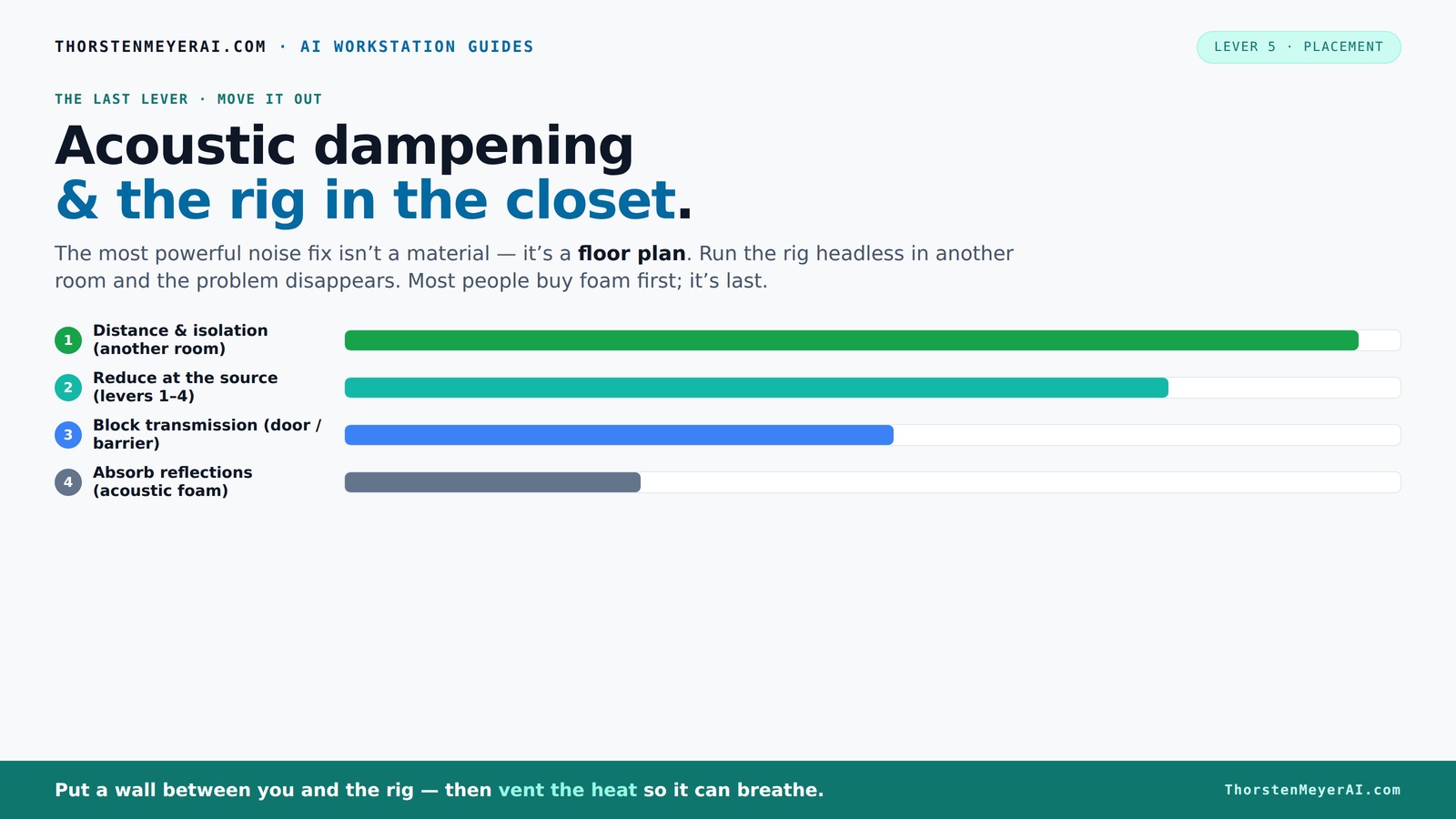
The most powerful noise fix isn’t a material — it’s a floor plan. A rig you can’t hear because it’s in another room beats any amount of foam. Tap the approaches in Part 1 to see what actually works.
(another room)
(levers 1–4)
(door / barrier)
(acoustic foam)
Contain the noise, not the heat
Key Takeaways
- Moving your rig into another room is the most effective way to eliminate noise.
- Proper ventilation is crucial if placing a hot, high-powered machine in a closet — passive vents or ducted airflow prevent overheating.
- Target reflection points with acoustic panels or blankets for the clearest recordings in small spaces.
- A mix of foam panels and blankets provides flexible, effective treatment without deadening your sound.
- Understand the difference between soundproofing and acoustic treatment to set realistic expectations and goals.
soundproofing foam panels for recording
As an affiliate, we earn on qualifying purchases.
As an affiliate, we earn on qualifying purchases.
Why Distance Is Your Best Friend for Quiet and Clarity
Distance and isolation are the most effective tools for reducing noise. Unlike adding foam or blankets, moving your rig away from your workspace can cut sound transmission by over 90%. Think of it like a loud car engine — if it’s parked in another room, it’s barely audible.
For example, placing your high-power AI rig in a basement or spare closet means you won’t hear its roar, even if it’s pumping out 600W of heat. Your laptop, talking to it over a network, becomes your main interface. This setup is common among AI researchers and content creators who want quiet, distraction-free zones.
All you need is a good wired connection and some ventilation. You won’t believe how much noise and heat vanish when the rig is in another room.
Beyond reducing noise, this separation also prevents heat from affecting your microphone and recording environment, maintaining a stable and comfortable workspace. However, it requires planning for reliable network connectivity and proper ventilation, which might involve some initial setup but pays off in cleaner recordings and less distraction.
acoustic treatment for small rooms
As an affiliate, we earn on qualifying purchases.
As an affiliate, we earn on qualifying purchases.
The 'Rig in the Closet' Setup — How to Make It Work Without Overheating
Placing a high-performance, heat-generating machine inside a closet seems perfect for noise reduction. But there's a catch: trapped heat can turn your closet into an oven, damaging your equipment and affecting performance. A GPU pulling 600W can raise the temperature by 10-15°F every hour if not ventilated, risking thermal throttling or hardware failure.
To keep your closet cool, you need active airflow — a vent, an exhaust fan, or a duct system. Many DIYers use quiet, low-RPM exhaust fans or even small AC units to keep temperatures down. For example, a common setup involves a small, thermostat-controlled fan that kicks in when the temperature hits 80°F. This proactive approach ensures your equipment stays within safe operating limits while maintaining a quiet environment.
More advanced setups include soundproof cabinets with built-in cooling, combining acoustic foam with ducted airflow and thermostats. These solutions not only keep noise levels low but also prevent overheating, allowing your rig to operate efficiently without throttling or shutdowns. The tradeoff often involves additional complexity and cost, but the payoff is reliable performance and a quieter, safer environment.
As an affiliate, we earn on qualifying purchases.
How to Position Your Microphone and Treatment for Sharpest Sound
In a tiny closet, where reflections bounce off walls and surfaces, placement is everything. The goal is to eliminate early reflections that cause a boxy or muddy sound. Start by positioning your microphone at the 'main reflection point' — usually where the sound hits the wall behind or beside you.
For instance, if you're standing in front of a wall, have someone mark the point where your voice’s first reflection bounces back to the mic. Hang absorption panels or blankets there to tame echo. Use a mirror trick: position a mirror on your wall and find the spots where your reflection shows the microphone’s position. Those are your reflection points.
Understanding why this matters is key: early reflections reach your mic before the direct sound, creating phase issues and muddiness that compromise clarity. By treating these points, you effectively reduce comb filtering, resulting in a more natural and focused vocal tone. Additionally, sealing the door with blankets or weatherstripping minimizes sound leakage and prevents reflections from the door surface, which can be a major source of unwanted noise. Treating the ceiling and desk surfaces is equally important because sound bouncing off these can interfere with your recordings, adding unwanted echo or coloration that diminishes clarity. Proper placement and targeted treatment help you get a clean, professional sound even in a tiny, reflective space.
sound isolation shields for microphones
As an affiliate, we earn on qualifying purchases.
As an affiliate, we earn on qualifying purchases.
Foam, Blankets, and Panels: What's Best for a Closet Booth?
Choosing the right treatment depends on your goals and space. Foam panels are lightweight, easy to hang, and effective for taming high-frequency reflections. For example, 2-inch foam panels can significantly reduce echo in a small closet, making your voice sound clearer and more natural. However, foam alone often leaves low frequencies unaddressed, which can cause muddiness in recordings.
Blankets or moving blankets are versatile and cheap. Hang them on the walls, door, or even create a makeshift booth. They absorb mid to high frequencies well and are excellent for quick, flexible setups. But they’re less effective at controlling low bass frequencies, which can cause a boomy or muddy sound if not managed properly.
In many DIY closet setups, a mix of both works best: foam on the reflective surfaces to reduce high-frequency echo, blankets on the door and other large surfaces for broader absorption, and some bass traps in corners if low-end buildup occurs. Thicker, denser panels (4-inch) are better for low-frequency issues but may be overkill in tiny spaces, potentially dulling the overall sound if overused. The key is balancing absorption to retain natural tone without creating a dead or muffled environment.
How Much Treatment Is Enough Without Killing the Sound?
Over-treating can make your space sound dead or unnatural, diminishing the vitality and clarity of your recordings. In a tiny closet, the goal is to strike a balance: treat enough to reduce harmful reflections and muddiness but avoid turning your space into a dead zone. Focus on the main reflection points — the wall behind you, the ceiling above, and the door area — as these are typically the biggest contributors to echo and coloration.
Use a handful of panels or blankets—about 4-6 in key spots—to achieve this balance. For example, hang a few foam panels at ear level where reflections are strongest and drape blankets over the door. Conduct listening tests: if your recordings sound muffled or overly dull, remove or reposition some treatment. If they still sound boxy or echoey, add a little more. The key is small, incremental adjustments based on your actual sound environment and listening preferences. Remember, an overly dead room can sap the liveliness from your recordings and make your voice sound unnatural, so aim for a natural, balanced acoustic environment.
Soundproofing vs. Acoustic Treatment — What's the Difference and Why It Matters
Soundproofing stops sound from escaping or entering a space — it’s about creating a barrier that isolates noise. Heavy, dense materials like mass-loaded vinyl, multiple layers of drywall, or sealing all gaps are typical approaches. Proper soundproofing prevents your neighbor’s lawnmower or street noise from bleeding into your recordings, which is essential if you need complete privacy or live in a noisy environment.
Acoustic treatment, on the other hand, improves the sound quality inside your room by managing reflections and reverberations. Think of it as softening the inside of a room with cushions and panels, so your voice sounds natural and clear. It doesn’t necessarily block sound from leaving but reduces echo and muddiness, making recordings more intelligible.
In a small closet, full soundproofing is often impractical due to space and cost. Instead, focusing on acoustic treatment enhances the clarity of your recordings without the complexity of sealing every gap. Understanding this distinction helps you prioritize: if you need quiet outside noise, invest in soundproofing; if your recordings are echoey, focus on treatment. Many DIY setups combine light soundproofing with targeted acoustic treatment to achieve a balance suited to their needs and budget.
Best Microphones for Small Closet Recordings
In a tiny space, your mic choice influences how much room sound gets captured. A dynamic microphone like the Shure SM58 rejects room noise and is great for noisy environments or untreated spaces because it primarily picks up sound from directly in front of it and less from the sides and rear. Condenser mics like the Audio-Technica AT2035, however, are more sensitive and pick up more detail, but also more room reflections, which can be problematic if your space isn’t well-treated.
If your closet isn’t perfectly treated, a dynamic mic can be a lifesaver, focusing on your voice and ignoring unwanted room reflections. For example, many streamers prefer the Shure SM7B or SM58 because they effectively isolate the voice from ambient noise, providing a cleaner, more professional sound. Conversely, if your environment is well-treated and acoustically controlled, a condenser mic can capture richer detail and warmth.
Ultimately, your choice should match your setup and goals: for quick, budget-friendly recordings or noisy spaces, go with dynamics. For studio-quality vocals in a treated space, condensers are ideal. The key is understanding how your environment interacts with the mic’s characteristics and choosing accordingly.
Frequently Asked Questions
Can I really turn a closet into a usable vocal booth?
Absolutely. With strategic placement, proper acoustic treatment, and ventilation, a closet can become a surprisingly effective vocal booth. Many creators do it for budget-friendly, temporary, or rental-friendly setups.Where should the mic face in a closet setup?
Position the mic away from reflective walls, aiming it directly at your mouth with the least nearby hard surfaces. Use the mirror trick or reflect on the main reflection points to find the best spot for capturing clear vocals.Should I treat the walls, ceiling, or corners first?
Focus on the main reflection points—walls behind you, the ceiling, and the door area. Corners are important if you notice bass buildup, but in small spaces, early reflections have a bigger impact.Do I need bass traps in a closet?
If you notice low-frequency muddiness or boomy recordings, adding bass traps in corners helps. In small closets, they’re often less critical unless you’re recording bass-heavy instruments or vocals.How thick should acoustic panels be for a small closet?
2-inch panels are usually enough for treating high and mid frequencies in small spaces. For better low-frequency control, 4-inch panels are preferable but may be overkill for a tiny closet.Conclusion
Turning a closet into a quiet, professional-quality recording space isn’t just about slapping foam on the walls. It’s about smart placement, proper ventilation, and targeted treatment. When you understand the physics of sound and heat, your tiny space transforms into a powerhouse of clarity and silence.
Remember: the most effective fix is often the simplest — move it out of your way. Your ears, your recordings, and your neighbors will thank you.
Halloween Picks
halloween
As an affiliate, we earn on qualifying purchases.