
TL;DR

Get monitors, keyboards and dev gear delivered free — and shop member deals
- Fast, free delivery on millions of items
- Access to Prime Big Deal Days deals on October 6–7
- Prime Video, Amazon Music and more included
Building an AI workstation used to be cheaper, but today prebuilt options often match or beat DIY costs due to component shortages and bulk buying. The choice now hinges on your need for speed, support, and customization versus control and potential savings.
If you’re eyeing an AI workstation, the question isn’t just about specs anymore. It’s about whether you want to spend your time assembling and tuning or prefer a ready-to-go system that’s tested and supported. The landscape has shifted—what used to be a clear cost win for DIY now requires a fresh look.
With component shortages and rising prices, prebuilt systems have become surprisingly competitive. This isn’t just about saving time; it’s about balancing cost, reliability, and how quickly you can start working. Here’s a straightforward guide to help you weigh your options for 2026.
Build vs buy
an AI workstation.
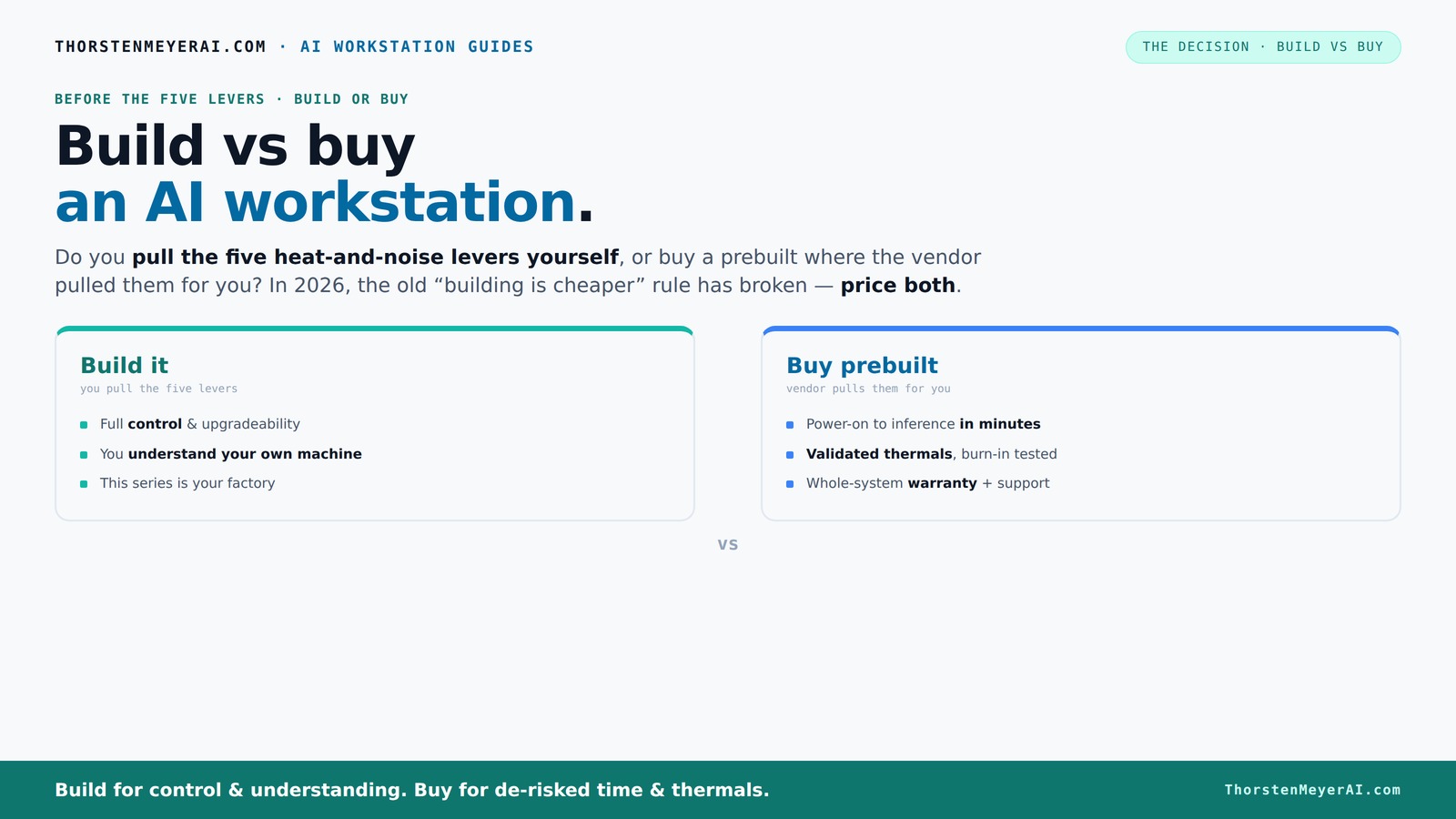
The real question behind this whole series: do you pull the five heat-and-noise levers yourself, or buy a prebuilt where the vendor pulled them for you? And in 2026, the old “building is cheaper” rule has broken. Match your situation in Part 3.
Key Takeaways
- Component shortages in 2026 have made prebuilt AI workstations often as affordable or cheaper than DIY builds, especially for high-end configs.
- Prebuilts include validated thermals, tested stability, and warranties, reducing risk and setup time for demanding workloads.
- DIY offers full customization—GPU choice, cooling, and noise control—but requires technical skill and time investment.
- For multi-GPU or high-wattage setups, prebuilt vendors have optimized solutions that save headaches and improve reliability.
- Your decision hinges on workload needs, time constraints, budget, and how much control you want over hardware tuning.
As an affiliate, we earn on qualifying purchases.
Why Building Your Own AI Workstation Might Cost More Than You Think
Building your own AI rig was once the obvious money-saver. But in 2026, component shortages have driven prices sky-high. Think of a high-end GPU like the Nvidia RTX 4090—what used to cost around $1,500 now often climbs above $2,000 due to supply constraints. RAM, SSDs, and power supplies follow similar trends.
For example, a typical DIY build with a top-tier GPU, 64GB RAM, and a fast NVMe SSD can push past $2,500 before you add OS and peripherals. Meanwhile, a prebuilt from a vendor like Lambda or BIZON often costs the same or less, because they buy in bulk and do the testing for you. That’s a game changer.
Furthermore, the time spent sourcing, assembling, and troubleshooting components can add hidden costs—delays that eat into project timelines and productivity. When component prices fluctuate unpredictably, the expected savings from building your own system diminish, and the risk of compatibility or stability issues increases. This shift compels a reevaluation: is DIY still the cost-effective choice, or does the convenience and reliability of prebuilt systems outweigh the potential savings?
custom gaming PC with high-end GPU
As an affiliate, we earn on qualifying purchases.
As an affiliate, we earn on qualifying purchases.
The Real Cost of a Prebuilt AI Workstation: More Than Just Hardware
Prebuilts aren’t just assembled parts—they come with support, validation, and warranty. For instance, Lambda’s systems undergo 24–48 hours of stress testing before shipping, guaranteeing they won’t throttle during heavy training. This level of quality assurance adds value that DIY can’t match without extra effort.
Expect to pay a premium for this convenience. A prebuilt might cost $3,000, but includes OS setup, driver optimization, and ongoing support. If your project depends on uptime and reliability, that support can save you days of troubleshooting.
Beyond immediate support, prebuilt vendors often provide firmware updates, hardware diagnostics, and compatibility assurances. This reduces the risk of unexpected failures or bottlenecks during critical workloads. For high-stakes AI projects, this added layer of reliability is often worth the extra cost, especially when downtime can mean lost revenue or missed deadlines. In essence, paying for a prebuilt is investing in peace of mind and operational continuity, which are vital for professional or enterprise environments.
professional AI workstation build kit
As an affiliate, we earn on qualifying purchases.
As an affiliate, we earn on qualifying purchases.
Understanding the Tradeoffs: Customization vs. Convenience
One of the core reasons people consider building their own AI workstation is the desire for full customization. When you build, you choose every component—GPU, CPU, cooling, case, power supply—tailoring the system precisely to your workload and preferences. This level of control allows for fine-tuning performance, noise levels, and upgrade paths, which can be crucial for specialized tasks or research environments.
However, this customization comes with tradeoffs. It requires significant technical expertise and time investment. Compatibility issues can arise, and troubleshooting can be complex, especially when dealing with multi-GPU configurations or cutting-edge hardware. Additionally, the more you customize, the more you risk instability if not done carefully.
Prebuilt systems, on the other hand, often sacrifice some degree of customization for optimized, tested configurations. They are designed to deliver reliable performance out of the box, with support and warranties that reduce risk. For many users, especially those who need quick deployment or lack deep technical skills, prebuilts offer a compelling balance of performance and convenience.
high performance workstation for AI
As an affiliate, we earn on qualifying purchases.
As an affiliate, we earn on qualifying purchases.
The Impact of Market Fluctuations on Cost and Availability
Market dynamics in 2026 have significantly influenced the cost and availability of components. Supply chain disruptions, geopolitical tensions, and increased demand for AI hardware have caused shortages and price spikes. This environment makes sourcing individual parts more unpredictable and often more expensive than anticipated.
For instance, high-performance GPUs are now often back-ordered for months, and prices can fluctuate daily. This unpredictability impacts the total cost of a DIY build, sometimes erasing potential savings and extending timelines. It also complicates planning, as buyers must decide whether to hold off on purchasing or accept higher prices and delays.
Prebuilts, benefiting from bulk purchasing and stockpiling, can sometimes mitigate these issues by maintaining inventory and offering more predictable pricing. They also often include pre-validated configurations that ensure compatibility despite component shortages. Recognizing these market influences helps in making informed decisions—sometimes paying a premium is the more reliable choice to ensure timely project delivery and system stability.
When Building Your Own AI Workstation Makes Sense
If you enjoy tinkering, have time on your hands, or want absolute control, building is still appealing. For example, a hobbyist who loves optimizing cooling and noise levels might spend a weekend tuning their rig. Plus, DIY allows you to pick exactly the GPU, CPU, and cooling you want—like a custom suit.
Additionally, building your own system can be more cost-effective in the long run if your workload is steady and predictable. Owning hardware means avoiding per-hour cloud fees and having the flexibility to run intensive training or inference sessions whenever needed, without worrying about additional costs. This approach is particularly advantageous for research labs or small enterprises with consistent workloads, where upfront investment can lead to lower operational expenses over time.
When Buying a Prebuilt System Saves You Hassle and Risks
If your priority is getting started fast or avoiding headaches, prebuilts shine. Imagine a researcher ready to run a large language model inference—no waiting for parts, no BIOS battles, no driver conflicts. Just power on and go.
Vendors test and validate thermals, install software stacks, and back it with support. This reduces the risk of compatibility issues, configuration errors, and hardware failures that can occur with DIY setups—especially for complex multi-GPU or high-wattage systems. For teams with tight deadlines or limited technical expertise, prebuilt solutions offer a smoother path to deployment, ensuring that the system performs reliably from day one. This can translate into faster project initiation, fewer troubleshooting hours, and more predictable performance, making prebuilts the preferred choice in high-pressure environments.
Deciding Based on Your Workload: Build or Buy?
Think about what you need from your AI workstation. For training large models with extensive datasets, GPU count and VRAM are critical; more VRAM allows handling bigger models and datasets efficiently. For inference or content creation, a single high-end GPU might be sufficient, but consider whether scalability for future needs is important. If your workload is steady, predictable, and demands maximum uptime, owning your hardware can be more cost-effective over time, avoiding cloud costs and providing immediate control.
Use this simple decision guide:
- Need fast deployment? Go prebuilt.
- Want full control and customization? Build your own.
- Require multi-GPU reliability and support? Prebuilt is safer.
- On a tight budget but enjoy DIY? Build it yourself.
Remember, the right choice hinges on understanding your workload’s demands, your technical skill, and how critical uptime and support are to your project’s success. Balancing these factors will help you select the most appropriate and cost-effective solution.
Frequently Asked Questions
Is it cheaper to build or buy an AI workstation in 2026?
It depends. Component shortages have driven up prices, making prebuilt systems often as affordable or even cheaper than DIY configurations for high-end setups. Always compare current prices for your specific configuration.When does buying prebuilt make more sense than building?
If you need a system immediately, want guaranteed stability, support, and validated thermals, or are deploying high-end multi-GPU setups, prebuilts are usually the smarter choice.What hardware specs matter most for AI workloads?
GPU memory and count are king—more VRAM and multiple GPUs speed up large model training. RAM and storage matter too, but the GPU often dictates overall performance for AI tasks.Can I upgrade a prebuilt AI workstation later?
Yes, but it depends on the design. Some prebuilts allow GPU or RAM upgrades, but others are more sealed. Check with the vendor’s upgrade policies before buying.How much power does an AI workstation typically use?
High-end AI systems can draw 600–1000W under load, especially with multiple GPUs. Consider your power supply and cooling needs accordingly.Conclusion
In 2026, the old rule—build cheap, buy fast—no longer applies straightforwardly. Your choice depends on how quickly you need to get productive, how much support you want, and whether you’re willing to tinker for savings.
Picture your ideal setup—plugged in, quiet, and ready to run. Now decide: do you build your own or let a vendor handle the heavy lifting? Either way, your AI journey is just beginning—and it’s better to choose on your terms.
Evergreen bestsellers Picks
bestsellers
As an affiliate, we earn on qualifying purchases.