TL;DR
A November 19 guide compares Mac mini, Mac Studio, Nvidia GPU PCs and cloud APIs by AI workload. Its main distinction is that memory limits local models, while cloud APIs can run the strongest closed models and Nvidia hardware suits tools built around CUDA.
A November 19, 2026, guide to running AI at home and work recommends matching hardware to the workload: a Mac mini for an always-on agent or small local model, a Mac Studio for larger open models, an Nvidia GPU PC for CUDA-centered tools, and a cloud API for leading closed models. The recommendations interpret published specifications and software documentation; they are not independent performance tests.

Get business pricing on monitors, keyboards and dev gear
- Business-only prices and quantity discounts
- Tax-exempt purchasing
- Multiple users, one account, clear invoices
For an agent that sends requests to a cloud model, the local computer mainly runs the agent loop, files and connected tools. The guide says a Mac mini can handle that role, citing Apple’s listed 4-watt idle power for the base model. That figure describes idle power, not consumption during a particular workload, and it does not mean the model itself runs locally. Prompts and other data sent to a cloud service leave the machine.
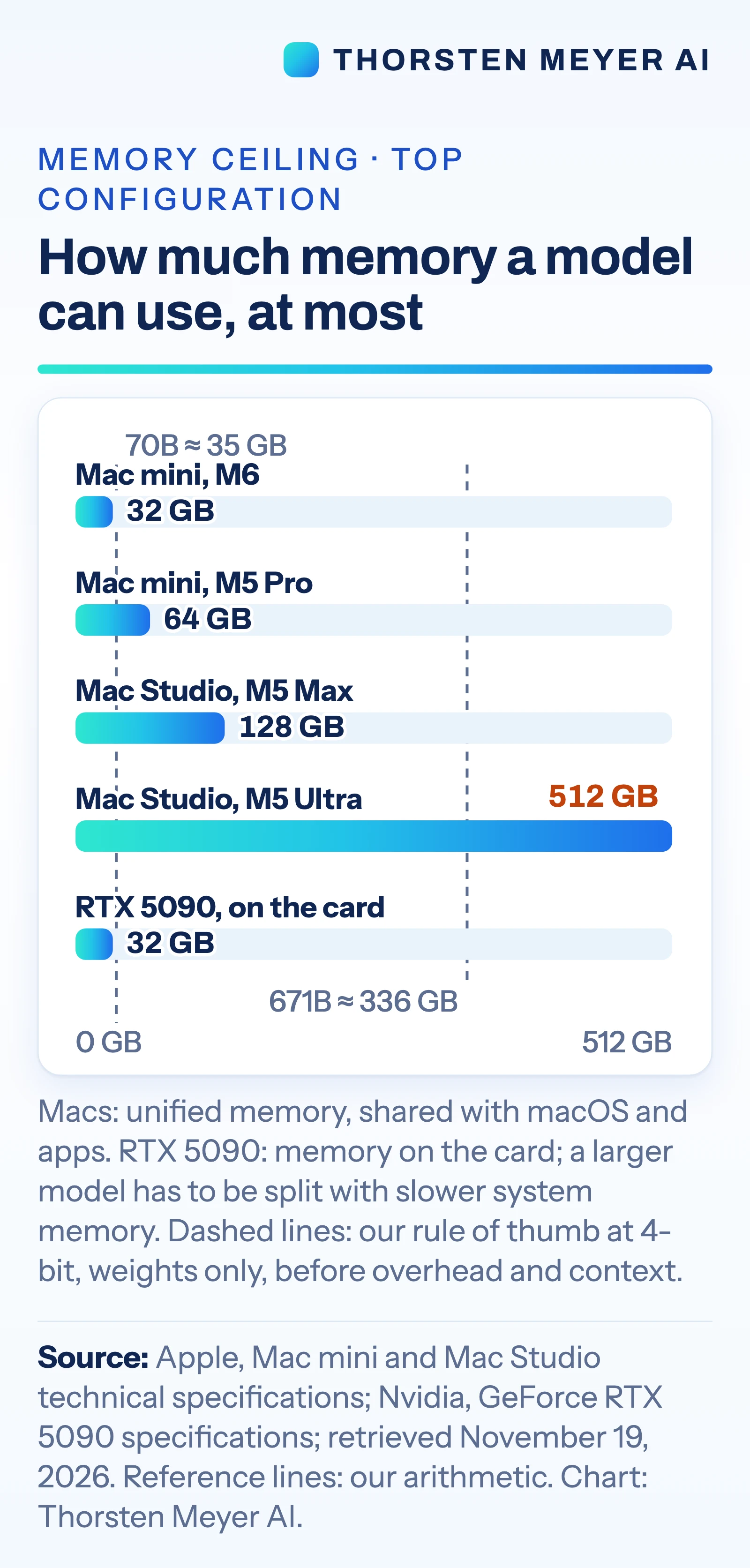
For local models, the guide puts memory capacity at the center of the choice. It lists Mac mini configurations up to 64 GB of unified memory, Mac Studio options up to 128 GB with M5 Max or 512 GB with M5 Ultra, and 32 GB of memory on Nvidia’s GeForce RTX 5090. As a rough estimate, it says 4-bit model weights need about half a gigabyte per billion parameters before overhead and conversation context: roughly 35 GB for 70 billion parameters and 336 GB for 671 billion. Those are estimates of weight storage, not guaranteed fit or speed.
The guide also points to software support and operating costs. It says vLLM provides CUDA binaries while Apple silicon support relies on a community-maintained plugin. Apple’s MLX tools support LoRA and QLoRA fine-tuning, and PyTorch supports GPU training on Mac. For power, it cites a maximum system draw of 385 watts for Mac Studio with M5 Ultra and a 575-watt rating for the RTX 5090 card alone; Nvidia recommends a 1,000-watt power supply for the system.
Memory Sets the Local Model Ceiling
The choice affects more than purchase price. With a local model, available memory constrains which models can load, while software compatibility can determine whether a particular serving or training workflow is practical. A Mac’s unified memory and an Nvidia card’s video memory are not interchangeable specifications, and capacity alone does not establish how quickly a model will respond.
For an always-on agent that calls a hosted model, spending on a large local GPU may not help with the main inference workload. A smaller computer may be adequate to run the surrounding automation, though cloud use brings per-token charges and sends prompts to an outside provider. Conversely, teams committed to CUDA-based serving tools may find an Nvidia GPU PC easier to use, while taking on greater power, cooling and setup requirements.
The guide’s comparisons are based on manufacturer specifications and tool documentation checked on November 19. They offer a way to narrow choices, but do not establish real-world speed, reliability, total cost or suitability for a buyer’s specific data and workload.
Products Worth Considering

Sonos Era 100 SL Compact Microphone-Free Speaker, Black

Bose SoundLink Plus Portable Bluetooth Speaker, Black

Samsung Galaxy Tab A11+ Tablet (6GB RAM, 128GB Storage, Gray)
As an affiliate, we earn on qualifying purchases.
From Always-On Agents to Local Models
The guide follows an earlier article about what Mac mini configurations with 16 GB to 64 GB of memory can run. It says Apple described its Mac mini, launched August 25, 2026, as “the leading desktop for always-on agentic computing.” That wording is Apple’s characterization, not an independent finding about market position or performance.
Its workload map spans five broad cases: cloud-connected agents; private assistants using small open models; very large open models; Nvidia-oriented serving, training and multi-user use; and tasks requiring the strongest hosted models. It assigns the first two mainly to Mac mini, large open models to higher-memory Mac Studio configurations, CUDA-first workloads to Nvidia GPUs, and leading closed models to cloud APIs. The source says the matching is the author’s interpretation of published specifications and documentation, not a buying recommendation.
Mac clustering is presented as possible but involved. According to the guide, fast links require Thunderbolt 5, a cable between each pair of Macs and a setting changed in macOS Recovery; the base M6 Mac mini has Thunderbolt 4. The source does not provide cluster benchmarks or show that connecting Macs produces a particular level of model performance.
Real-World Speed Remains Unmeasured
The guide does not report independent benchmarks comparing these systems on the same models and tasks. It specifically says there are no independent speed tests for the cited Mac Studio configuration running models at the hundreds-of-billions-of-parameters scale. Performance will also depend on model format, context length, software and workload; the memory estimates alone cannot answer how fast or reliably a system will run.
Prices, electricity costs, cloud pricing and operating costs are not compared consistently across the options. The source gives a US list price of $5,499 for the cited Mac Studio with M5 Ultra as of November 19, 2026, but does not calculate total cost against a GPU PC or ongoing API use. It also does not identify which hosted models are best for particular tasks, or assess the data handling terms of individual providers.
Test Against Your Own Workload
The guide recommends treating its matrix as a starting point and checking a candidate setup against the actual model, context size, tools and expected number of users. Buyers would need current configuration and pricing information from Apple, Nvidia and cloud providers, along with software documentation for their intended workflow. The source gives no announced follow-up benchmark or testing date, so whether these recommendations hold up in direct comparisons remains open.
Key Questions
Which computer does the guide suggest for an AI agent that uses a cloud model?
It suggests a Mac mini or an existing Mac because the computer runs the agent and its tools while inference happens through the cloud service. Prompts and other submitted data still go to that provider.
Why does memory matter for running a model locally?
The model’s weights, conversation context and other overhead need to fit in memory the system can use. The guide’s estimate for 4-bit weights is about 0.5 GB per billion parameters, before context and overhead; it is not a speed guarantee.
When does an Nvidia GPU PC fit better?
The guide favors an Nvidia GPU PC when the workflow depends on tools built for CUDA, including common serving software. It also cites the RTX 5090’s 575-watt card rating and Nvidia’s 1,000-watt recommended system power supply.
Can a Mac run fine-tuning?
The source says Apple’s MLX tools support LoRA and QLoRA, and PyTorch supports GPU training on Mac. Fine-tuning generally requires more memory than inference with the same model, according to the guide.
Does the guide prove which option is fastest or cheapest?
No. It interprets specifications and documentation and does not provide comparable independent benchmarks or a full cost analysis. Results depend on the workload, configuration, software and cloud pricing.
Source: Thorsten Meyer AI