🔍 Read the full analysis: The 2027 Guide To 9 Best AI Mini PCs For Local Workloads on ThorstenMeyerAI.com

Get business pricing on monitors, keyboards and dev gear
- Business-only prices and quantity discounts
- Tax-exempt purchasing
- Multiple users, one account, clear invoices
TL;DR
A buyer’s guide from ThorstenMeyerAI.com ranks nine mini PCs for local AI and other workloads, naming the MINISFORUM MS-S1 MAX its best overall pick. Its recommendations are based on listed hardware specifications, not independent performance tests; the right choice depends on workload, memory, storage and connectivity needs.
ThorstenMeyerAI.com has published a 2027 guide ranking nine mini PCs for local AI and related workloads, selecting the MINISFORUM MS-S1 MAX as its best overall option. The ranking favors configurations with more memory and workstation-oriented connectivity, but it is a specification-based comparison: the source does not report benchmark testing or verified performance on particular AI software.
The guide says the MS-S1 MAX combines a Ryzen AI Max+ 395 processor, 128GB of RAM and a 2TB SSD. It also lists dual 10GbE networking, USB4 V2 and two M.2 PCIe 4.0 slots. The author considers that combination versatile for demanding work, though the available material does not establish how quickly it runs any given model.
Among the alternatives, the GEEKOM A9 Max pairs a Ryzen AI 9 HX 470 with 32GB of RAM and a 2TB SSD. The guide frames it as a newer-platform choice for everyday computing rather than a substitute for the 128GB systems when a workload needs more memory. The GMKtec K15 is described as a simpler option for lighter workloads.
Three listed PCs use the Ryzen AI Max+ 395: the MS-S1 MAX, GMKtec EVO-X3 and BOSGAME M5. The source identifies 128GB configurations for all three as candidates for memory-heavy local work. It also warns that lower-capacity configurations, including the Glorlin’s 16GB of RAM and the smaller listed SSDs in the GMKtec K15 and GEEKOM IT13 MAX, call for closer matching to the intended tasks. The supplied source does not give complete model-by-model specifications for every entry.
The 9 picks
- 1
 MINISFORUM MS-S1 MAX Mini AI Workstation PC, AMD Ryzen AI Max+ 395, 128GB RAM…View on Amazon →
- 2
 GMKtec EVO-X3 Mini PC with AMD Ryzen AI Max+ 395, 128GB LPDDR5X, and 2TB PCIe…View on Amazon →
- 3
 BOSGAME M5 AI Mini PC with AMD Ryzen AI Max+ 395, 128GB LPDDR5X, 2TB SSDView on Amazon →
- 4
 GMKtec EVO-X2 AI Mini PC with AMD Ryzen AI Max+ 395View on Amazon →
- 5
 GEEKOM A9 Max Top AI Mini PC, AMD Ryzen AI9 HX470, 32GB DDR5, 2TB SSDView on Amazon →
- 6
 MINISFORUM AI X1 Pro-370 Mini PC with AMD Ryzen AI 9 HX 370, 32GB DDR5, 1TB P…View on Amazon →
- 7
 GEEKOM IT13 MAX AI Mini PC 2026, Intel Ultra 9 185H, 24GB LPDDR5, 500GB SSDView on Amazon →
- 8
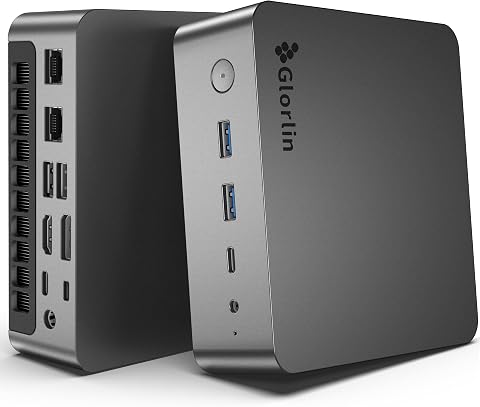 Glorlin AI Mini PC AMD Ryzen 7 Pro 8845HS, 16GB DDR5, 1TB SSD, Gaming & Offic…View on Amazon →
- 9
 GMKtec K15 AI Mini PC Oculink Intel Ultra 5 125U 32GB DDR5 512GB SSD, Desktop…View on Amazon →
Memory Sets the Workload Ceiling
The guide’s main point for buyers is that an AI-branded processor does not, by itself, establish how useful a mini PC will be for local AI. Memory capacity, memory bandwidth, graphics resources and software support can all affect whether a model or dataset fits and how a workload runs. A 128GB system offers more capacity headroom than a 16GB or 32GB configuration, but that difference is not proof of a particular speed advantage.
That distinction matters because compact PCs often require a trade-off between workstation capacity and a smaller, more straightforward everyday setup. A buyer who runs small experiments or general desktop applications may not benefit from paying for hardware they will not use. Someone planning to load larger models or datasets should check software requirements, upgrade options and workload-specific tests before choosing.
Storage and ports also shape practical use. A 2TB SSD provides more local room for models and projects than a smaller drive, while faster networking and USB connections may matter for shared storage, peripherals or a development setup. These are listed specifications, not independently verified performance results.
Products Worth Considering

DJI Mini 4 Pro Fly More Combo with DJI RC 2

DJI Mini 3 Drone with DJI RC and 3-Axis Gimbal

Jackery Explorer 300 Portable Power Station with 40W Solar Panel, 292Wh
As an affiliate, we earn on qualifying purchases.
How the Guide Ranks the PCs
The source says it ranks systems by how their stated configurations align with likely workloads, considering processor tier, RAM, graphics information, SSD capacity and connectivity. It describes possible uses including local models, development, creative work and general desktop computing. Its value judgment means capability matched to need, not a comparison of prices.
The author explicitly says the specifications provided do not establish benchmark results, sustained cooling performance or software compatibility. Accordingly, the ranking should be read as a hardware-based buyer’s guide rather than a report of hands-on testing. The source also advises checking whether memory is soldered or replaceable, but does not confirm upgradeability for all nine models.
“I ranked these AI mini PCs by how well their stated configurations match likely workloads, rather than treating an AI-capable processor as a guarantee of strong local AI performance.”
— ThorstenMeyerAI.com guide
Performance Evidence Is Missing
The source does not provide independent benchmarks, sustained-load or cooling tests, or confirmed compatibility results for named AI frameworks and models. It also does not establish the street prices, availability, exact upgrade paths or full specifications for every product. The ranking therefore cannot show which system is fastest, most efficient or best value at current prices.
Memory capacity alone does not guarantee that a particular model will run well. Performance can depend on memory bandwidth, thermal behavior, software support and whether an application can use the CPU, integrated graphics or neural processing unit. Buyers should verify the configuration being sold and seek tests for their own workloads.
Verify Specs Before Buying
The next useful step for buyers is to compare the exact retail configuration with the requirements of their intended software and models. Check memory capacity and upgradeability, SSD size and expansion slots, ports, network needs and current pricing. For sustained or business-critical work, look for independent tests using comparable workloads and confirm software support with the manufacturer or software provider.
The source does not announce a testing schedule or further product updates. Its recommendations may need reconsideration as prices, configurations and compatibility information change; those details are not established in the guide material provided.
Key Questions
Which mini PC does the guide rank first?
ThorstenMeyerAI.com names the MINISFORUM MS-S1 MAX its best overall pick, citing its listed Ryzen AI Max+ 395, 128GB of RAM, 2TB SSD and workstation-oriented connectivity.
Does the guide confirm which PC runs AI models fastest?
No. The source does not supply benchmark results or workload-specific tests, so it does not establish a fastest system.
Why does RAM capacity matter for local AI?
Memory can limit how much of a model or dataset fits in a system alongside its operating system and applications. More RAM provides more capacity headroom, but does not guarantee faster performance or software compatibility.
Is the GEEKOM A9 Max a workstation alternative?
The guide presents it as an option with a Ryzen AI 9 HX 470, 32GB RAM and 2TB SSD, suited to buyers prioritizing a newer processor platform and everyday use. It is not described as equivalent to the listed 128GB configurations for memory-heavy tasks.
What should buyers verify before choosing?
Confirm the exact memory and storage configuration, upgrade options, required ports and software support. For demanding work, seek independent tests on comparable workloads, since the guide does not report those results.
Source: ThorstenMeyerAI.com