
Finding the best camera for recording online courses involves balancing video quality, ease of setup, and affordability. The top overall pick, the Logitech HD Pro Webcam C920, offers reliable 1080p streaming at a reasonable price, making it ideal for most creators. For those seeking higher resolution, the NexiGo N680E Pro 4K Webcam provides superior clarity, though it comes with a higher cost and slightly more complex setup. Many options struggle to deliver both professional quality and simplicity in one package, forcing buyers to choose between affordability and features. Continue reading for a detailed breakdown of the best cameras to elevate your online course recordings.
Key Takeaways
- Higher resolution webcams like 4K models offer sharper image quality but often come with higher prices and increased setup complexity.
- Built-in microphones and privacy covers are common features that improve usability but can vary significantly in quality.
- Wide-angle lenses are beneficial for capturing more of your environment but may distort image edges if not well-designed.
- Plug-and-play connectivity remains a priority for ease of use, especially for users without technical support.
- Premium models with ring lights and autofocus tend to produce more professional-looking videos but are usually more expensive.




More Details on Our Top Picks
Septekon 1080P HD Webcam with Microphone for Video Calling and Streaming
The Septekon 1080P HD Webcam offers a straightforward, budget-friendly solution that delivers sharp 1080p video at 30 fps, comparable to more expensive models like the Logitech C920. Its built-in stereo microphone with noise reduction enhances audio clarity, making it ideal for online courses where clear communication is key. Unlike the EMEET C960, which provides 4K but defaults to 1080p, this webcam’s simplicity ensures quick setup without the need for additional software. However, it lacks a privacy cover and requires a USB connection, which might be limiting for privacy-conscious users. Overall, it strikes a balance between affordability and performance, perfect for educators on a budget.
Pros:- Affordable price point for high-quality HD video
- Built-in noise-reducing stereo microphone
- Plug-and-play with broad device compatibility
- Adjustable angle for flexible positioning
Cons:- No privacy cover included
- Requires USB connection, which may limit mobility on some older devices
Best for: Instructors seeking reliable, easy-to-use HD video with decent audio at an affordable price.
Not ideal for: Professionals needing 4K resolution or advanced features like auto-focus and light correction, which this model doesn’t support.
- Resolution:1920×1080
- Frame Rate:30 fps
- Pixel:2 million
- Microphone:Built-in stereo with noise reduction
- Compatibility:Laptop, desktop, Mac, Android TV, Xbox
- Adjustability:360° rotation, 30° tilt
Bottom line: This webcam provides excellent value for educators who want straightforward HD video and clear sound without extra bells and whistles.
EMEET C960 4K Webcam for PC with Auto Focus and Dual Mics
The EMEET C960 distinguishes itself with true 4K resolution and advanced auto-focus, making it ideal for educators who want crisp, detailed video that surpasses the 1080p offerings of the Septekon. Its auto light correction ensures consistent image quality even in varying lighting conditions, a feature the Logitech C920 lacks. The dual omnidirectional microphones provide clear, natural audio, but the camera defaults to 1080p unless you switch settings via software. Its limited field of view (73°) makes it better suited for close-up shots rather than wide classroom setups. If you prioritize high resolution and auto-focus, this model delivers but requires some software configuration for maximum quality.
Pros:- True 4K UHD resolution for detailed video
- Auto focus and auto light correction for consistent image quality
- Dual omnidirectional microphones for clear audio
- Includes privacy cover for security
Cons:- Video defaults to 1080p, requiring software adjustment for 4K
- Limited 73° field of view for wider shots
- Requires compatible software for settings changes
Best for: Online course creators needing professional-grade, high-resolution video with crisp audio.
Not ideal for: Instructors seeking a wide-angle shot or easy setup without software adjustments, as the limited field of view and configuration requirements may be restrictive.
- Resolution:4K UHD
- Sensor:CMOS
- Field of View:73°
- Focus:Auto (PDAF)
- Microphones:Dual omnidirectional
- Compatibility:Windows, macOS, Android TV, Linux
Bottom line: This webcam is perfect for educators who want high-resolution, professional-looking video and are comfortable with some setup complexity.
1080P HD Webcam with Microphone, Privacy Cover, Wide-Angle Lens, Auto Light Correction, Plug & Play USB for Laptop, Desktop, PC, Mac, Streaming
This webcam stands out for delivering crisp 1080p video with a broad wide-angle lens, making it ideal for online courses where capturing more of your environment improves engagement. Its automatic light correction ensures consistent image quality in varying lighting conditions, a feature that can surpass basic webcams like the Logitech C920. The noise-canceling microphone enhances audio clarity, vital for clear instruction, though the device’s reliance on USB limits flexibility compared to wireless options. It’s a straightforward plug-and-play device, perfect for educators who want reliable quality without fuss. However, it lacks wireless connectivity or advanced features like autofocus, which means users with inconsistent lighting or dynamic movement might find it less adaptable.
Pros:- Sharp 1080p video with a wide-angle view for more engaging presentations
- Automatic light correction maintains quality in different environments
- Built-in noise-canceling microphone ensures clear audio
- Simple plug-and-play setup for quick deployment
Cons:- Limited to USB connectivity, no wireless option
- No autofocus feature, which may affect focus during movement
Best for: Educators and online instructors seeking a dependable, easy-to-use webcam for regular recording sessions
Not ideal for: Content creators who need mobility or wireless setup, as this webcam only connects via USB
- Resolution:1080p Full HD
- Frame Rate:30 fps
- Lens:Wide-Angle
- Microphone:Noise-Reducing Built-In
- Light Correction:Automatic
- Connectivity:USB 2.0/3.0/3.1, OTG
Bottom line: This webcam offers reliable, high-quality video suitable for educators who prioritize simplicity and consistent performance.
NexiGo N680E Pro 4K Webcam with Ring Light, Autofocus, 1080p 60FPS, Dual Mics, Privacy Shutter, USB Plug-and-Play
The NexiGo N680E Pro transitions into a higher-tier class with its 4K sensor, offering stunning clarity that surpasses standard 1080p webcams like the Logitech C920. Its 1080p 60FPS mode ensures smooth, fluid video, ideal for detailed online courses or high-quality content. The built-in tri-tone ring light and stepless brightness adjustment provide perfect lighting, especially useful when ambient conditions fluctuate. Autofocus with PDAF keeps your image sharp even if you move, a step above fixed-focus models. Dual noise-canceling microphones deliver crisp audio, making this an excellent choice for professional instructors. Its higher price and reliance on USB-A might pose compatibility issues for some users. Overall, it’s a robust choice for those who prioritize picture quality and lighting control.
Pros:- Exceptional 4K resolution with smooth 1080p 60FPS streaming
- Built-in tri-tone ring light for adjustable, professional lighting
- Autofocus with PDAF keeps images sharp during movement
- Dual noise-canceling microphones improve audio clarity
Cons:- Higher price compared to basic webcams
- Requires USB-A port, which may need adapters for some devices
Best for: Professional educators and content creators demanding high-resolution, smooth video with integrated lighting and autofocus
Not ideal for: Budget-conscious users or those with devices lacking USB-A ports, due to higher cost and connectivity requirements
- Sensor:Sony 1/2.5″ 4K sensor
- Resolution:4K
- Frame Rate:1080p 60FPS
- Autofocus:PDAF
- Microphones:Dual noise-canceling
- Ring Light:Tri-tone adjustable, stepless brightness
Bottom line: This webcam is ideal for online course creators who need professional-grade video, lighting, and autofocus capabilities.
Wide Angle Webcam 120° 1080P Full HD Video Conference Camera with Built-in Microphone
This wide-angle webcam offers an expansive 120° field of view, making it perfect for recording courses where capturing your entire environment or multiple participants is beneficial. Compared to standard webcams like the NexiGo N680E Pro, it sacrifices some image sharpness for broader coverage, and manual focus may require frequent adjustment, especially if your setup involves different distances. Its automatic low-light correction helps maintain clarity in dim rooms, but the lack of autofocus limits versatility when moving or changing focus points. Easy to use and compatible across many platforms, this model suits instructors who want to record or stream in larger spaces or with multiple students in view.
Pros:- 120° wide field of view captures more of the environment
- Full HD 1080p video quality with vibrant colors
- Automatic low-light correction for versatile environments
- 360° rotation provides flexible framing options
Cons:- Manual focus can be inconvenient for dynamic setups
- Lower detail compared to premium autofocus webcams
Best for: Instructors needing a wide-angle view for multi-person recordings or larger teaching spaces
Not ideal for: Single-person educators who prioritize sharp focus and detailed image quality, as manual focus can be cumbersome
- Field of View:120 degrees
- Resolution:Full HD 1080P
- Frame Rate:30 fps
- Focus:Manual
- Light Correction:Automatic low-light correction
- Microphone:Built-in noise-canceling
Bottom line: This webcam excels for capturing broad scenes or multiple participants, ideal for educators in larger or more interactive classroom settings.
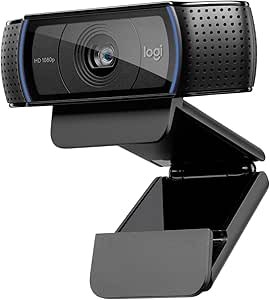
Logitech HD Pro Webcam C920 – Widescreen Video Calling and Recording, 1080p
The Logitech HD Pro Webcam C920 stands out for offering crisp 1080p video quality that works well for both professional online courses and casual streaming. Its compatibility across desktops and laptops makes it a flexible choice, especially compared to more specialized webcams like the NexiGo N930E, which adds features like a ring light but may be less portable. While it provides excellent video clarity, it lacks detailed information on microphone quality, which is key for clear lecture audio. This model is ideal for educators who want reliable, high-definition video with minimal fuss, but it isn’t the best choice for those needing advanced lighting or auto-focus features.
Pros:- High-definition 1080p video quality ensures clear visuals
- Compatible with a wide range of desktops and laptops
- Widescreen format enhances viewing experience during recordings
Cons:- Limited information on microphone performance, which may affect audio clarity
- Lacks advanced features like auto-focus or built-in lighting
Best for: Educators or content creators seeking a dependable, high-resolution webcam for straightforward online course recording.
Not ideal for: Users needing integrated lighting solutions or auto-focus for dynamic movement or varied distances.
- Video Resolution:1080p
- Compatibility:Desktop and Laptop
- Features:Widescreen video calling and recording
Bottom line: This webcam is perfect for those prioritizing simple, high-quality video without extra bells and whistles.
NexiGo N60 1080P Webcam with Microphone, Privacy Cover, USB Plug and Play for Video Conferencing and Streaming
The NexiGo N60 offers sharp 1080p video quality comparable to the Logitech C920 but adds a built-in noise-canceling microphone, making it an attractive option for online instructors who prioritize audio clarity alongside video. Its plug-and-play setup with wide OS support simplifies use for less tech-savvy users, unlike some webcams that require special drivers. The integrated privacy cover adds security, a feature not always included in similar models like the NexiGo N930E. However, its fixed focus lens may be a drawback for courses requiring varied distances, and firmware updates might be necessary for optimal audio performance.
Pros:- Sharp 1080p video with clear, detailed image quality
- Built-in noise-canceling microphone improves audio clarity
- Easy setup with broad OS compatibility and privacy cover for security
Cons:- Limited focus adjustment, unsuitable for varied distances
- No 4K resolution option for ultra-high detail
Best for: Online educators or streamers needing dependable video with integrated, noise-reducing audio and security features.
Not ideal for: Gamers or advanced streamers who require adjustable focus or 4K resolution for more detailed video output.
- Resolution:1920 x 1080 at 30fps
- Microphone:Built-in noise-canceling
- Compatibility:USB 2.0/3.0, Windows, Mac, Linux, Chrome OS
- Privacy Cover:Yes
Bottom line: This webcam is well-suited for online teachers who need excellent audio and secure, high-quality video without complex setup.
NexiGo StreamCam N930E 1080P Webcam with Ring Light, Auto-Focus, Privacy Cover, Plug and Play
The NexiGo N930E elevates online course recording with its integrated three-level ring light and auto-focus, features not available on the other two models, making it ideal for those who need consistent, well-lit visuals. Its broad compatibility across operating systems and the flexible mounting options make it especially suitable for creators who often switch between devices or locations. Although it’s limited to USB 2.0 and doesn’t offer 4K resolution, the adjustable lighting and auto-focus can significantly improve video quality in less-than-ideal lighting conditions, a common challenge in home setups. The absence of higher resolution options means it’s less suited for large screens or detailed demonstrations.
Pros:- Auto-focus with sharp 1080p video ensures clear, focused images
- Three-level adjustable ring light for perfect illumination
- Broad OS compatibility and flexible mounting options
Cons:- Limited to USB 2.0, which may restrict data transfer speed in some cases
- No 4K resolution, limiting ultra-high detail visuals
Best for: Online course creators who want professional lighting and auto-focus for polished video presentations.
Not ideal for: Users requiring ultra-high resolution or those on strict budget, as the added features come at a higher price point.
- Resolution:1080p (1920×1080) @ 30 fps
- Field of View:75° wide angle
- Ring Light:Three adjustable levels
- Microphone:Built-in noise-canceling
- Compatibility:Windows, Mac, Linux, Chrome OS, Ubuntu
- Connectivity:USB 2.0
Bottom line: This webcam is best for professionals who prioritize optimal lighting and auto-focus over ultra-high resolution or advanced features.
How We Picked
These cameras were selected based on a combination of performance, usability, build quality, and value. Priority was given to models with at least 1080p video quality, reliable autofocus, and clear audio options, as these features directly impact the professionalism of online course recordings. We also considered ease of setup, compatibility with common platforms, and additional features like privacy covers or built-in lights. The ranking reflects a balance between cost-effectiveness and feature set, ensuring options suit a range of budgets and needs. Ultimately, the best picks deliver consistent, high-quality video with straightforward operation for content creators at any skill level.Factors to Consider When Choosing Best Camera For Recording Online Courses
Choosing the right camera for recording online courses requires thoughtful consideration of several factors. While resolution is important, ease of use, lighting, and audio quality can significantly influence the final video. Understanding these aspects helps prevent common mistakes like opting for overly complex models or sacrificing essential features for cheaper options. The following sections highlight key factors that will assist you in making an informed decision tailored to your specific needs and budget.Video Resolution and Quality
Higher resolution cameras, such as 1080p or 4K, deliver crisper images that enhance viewer engagement and professionalism. However, 4K models tend to be more expensive and may require more powerful hardware for streaming or recording. For most online courses, 1080p offers a good balance of quality and performance, ensuring clear visuals without demanding excessive bandwidth or processing power. Keep in mind that your lighting setup and camera placement also influence perceived video quality, so investing in good lighting can often compensate for lower resolutions.
Ease of Setup and Compatibility
Plug-and-play USB cameras are generally the most straightforward, especially for users without technical experience. Compatibility with popular platforms like Zoom, OBS, and Teams is essential to ensure smooth integration. If you prefer a more flexible setup, consider cameras with adjustable mounts or tripod compatibility. Avoid overly complex models that require drivers or software installation unless you’re comfortable troubleshooting technical issues, as this can cause delays and frustration during your recording sessions.
Audio Quality and Microphone Integration
Clear audio is just as important as video quality for online courses. Many webcams include built-in microphones, but their sound clarity can vary widely. For best results, choose models with dual microphones or consider using an external mic for professional-grade audio. Privacy covers and noise-canceling features can also improve your recording environment, especially if you record in noisy or shared spaces. Remember, poor audio quality can distract viewers and diminish the perceived professionalism of your content.
Lighting and Autofocus Features
Good lighting dramatically improves video clarity and reduces the need for expensive post-production. Cameras with built-in ring lights or automatic light correction help maintain consistent image quality in varying environments. Autofocus ensures your face remains sharp even if you move slightly during recording, which is particularly useful for dynamic presenters. Investing in a dedicated lighting setup alongside your camera can deliver even better results, but built-in features are a cost-effective way to enhance video quality immediately.
Additional Features and Build Quality
Features like privacy shutters protect your privacy when the camera isn’t in use, and wide-angle lenses can capture more of your surroundings for a more engaging presentation. Durability and build quality matter if you plan to use the camera frequently, especially in different locations. Models with sturdy mounts and adjustable stands offer greater flexibility and longevity. Remember, extra features often come with a higher price tag, so prioritize those that directly impact your recording quality and convenience.
Frequently Asked Questions
Is 1080p resolution sufficient for online course recordings?
Yes, 1080p resolution is generally sufficient for online courses, providing clear and professional-looking video quality that most viewers find engaging. It strikes a good balance between image sharpness and streaming performance, especially if your internet bandwidth is limited. While 4K offers crisper detail, it also demands more from your hardware and internet connection. For most educators, 1080p is the sweet spot, ensuring high-quality visuals without unnecessary technical complexity.
Should I invest in an external microphone or rely on the webcam’s built-in mic?
Investing in an external microphone usually yields much better audio quality, which is crucial for keeping your audience engaged and ensuring clarity of your explanations. Built-in microphones are convenient but often pick up background noise and produce flatter sound. External mics can be positioned closer to you, minimizing ambient noise and capturing your voice more crisply. If your budget allows, pairing your camera with a dedicated microphone can significantly elevate the professionalism of your courses.
What features are most important for a beginner recording setup?
For beginners, simplicity and reliability are key. A plug-and-play webcam with at least 1080p resolution, a built-in microphone, and a privacy cover offers a great starting point. Autofocus and automatic light correction help maintain good video quality without manual adjustments. Ease of setup and compatibility with essential platforms like Zoom or OBS are also critical. As confidence and needs grow, you can upgrade to more advanced features like ring lights or external mics.
Are 4K webcams worth the extra cost for online courses?
4K webcams provide sharper images, which can be beneficial if your course involves detailed visuals or screen sharing that benefits from high resolution. However, they come with higher prices and may require more powerful hardware and faster internet speeds. For most personal or small-scale educators, 1080p cameras deliver excellent quality at a lower cost and easier setup. Consider whether your audience’s viewing devices and your recording environment justify the investment in 4K.
How much should I spend on a camera for online course recordings?
Budgeting around $50–$150 typically covers reliable webcams with good resolution, decent microphones, and straightforward setup for most online educators. More premium options, costing $200 or more, include features like 4K resolution, ring lights, and advanced autofocus, which are useful for professional-grade recordings. However, spending more isn’t always necessary if your primary focus is clear video, good audio, and ease of use. Assess your specific needs and consider investing in external lighting or microphones if your budget is limited.
Conclusion
For most online course creators, the Logitech HD Pro Webcam C920 remains the best overall choice, combining affordability, reliability, and solid video quality. Those seeking the highest resolution and professional features should consider the NexiGo N680E Pro 4K Webcam, despite its higher price and setup complexity. Beginners or educators on a tight budget will find the NexiGo N60 or NexiGo StreamCam N930E excellent starting points with straightforward operation. If you need a camera with advanced lighting and auto-focus, investing in premium models makes sense. Tailor your choice based on your recording environment, budget, and the level of professionalism you want to achieve.