Building a software testing bench for 2026? This checklist is for QA engineers and developers who need practical tools for checking signals, power, network connections, and test data. It can also help teams setting up a shared bench or refreshing a few essentials.

Get business pricing on monitors, keyboards and dev gear
- Business-only prices and quantity discounts
- Tax-exempt purchasing
- Multiple users, one account, clear invoices
The sections move from signal and connectivity tools to power checks, Ethernet testing, adapters, and portable storage. Each slot explains what to consider and names a pick where one was provided; the programmable USB hub section offers buying guidance without a specific product.
Use the checklist to match each tool to the devices and workflows you actually test. Before buying, confirm connector types, supported standards, and channel or capacity needs against your equipment, and check that the product details cover your intended setup.
USB Logic Analyzer
A logic analyzer helps you inspect digital signals while debugging hardware interfaces and embedded systems. The channel count and supported signal characteristics should match the devices you plan to test; a tool that cannot observe enough signals at once can make a multi-line issue harder to diagnose.
For the Saleae Logic Pro 16-Channel Logic Analyzer, Red, check the product details for software compatibility, input limits, and included connections before adding it to a bench. A common buying mistake is choosing by channel count alone without checking whether the analyzer fits the target voltage levels and the computer used for analysis. Confirm how the unit connects to your computer and whether you need separate probes or accessories for your boards.
Bench pick: Saleae Logic Pro 16-Channel Logic Analyzer, Red.
What to look for:
- Enough channels for the signals you need to observe together
- Input voltage and threshold specifications compatible with your devices
- Computer and operating system compatibility
- Probe and cable connections that fit your boards
- Capture and analysis features suited to your debugging workflow
Saleae Logic Pro 16-Channel Logic Analyzer, Red
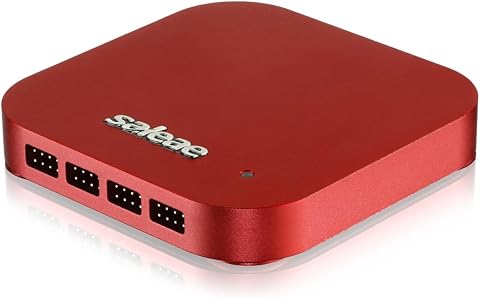
A 16-channel logic analyzer with inputs that support both digital and analog signals. It decodes SPI, I2C, and over 23 other protocols, and works with Windows, macOS, and Linux.
Pros:
- Supports both digital and analog inputs
- Decodes SPI, I2C, and 23+ additional protocols
- High digital and analog sample rates
- Compatible with Windows, macOS, and Linux
Cons:
- Sample capacity uses the connected PC’s memory
Best for: Teams inspecting multiple digital signals during hardware debugging
Not ideal for: Setups that have not confirmed voltage and software compatibility
Bottom line: Match the analyzer’s inputs, connections, and software to the devices you intend to debug.
Programmable USB Hub
A programmable USB hub can help organize a bench where devices need repeatable connection or power control. Its value depends on how your test workflow handles ports: identify whether you need per-port switching, remote control, or simply a stable way to connect several peripherals.
Because there is no named pick for this slot, compare product documentation against your test scripts and connected equipment. A common mistake is assuming every hub offers individual port control or exposes that control through an interface your automation can use. Check the control method, host compatibility, and power arrangement, including whether the hub can handle the combined needs of attached devices.
Also map out the physical setup before choosing: count the devices you will connect at once, note their connector types, and allow for the cables and power supply your bench requires. Favor clear documentation and confirm that the hub’s programmable features work with your intended operating system and test tools.
What to look for:
- Documented per-port control if your tests need it
- A control interface compatible with your scripts and host
- Enough ports for the devices used together
- Power specifications appropriate for connected equipment
- Connector types and cable layout that suit the bench
USB Power Meter
A USB power meter makes it easier to observe voltage and current during charging or device testing. The key is whether the meter supports the connectors and operating range used by your equipment; a display alone does not guarantee useful readings for every test setup.
The listed pick is the FNIRSI USB Tester 4-28V 7A LCD USB A&C Voltage Current Power Tester Mu. Before choosing it, verify the complete product specifications and connector arrangement against the devices and cables on your bench. A common mistake is overlooking the meter’s supported limits or assuming that USB-A and USB-C connections behave identically in every configuration. Check whether the meter suits the measurement conditions and pass-through setup you need.
Consider how readings will be used: occasional visual checks may call for a straightforward display, while a repeatable validation process may need clearly documented measurement behavior. Confirm the meter can be placed inline without changing the connection you are trying to evaluate, and keep its supported limits in view when planning tests.
What to look for:
- Supported voltage and current ranges for your test cases
- USB-A and USB-C connector arrangement that fits your setup
- Clear documentation for measurement behavior and limits
- Pass-through connections compatible with the cables and devices
- Display and readout details useful for your bench workflow
FNIRSI USB Tester 4-28V 7A LCD USB A&C Voltage Current Power Tester Multimeter w

The FNIRSI USB Tester FNB58 is a multifunctional device designed to monitor voltage, current, power, resistance, and capacity across multiple USB ports. It supports fast charge protocol detection, waveform analysis, and data recording, making it ideal for testing and troubleshooting USB charging devices.
Pros:
- Supports multiple fast charging protocols and automatic detection
- Provides detailed real-time data with waveform and ripple analysis
- Includes app software for extended monitoring and data logging
- Multiple USB interfaces for versatile testing
Cons:
- No printed manual included; requires QR code access for documentation
- Device defaults to 5V output if incompatible protocol is detected
- Complex setup may require technical knowledge
Best for: Bench users checking USB voltage and current readings
Not ideal for: Tests requiring ranges or connections outside the documented limits
Bottom line: Verify the meter’s limits and connector path against your specific devices before testing.
PoE Network Tester
A PoE tester helps you check power over Ethernet connections when validating networked devices. The important fit is the PoE standards and readings your equipment requires; confirm these in the tester’s documentation and compare them with the devices and network setup under test.
The listed pick is the PoE Texas Power Over Ethernet Detector & Tester for Voltage, Current, . The product name does not specify the complete supported feature set, so review the full listing or documentation before relying on it for a particular test. A common mistake is treating a voltage or current indication as a complete compatibility check. Confirm supported PoE types, connector details, and what the tester reports so the result answers the question your test is meant to resolve.
Plan where the tester will sit in the network path and ensure its connections suit the cables and powered devices on your bench. If a test requires identifying a particular fault or confirming a specific power behavior, check that the documented functions cover that use. Match the tester to the actual PoE setup before making it part of a repeatable procedure.
What to look for:
- Supported PoE standards and modes documented for the tester
- Voltage and current information relevant to your checks
- Ethernet connector and cable compatibility
- Clear instructions for connecting it in the network path
- Functions that address the specific faults or behaviors you test
PoE Texas Power Over Ethernet Detector & Tester for Voltage, Current, and Power
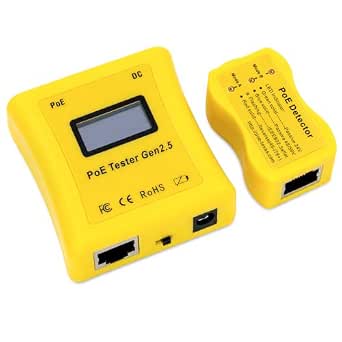
This all-in-one kit includes a PoE detector and tester to quickly identify power supply types and measure power consumption on Ethernet lines. It helps safely install and diagnose PoE devices like cameras, Wi-Fi access points, and IP phones without batteries, drawing power directly from the PoE line.
Pros:
- Detects and tests multiple PoE standards including IEEE 802.3af/at/bt
- No batteries needed, powered directly from PoE line
- Compact, ergonomic design for easy use in tight spaces
- Provides comprehensive diagnostics for PoE installations
Cons:
- Limited to Ethernet and PoE-related testing, not suitable for other power sources
- Requires PoE power source to operate, cannot be used standalone
Best for: Teams validating power over Ethernet connections
Not ideal for: Setups needing a specific PoE function not listed in documentation
Bottom line: Confirm the tester supports your network’s PoE setup and the readings your procedure requires.
Serial Adapter
Adapters are easy to misidentify because similar-looking plugs can serve different purposes. Start with the exact device ports and protocol your test requires, then verify that the adapter supports that connection. A connector that physically fits is not, by itself, evidence that it provides the needed data or serial function.
The provided pick is USB C to Lightning Adapter 4-Pack, MFi Certified, 27W Fast Charging, D. Its name describes a USB-C to Lightning adapter, but does not identify it as a serial adapter. Check the full product details and your target device requirements carefully before assigning it this bench role. A common mistake is choosing an adapter based on its connector labels or charging description without confirming data transfer and protocol compatibility.
For a serial test setup, confirm the required interface, operating system support, and any drivers or wiring details in the product documentation. If the intended task is instead connecting or charging Lightning devices, check that the adapter’s stated use matches that need. Keep a labeled adapter inventory so the right cable is selected for each test and its purpose is clear to other bench users.
What to look for:
- A documented serial or data function matching the intended task
- Connector genders and types that fit both devices
- Protocol and operating system compatibility
- Driver or setup requirements stated by the manufacturer
- Clear labeling to distinguish it from charging-only adapters
USB C to Lightning Adapter 4-Pack, MFi Certified, 27W Fast Charging, Data Sync,

This 4-pack of USB C to Lightning adapters allows for convenient charging and data transfer for compatible Apple devices. Made with durable materials, these adapters support fast charging and are MFi certified, ensuring safety and reliability.
Pros:
- MFi certified for safe and reliable use
- Supports fast charging up to 27W
- Durable aluminum alloy construction
- Convenient 4-pack for multiple devices
Cons:
- Supports only data sync, not audio or OTG functions
- Not compatible with Android devices or OTG peripherals
- Limited to Apple devices
Best for: Users whose devices and intended connection match the documentation
Not ideal for: Serial testing when the adapter’s data or protocol support is unconfirmed
Bottom line: Confirm that the adapter supports the required serial function before using it in a test.
Portable SSD
Portable storage can keep test images, logs, datasets, and other bench files together for transport between systems. Choose capacity and connection performance around the size and movement of your test data, while checking that the drive works with the computers and ports you use.
The listed pick is the SanDisk Extreme Portable SSD, 4TB, Up to 2000MB/s. Treat the stated capacity and speed as product details to verify against the current listing and your host connection. A common mistake is assuming the drive will reach its stated transfer rate in every setup; the computer, port, cable, and workload can affect practical results. Confirm interface compatibility and required formatting before relying on it for a handoff or test run.
Consider how the SSD will be used across the team: confirm the file system works for each intended operating system, and establish a consistent folder and backup approach for important results. Check the drive’s dimensions and cable arrangement for your bench or travel kit, and keep test data organized so a portable drive remains useful during debugging and review.
What to look for:
- Capacity appropriate for datasets and test artifacts
- Host and interface compatibility for your computers
- Cable and connector fit for the ports in use
- File system compatibility across intended operating systems
- A storage and backup workflow suitable for important test results
SanDisk Extreme Portable SSD, 4TB, Up to 2000MB/s

This portable 4TB SSD offers read speeds up to 2000MB/s for backing up projects and storing photos and videos. It has an IP65 rating, up to 3-meter drop protection, and password protection with 256-bit AES encryption.
Pros:
- Fast read speeds up to 2000 MB/s
- Large 4 TB capacity
- IP65 water and dust resistance
- Portable design with drop protection
Cons:
- Write speeds are lower than read speeds
- Password protection requires software download and is supported on Windows 10+ and macOS 12+
Best for: Teams moving large test files between compatible systems
Not ideal for: Workflows that have not confirmed host, cable, and file system compatibility
Bottom line: Check the host connection and file system before making the SSD part of your data workflow.
Build the bench in the order your work depends on: first cover the interfaces and signals you need to inspect, then add power and network checks, followed by adapters and storage that match your devices. For each slot, confirm compatibility and limits before buying so every tool has a clear job.
You do not need to fill every slot at once. Start with the tests your team runs most often, keep a short record of what each tool supports, and add the remaining pieces as your workflows call for them. A well-matched, clearly documented bench makes it easier for everyone to repeat checks and understand results.
Halloween Picks
halloween
As an affiliate, we earn on qualifying purchases.