
Finding the best portable monitor for travel work involves balancing size, weight, display quality, and connectivity. The InnoView 15.6″ stands out as the overall top choice due to its versatile adjustable stand and protective sleeve, making it ideal for frequent travelers. The ASUS ZenScreen 16” impresses with its eye care features and dual USB-C ports, perfect for those prioritizing eye comfort and simple connectivity. Meanwhile, the Lenovo L15 offers a height-adjustable stand and flicker-free tech for extended use. These options highlight the key tradeoff: lighter, more compact monitors may sacrifice some screen size or features. Continue reading for a detailed breakdown of each model and how to choose the best fit for your travel work needs.

Get business pricing on monitors, keyboards and dev gear
- Business-only prices and quantity discounts
- Tax-exempt purchasing
- Multiple users, one account, clear invoices
Key Takeaways
- Top picks balance size and weight with display quality for optimal portability.
- Connectivity options like USB-C and HDMI are crucial for versatile device pairing.
- Build features like adjustable stands and protective sleeves significantly enhance travel usability.
- Tradeoffs often involve sacrificing screen size or additional features for lighter, more portable designs.
- Premium models tend to offer better eye care and durability, but at higher price points.




More Details on Our Top Picks
InnoView 15.6″ Portable Monitor with Adjustable Stand and Protective Sleeve
The InnoView 15.6-inch portable monitor stands out for its high-quality 1080P IPS display, which delivers vivid colors suitable for both work and entertainment. Its ultra-slim profile and light weight of just 1.5 pounds make it incredibly easy to carry. The built-in adjustable stand and included protective sleeve add convenience, especially compared to bulkier options like the ASUS ZenScreen MB169CK. However, it requires a power source if flickering occurs and depends on device compatibility for optimal USB-C performance. While it offers excellent image quality, it isn’t designed for heavy multitasking or prolonged extended use without additional power. This pick is ideal for travelers who prioritize crisp visuals and portability in a simple setup.
Pros:- Vivid 1080P IPS display with HDR support
- Ultra-slim and lightweight for easy portability
- Includes adjustable stand and protective sleeve
- Multiple connectivity options: USB-C and HDMI
Cons:- Requires external power if flickering occurs
- Compatibility relies on device support for Thunderbolt 3/USB 3.1
- Limited to 15W+ power adapter for optimal performance
Best for: Travelers who need a lightweight, high-quality display for both work and entertainment on the move
Not ideal for: Power users who require extensive multitasking or a built-in battery for all-day use without external power
- Display Size:15.6 inches
- Resolution:1080P
- Contrast Ratio:1200:1
- Panel Type:IPS
- Weight:1.5 pounds
- Ports:2 USB-C, 1 HDMI
Bottom line: This monitor is perfect for frequent travelers seeking a high-quality, portable display with versatile connectivity.
ASUS ZenScreen 16” Portable USB Monitor (MB169CK) – Full HD, IPS, Dual USB-C, Mini-HDMI, Eye Care, Flicker-Free, Blue Light Filter, Anti-Glare Surface, 360° Kickstand, 3-Year Warranty
The ASUS ZenScreen MB169CK makes a compelling case for travelers who value eye comfort and flexible viewing modes. Its 15.6-inch IPS display with Flicker-Free technology rivals the InnoView in visual quality but adds features like a 360° kickstand and embedded tripod socket, enhancing usability in various scenarios. The inclusion of eye care features such as blue light filtering makes it a good choice for extended work sessions compared to other lightweight options like the Lenovo L15. However, its size is fixed at 15.6 inches, and it depends heavily on compatible devices with USB-C or HDMI outputs, which might require additional adapters. The extra accessories, including cables and a sleeve, add to the overall convenience but may be inconvenient for minimalists. This monitor suits mobile professionals who need a versatile, eye-friendly display with a durable design.
Pros:- IPS display with excellent color accuracy
- Eye care features like flicker-free and blue light filtering
- 360° rotatable stand and tripod socket for versatile positioning
- Includes comprehensive accessories and 3-year warranty
Cons:- Limited to 15.6 inches, not larger
- Requires compatible device with USB-C or HDMI output
- Additional accessories needed for full functionality
Best for: Travelers who need an adaptable, ergonomic portable monitor with eye care features
Not ideal for: Users seeking a larger display or a built-in battery for all-day mobile use without external power sources
- Display Size:15.6 inches
- Resolution:Full HD (1920×1080)
- Display Type:IPS
- Connectivity:Dual USB-C, Mini HDMI
- Features:Flicker-Free, Blue Light Filter, Anti-Glare
- Warranty:3 years
Bottom line: This monitor is ideal for travelers who need a portable, eye-friendly display with multiple orientation options.
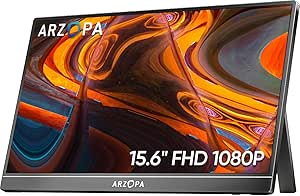
ARZOPA 15.6” FHD Portable Monitor with Kickstand, IPS Display, USB-C & HDMI
The ARZOPA 15.6-inch FHD portable monitor offers a compelling blend of visual clarity and adaptability, thanks to its 178° viewing angles and full HD resolution. Its lightweight, slim design makes it easy to carry, and the built-in kickstand supports multiple viewing orientations. Compared with the Lenovo L15, it provides broader compatibility with a range of devices including gaming consoles like PS5 and Switch, making it suitable for both work and play. The lack of a built-in battery and some potential compatibility issues with certain laptops might be drawbacks, but overall, its plug-and-play nature simplifies use on the go. This monitor is well-suited for users who need a versatile display for different devices and environments.
Pros:- Full HD IPS display with wide viewing angles
- Lightweight and ultra-slim
- Multiple display modes for versatility
- Plug-and-play with various devices
Cons:- No built-in battery, depends on external power
- Limited to 15.6 inches, not larger
- Potential compatibility issues with some devices
Best for: Travelers who want a portable, high-quality display for both work and entertainment, with broad device compatibility
Not ideal for: Those requiring an integrated battery or minimal setup for daily, all-day use without external power
- Screen Size:15.6 inches
- Resolution:1920 x 1080
- Display Type:IPS
- Connectivity:USB-C, HDMI
- Viewing Angle:178°
- Weight:1.6 lbs
Bottom line: This monitor is ideal for travelers needing a portable, adaptable display that works with a broad range of devices.
Lenovo L15 Portable Monitor, 15.6” Full HD IPS Display, USB-C, Height-Adjustable Stand, Flicker-Free Technology, Grey
The Lenovo L15 excels in providing a reliable, ergonomic portable display, featuring a 15.6-inch Full HD IPS panel with vibrant visuals. Its height-adjustable stand and flicker-free tech promote comfortable viewing over long sessions, making it a practical choice for extended work periods. Compared to the ARZOPA, it offers a more adjustable ergonomic setup but falls slightly behind in versatility for gaming or non-work leisure. Its reliance on external power and the lack of detailed weight specifications may be minor inconveniences, but its seamless USB-C connectivity and flicker-free tech make it a strong contender for productivity-focused travelers. This monitor fits best with users who prioritize comfort and clear visuals for extended use.
Pros:- Vibrant Full HD IPS display
- Height-adjustable stand for ergonomic comfort
- Flicker-free technology reduces eye strain
- Seamless USB-C connectivity
Cons:- Limited to 60Hz refresh rate, not ideal for gaming
- Exact weight not specified, may impact portability
- Requires compatible devices for full functionality
Best for: Travelers who need a portable, ergonomic display for extended work or study sessions
Not ideal for: Those who prefer a built-in stand or require a larger, more immersive screen for media editing
- Display Size:15.6 inches
- Resolution:Full HD (1920×1080)
- Panel Type:IPS
- Brightness:250 nits
- Refresh Rate:60Hz
- Ports:2 x USB-C
Bottom line: This monitor is perfect for travelers who value visual clarity and ergonomic comfort during long working hours.
KYY 15.6-inch 1080P FHD Portable Monitor with HDR, IPS Screen, USB-C & HDMI, Smart Cover, Speakers
The KYY 15.6-inch FHD Portable Monitor stands out for its vibrant IPS display with HDR support, delivering rich colors that benefit creative professionals and remote workers alike. Its compatibility with both USB-C and HDMI makes it highly flexible, especially compared to the ASUS ZenScreen MB16ACE, which relies more on USB-C and may require adapters for HDMI. Despite its slim profile and lightweight build—just 1.7 pounds—its 15.6-inch size strikes a good balance for portability without sacrificing screen real estate. The built-in speakers add convenience but are not suitable for critical audio tasks. Tradeoffs include its limited size for those needing larger displays, and the requirement for compatible devices with Thunderbolt 3 or USB-C, which could be restrictive. Overall, this monitor offers a compelling mix of portability, display quality, and device compatibility for frequent travelers needing a reliable second screen.
Pros:- Vibrant 1080P FHD IPS display with HDR for color accuracy
- Lightweight at 1.7 lbs and ultra-slim profile
- Flexible connectivity via USB-C and HDMI
Cons:- Limited to 15.6 inches, not suitable for larger workspace needs
- Built-in speakers lack audio fidelity for critical listening
Best for: Travel professionals and digital artists who need vibrant visuals and wide device compatibility on the go.
Not ideal for: Users requiring larger screens or advanced audio quality, since the built-in speakers are basic and size is limited to 15.6 inches.
- Display Size:15.6 inches
- Resolution:1920×1080 (FHD)
- Screen Type:IPS
- Viewing Angle:178°
- Weight:1.7 lbs
- Connectivity:USB-C, HDMI
Bottom line: This monitor is perfect for travelers who prioritize a portable, high-quality display with broad device compatibility.
ASUS ZenScreen 15.6” 1080P Portable USB Monitor (MB16ACE)
The ASUS ZenScreen MB16ACE makes a strong case for users who value auto-rotation and eye care features, thanks to its IPS panel with anti-glare coating. Compared to the KYY monitor, it emphasizes user comfort over raw display vibrancy, making it ideal for prolonged use during travel. Its dual connectivity via USB-C and USB-A simplifies setup, especially for users with mixed device ecosystems. The included foldable smart case doubles as a stand, adding to its portability. However, it’s limited to 15.6 inches, similar to the KYY, and requires compatible USB ports for power and video, which could be restrictive in some setups. This monitor is well-suited for mobile workers who need a reliable, easy-to-use display that reduces eye strain.
Pros:- Auto-rotation and eye care features for comfortable extended use
- Ultra-slim, lightweight design for portability
- Supports dual connectivity (USB-C and USB-A)
Cons:- Requires compatible USB ports for power and data
- Limited to 15.6 inches, restricting workspace size
Best for: Remote workers and students who need auto-rotation, eye care, and a lightweight form factor for frequent travel.
Not ideal for: Power users needing larger screens or advanced audio features, as it lacks built-in speakers and larger display options.
- Display Size:15.6 inches
- Resolution:1920 x 1080 (Full HD)
- Panel Type:IPS
- Surface:Anti-glare
- Connectivity:USB Type-C, USB Type-A
- Features:Auto-rotation, Eye Care
Bottom line: This monitor is ideal for travelers seeking a portable display with smart features and eye comfort for daily work routines.
How We Picked
In evaluating these portable monitors, I focused on key factors that matter most to travelers, such as size, weight, build quality, and ease of connectivity. Performance aspects like display resolution, color accuracy, and eye care features were prioritized, as they directly influence work quality and comfort. Value was also considered, balancing features against price to recommend options suitable for different budgets. Monitors with versatile stands and protective accessories received extra points, since these enhance portability and durability during frequent travel. The ranking reflects a combination of usability, reliability, and overall value for travel-intensive use cases.Factors to Consider When Choosing Best Portable Monitor For Travel Work
Choosing the right portable monitor for travel work involves considering several important factors that go beyond just screen quality. First, size and weight are critical—you’re looking for a balance that offers a comfortable viewing experience without adding excessive bulk to your carry-on. Connectivity options such as USB-C or HDMI determine how easily the monitor pairs with your devices, especially when working with laptops, tablets, or phones. Eye care features like flicker-free technology help reduce fatigue during long work sessions, especially in varied lighting conditions. Durability, including a sturdy build and protective accessories, can extend the monitor’s life in travel environments. Finally, consider your budget and whether premium features justify the additional cost, depending on how often and intensively you’ll use the monitor.Size and Weight
Size and weight are among the most critical factors for travel monitors. A larger screen can boost productivity, but it also adds bulk and weight, making it less convenient to carry. Many travelers prefer a 15.6-inch monitor, which strikes a good balance between usability and portability. Lighter models tend to be more flexible for airline carry-on limits and easier to handle during transit, but they may compromise on screen size or features. Choosing a monitor that fits comfortably in your bag while still providing enough screen real estate is key to maintaining productivity on the go.
Connectivity Options
Reliable connectivity options like USB-C, HDMI, or even wireless connections can simplify your workflow. USB-C is especially convenient because it often supports both power and display data over a single cable, reducing clutter. Some monitors also include mini-HDMI ports, which broaden compatibility with various devices like cameras or gaming consoles. Wireless options, like Bluetooth, are rare but can eliminate cables altogether. Ensuring your devices can connect easily without adapters or multiple cables saves time and frustration, making your travel setup more seamless.
Display Quality and Eye Care
High resolution and accurate color reproduction matter for tasks like photo editing or detailed design work. Most travel monitors feature Full HD or higher resolutions, which provide sharp images in a portable size. Eye care features such as flicker-free technology and blue light filters help reduce eye strain during extended use, especially in varying lighting conditions on the move. These features are often overlooked but can make a significant difference in maintaining comfort over long working sessions, particularly when working in less-than-ideal lighting environments.
Durability and Accessories
Travel demands a sturdy build, with features like reinforced cases, protective sleeves, and adjustable stands. Monitors with foldable or kickstand options improve versatility, allowing you to set up a stable workspace anywhere. Investing in quality accessories like screen protectors or carrying cases can prolong the lifespan of your monitor, especially when facing rough handling during transit. Remember, a durable design isn’t just about protecting the device—it also ensures consistent usability on the road.
Price and Value
Prices vary widely, with premium models offering advanced features like HDR, better color accuracy, and enhanced durability. While it might be tempting to opt for the cheapest option, consider whether the added features justify the cost—especially if you’ll use the monitor daily or on long trips. Budget-friendly monitors can be perfectly suitable for light work or occasional travel, but they may lack some build quality or eye care features. Striking the right balance between price and features ensures you get the best value for your specific travel work needs.
Frequently Asked Questions
Will a portable monitor drain my laptop’s battery quickly?
Using a portable monitor can impact your laptop’s battery life, especially if it relies on power through USB-C or HDMI. Monitors with energy-efficient screens and auto-sleep modes help mitigate this effect. Additionally, many portable monitors can be powered via a power bank or external source, reducing strain on your laptop’s battery. When planning extended work sessions, consider carrying a portable power bank to keep both devices charged, ensuring your workflow remains uninterrupted.
Can I connect a portable monitor to a phone for travel work?
Many portable monitors support connection through USB-C, which is compatible with certain smartphones, especially those with DisplayPort or HDMI support. However, compatibility depends on your phone’s output capabilities and the monitor’s input options. Using a USB-C to HDMI adapter can expand compatibility with phones lacking direct USB-C video output. Keep in mind that power requirements may vary, so check whether your phone can supply enough power or if you’ll need an external power source for the monitor.
Are matte or glossy screens better for travel work?
Matte screens are generally preferable for travel work because they reduce glare and reflections in variable lighting environments, such as airports or outdoor cafes. Glossy screens offer more vibrant colors but can be difficult to view in bright conditions. For portability, a matte finish can improve visibility and reduce eye strain, making it easier to work comfortably in different settings. If you frequently work outdoors or in well-lit areas, prioritizing a matte surface is a wise choice.
How durable are these portable monitors for frequent travel?
Durability varies widely among models, with premium options typically featuring reinforced cases, protective covers, and sturdy stands. Cheaper models might lack these features, increasing the risk of damage during transit. When selecting a monitor for frequent travel, look for models with reinforced edges, protective sleeves, and reliable stand mechanisms. Investing in additional accessories like rugged cases or screen protectors can further safeguard your device, ensuring it withstands the rigors of constant movement.
Is it worth paying extra for a monitor with HDR or color accuracy?
For most travel work, HDR and high color accuracy are not essentials unless your tasks involve detailed photo editing or color-sensitive work. However, if you frequently work with visual content that demands precise color reproduction, investing in a monitor with these features can be beneficial. Higher-end monitors with HDR can also offer better contrast and a richer visual experience, which might improve overall work quality. Weigh the cost against your specific needs to decide if these premium features are worth the additional expense.
Conclusion
For those seeking the best overall experience, the InnoView 15.6″ offers a great balance of portability, usability, and features. Budget-conscious travelers will appreciate the ASUS ZenScreen 16” for its reliable display and eye care tech. If durability and adjustable stands are priorities, the Lenovo L15 delivers with its sturdy design and flexible setup. Beginners or casual users should consider models with simpler connectivity and lighter weight, while professionals needing color accuracy may find the premium options justified. Tailor your choice to your travel frequency, work demands, and budget to get the best fit.
Halloween Picks
halloween
As an affiliate, we earn on qualifying purchases.