
Choosing the best microphone for Zoom meetings can significantly enhance your audio clarity and professionalism. The Logitech Blue Yeti USB Microphone stands out as the overall top choice for its versatile sound quality and easy setup. For those seeking a more portable option, wireless earbuds with a built-in mic offer convenience, while conference speakerphones excel in group calls. The main tradeoffs involve balancing sound quality, ease of use, and budget. Keep reading for a detailed breakdown of the best options to suit different needs and setups.

Get business pricing on monitors, keyboards and dev gear
- Business-only prices and quantity discounts
- Tax-exempt purchasing
- Multiple users, one account, clear invoices
Key Takeaways
- The Blue Yeti models dominate for sound quality, but come at a higher price and size.
- Conference speakerphones like the Anker PowerConf excel in multi-participant calls, offering 360° voice pickup.
- Wireless earbuds provide portability and simplicity but often compromise on microphone quality compared to dedicated mics.
- The best value picks combine decent sound quality with affordability, often with simple plug-and-play design.
- Choosing between USB microphones and speakerphones depends largely on whether you prioritize individual clarity or group coverage.


More Details on Our Top Picks
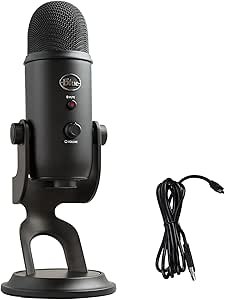
Logitech Blue Yeti USB Microphone for PC, Mac, Gaming, Recording, Streaming, Podcasting, Studio – Blackout
The Blue Yeti is widely regarded as a top-tier microphone for Zoom meetings due to its excellent sound quality and versatile features. Its four pickup patterns—Cardioid, Omni, Bidirectional, and Stereo—allow for adaptable use, whether you’re solo on a call or in a group setting. Compared to the Blue Yeti Midnight Blue, this model offers similar performance but with a more neutral aesthetic that fits professional environments. The onboard controls for volume, pattern, and gain, combined with Blue VO!CE effects, provide a level of customization ideal for those who want clear, broadcast-quality audio without complex setup. The main tradeoff is its bulkier size, which might be less appealing for users with limited desk space or who prefer a more discreet microphone. This pick makes the most sense for remote workers who prioritize sound quality and flexibility.
Pros:- Exceptional sound clarity and multiple pickup patterns
- User-friendly with onboard controls and effects
- Plug-and-play setup on PC and Mac
- Suitable for a range of applications beyond Zoom
Cons:- Relatively bulky design
- Higher price point compared to basic mics
Best for: Professionals and content creators needing high-quality, versatile audio for frequent Zoom meetings.
Not ideal for: Users with limited desk space or those seeking a compact, portable microphone for on-the-go use.
- Pickup Patterns:Cardioid, Omni, Bidirectional, Stereo
- Connectivity:USB
- Software:Blue VO!CE effects
- Controls:Headphone volume, pattern selection, mute, mic gain
- Included accessories:Desktop stand
- Compatibility:PC, Mac
Bottom line: Ideal for users who want professional-grade audio with flexible pattern options and easy controls, though size and cost may be considerations.
Logitech Blue Yeti USB Microphone – Midnight Blue
The Midnight Blue Blue Yeti offers the same core features as the standard Blackout model, including four pickup patterns and onboard controls, but with a stylish aesthetic that adds personality to your workspace. It’s especially appealing for users who want high-quality audio without sacrificing visual flair. Compared with other premium options, it maintains ease of use through its plug-and-play design, making it suitable for those who prefer straightforward setup and operation. The main drawback is its size; it’s bulkier than compact mics, and some users find the onboard effects complex to master, especially if they only want simple audio input for Zoom. For those prioritizing appearance and reliable sound, this microphone hits the sweet spot.
Pros:- High-quality audio with multiple pickup patterns
- Attractive midnight blue finish
- Easy to set up with plug-and-play functionality
- Adjustable positioning for optimal sound
Cons:- Bulkier form factor
- Complexity of onboard effects for beginners
Best for: Creative professionals and streamers who want a visually distinctive microphone with solid Zoom performance.
Not ideal for: Users with limited desk space or those seeking an understated, minimalist design.
- Pickup Patterns:Cardioid, Omnidirectional, Bidirectional, Stereo
- Software:Blue VO!CE effects
- Connectivity:USB
- Color:Midnight Blue
- Onboard Controls:Headphone volume, pattern selection, mute, mic gain
- Included Accessories:Desktop stand
Bottom line: Best for users who want a stylish, professional-quality mic that adds visual flair to their workspace, but not for those needing a compact setup.
Anker PowerConf S500 Conference Speakerphone with Zoom and Google Meet Certification
The Anker PowerConf S500 stands out for its ability to deliver clear voice pickup and high-quality audio in small to medium conference rooms. Its four microphones with VoiceRadar Technology ensure accurate voice capture, making it a reliable choice over simpler speakerphones like the PowerConf with 6 microphones, which may not focus as precisely in noisier environments. While it offers excellent noise reduction and full duplex audio, its main limitation is the room size—suitable up to about 12 people, which might restrict larger meetings. The device’s certification for Zoom Rooms and Google Meet adds confidence for professional use, but it relies on USB-C or Bluetooth, which could be less convenient for some setups. Compared to the PowerConf with six microphones, this model prioritizes audio clarity and certification but sacrifices capacity and wireless flexibility.
Pros:- Excellent noise reduction and voice pickup
- High-quality sound with a dedicated speaker
- Zoom and Google Meet certified for reliable platform compatibility
- Wireless pairing for larger room setups
Cons:- Designed mainly for small to medium rooms, limiting capacity
- Requires USB-C or Bluetooth connection, which might be less flexible in some setups
Best for: Small to medium teams needing reliable, certified audio for up to 20 participants with excellent noise reduction.
Not ideal for: Large conference rooms or organizations requiring support for more than 20 participants, as it is limited in room capacity.
- VoiceRadar Technology:Yes
- Microphones:4
- Sampling Rate:32KHz
- Speaker Size:1.75 inches
- Room Capacity:Up to 12 people (single unit), up to 20 with two units
- Connectivity:USB-C, Bluetooth
Bottom line: This is a solid choice for small to medium teams that prioritize certified, clear audio with reliable platform support.
FIFINE K669S USB Microphone for PC and Mac, Metal Condenser Desktop Mic with Gain Control, Silver
The FIFINE K669S makes the list for its straightforward, plug-and-play design that appeals to users new to mic setups. Its condenser capsule delivers clear, full-bodied sound, making it a step above basic laptop microphones when used with Zoom or Teams. Compared to the specialized speakerphones like the Anker PowerConf S500, this model offers more flexible positioning and direct control over gain, which benefits those who want to fine-tune audio quality without complex equipment. However, it’s limited to desktop use and doesn’t support wireless connections, which could be inconvenient for mobile or multi-room setups. Its compatibility with Windows and Mac is broad, but those needing a portable or wireless solution might find it restrictive compared to the Anker PowerConf with Bluetooth.
Pros:- Provides clear, full-bodied sound with noise reduction
- Simple plug-and-play setup
- Adjustable gain control for precise audio tuning
- Solid metal construction for durability
Cons:- Limited to desktop use, not portable or wireless
- Requires USB-C adapter for some laptops, reducing plug-and-play simplicity
Best for: Individuals new to virtual meetings seeking an easy-to-use, high-quality desktop microphone.
Not ideal for: Users needing wireless or portable devices, or those with gaming consoles like Xbox, since it’s designed primarily for PC and Mac desktops.
- Type:Condenser Microphone
- Connectivity:USB
- Color:Silver
- Cable Length:6 ft
- Included Accessories:Pivot mount, tripod stand, user manual
- Compatibility:Windows, Mac (requires USB-C adapter for some laptops)
Bottom line: This microphone is ideal for desktop users who want straightforward, quality audio without fuss.
Anker PowerConf Speakerphone with 6 Microphones, 360° Voice Pickup, 24H Battery, Bluetooth 5.3, USB-C, Zoom Certified
The Anker PowerConf Speakerphone with 6 microphones excels in environments where mobility and all-day use matter. Its 360° voice pickup with six microphones ensures everyone’s voice is heard clearly, even in larger or noisy rooms, outperforming smaller speakerphones like the PowerConf S500 in capturing multiple voices. The long-lasting 24-hour battery paired with wireless Bluetooth 5.3 makes it perfect for remote workers or teams on the go, contrasting with the more stationary PowerConf S500. While its price is higher, its portability, AI noise reduction, and compatibility with all major platforms—including Zoom—make it a versatile, all-in-one option. The main tradeoff is that its wireless setup might be overkill for fixed, small conference rooms where a dedicated microphone or speakerphone suffices.
Pros:- 360° voice pickup with 6 microphones for comprehensive coverage
- Long-lasting 24-hour battery for continuous use
- Wireless Bluetooth and USB-C options for flexible setup
- AI noise reduction and echo cancellation improve call clarity
Cons:- Higher price point compared to basic speakerphones
- Wireless connection may introduce latency or pairing issues in some setups
Best for: Remote teams and mobile professionals who need a portable, all-day conference solution with broad compatibility.
Not ideal for: Fixed office setups with dedicated, wired conference systems, where portability and battery life are less critical.
- Microphone Count:6
- Voice Pickup:360°
- Battery Capacity:5200mAh
- Battery Life:24 hours
- Connectivity:Bluetooth 5.3, USB-C
- Additional Features:AI noise reduction, echo cancellation, PowerIQ charging
Bottom line: This model suits teams valuing portability and all-day battery life over fixed, wired setups.
How We Picked
Our evaluation focused on performance, usability, build quality, and value. We prioritized microphones that deliver clear, natural sound with minimal setup fuss, especially for Zoom calls. Ease of integration with common conferencing platforms was key, along with durability and flexibility in different environments. Products were ranked based on a combination of sound quality, user reviews, features like noise suppression, and price point. This approach ensures we recommend options that suit a range of typical user needs, from casual users to professionals.
Factors to Consider When Choosing Best Microphone For Zoom Meetings
When selecting the best microphone for Zoom meetings, it’s important to consider factors that influence sound quality, ease of use, and overall value. The right choice depends on your environment, budget, and how you use Zoom—whether for casual calls or professional presentations. Being aware of these broader considerations helps avoid common pitfalls, like choosing a microphone that’s incompatible or overly complex for your setup.
Sound Quality and Voice Clarity
Clear, natural voice reproduction is essential for effective communication on Zoom. Look for microphones with good frequency response and noise reduction features. Consider models with cardioid pickup patterns to focus on your voice and minimize background noise. High-quality audio makes a noticeable difference in professionalism and reduces misunderstandings during meetings.
Ease of Use and Compatibility
Simplicity in setup and compatibility with your device matter more than ever. USB microphones generally offer plug-and-play operation, which suits most users. If you prefer wireless options, ensure they have reliable Bluetooth or Wi-Fi connectivity. Compatibility with your operating system and conferencing software ensures seamless integration, saving time and frustration.
Portability and Form Factor
Consider whether you need a portable mic or one that stays on your desk. Compact, lightweight models are ideal for those who work on the go or switch between locations. Larger, desktop microphones often provide better sound but are less convenient for mobile use. Balance size with your typical workspace or travel needs.
Budget and Value
Prices vary widely, from budget-friendly options to premium models. Cheaper microphones may lack advanced noise cancellation or clarity, but some offer excellent value for casual use. Investing more often yields better sound quality and durability, especially if you attend frequent or professional meetings. Weigh the features you need against your budget to find the best fit.
Additional Features to Consider
Features like built-in mute buttons, adjustable gain, or multiple microphone arrays can enhance your experience. Noise suppression and echo cancellation are especially helpful in less-than-ideal environments. Also consider the mic’s aesthetic and whether it fits your workspace or personal style. These extras can improve usability but might add to the cost.
Frequently Asked Questions
Is a dedicated microphone worth it for Zoom calls?
Yes, a dedicated microphone generally provides clearer, more natural audio compared to built-in laptop or webcam mics. It reduces background noise and offers better voice clarity, which is especially important for professional settings or lengthy meetings. While it may require a small investment and setup, the improved communication quality often justifies the cost.
Should I choose a USB microphone or a conference speakerphone?
Choosing between a USB microphone and a speakerphone depends on your typical meeting setup. USB mics are excellent for individual clarity and are easy to connect to laptops. Speakerphones, however, are better suited for group calls, as they can pick up voices from multiple directions and fill larger rooms. Consider your usual meeting environment and participant size when making this decision.
How much should I spend on a good Zoom microphone?
Entry-level options can be found for under $50, but they often sacrifice sound quality. For most regular users seeking clear audio, investing between $100 and $200 delivers noticeable improvements in clarity, noise reduction, and build quality. Premium models above this range are ideal for professional use or broadcast-quality sound but aren’t necessary for casual or occasional Zoom calls.
Are wireless microphones reliable for Zoom meetings?
Wireless microphones and earbuds offer great convenience but can sometimes face issues like latency, connection drops, or interference. For critical or professional meetings, wired USB mics tend to be more reliable. Wireless options are suitable if portability and minimal desk clutter are priorities, but ensure your device supports stable Bluetooth or Wi-Fi connections.
What features should I look for in a microphone for frequent Zoom use?
Focus on features like noise suppression, echo cancellation, and adjustable gain to improve audio in various environments. A mute button or quick-access controls add convenience during meetings. Compatibility with your device and platform, along with a sturdy build, ensure long-term reliability. These features help maintain clear communication even in challenging settings.
Conclusion
For most users seeking the best overall experience, the Blue Yeti USB Microphone offers excellent sound quality and ease of use. If budget is a concern, the FIFINE K669S provides solid performance at a lower price point, making it ideal for casual or infrequent Zoom calls. Professionals or those requiring group coverage might prefer the Anker PowerConf speakerphone, which handles multiple voices effortlessly. Beginners or those who prioritize portability should consider wireless earbuds with built-in microphones for convenience, while demanding users can look into premium options with advanced features and superior sound clarity.