Finding the best external monitor for a MacBook Pro involves balancing display quality, portability, connectivity, and price. The BenQ MA270U stands out as the top overall choice thanks to its 4K resolution and seamless MacBook compatibility. For those prioritizing portability, options like the Cocopar 15.6-inch portable monitor offer excellent mobility without sacrificing too much screen real estate. Meanwhile, the Dell 27 Plus provides a larger, high-resolution experience suited for professional workflows. The main tradeoffs often involve choosing between size, portability, and display fidelity. Keep reading for a detailed breakdown to help you find the perfect match.

Get business pricing on monitors, keyboards and dev gear
- Business-only prices and quantity discounts
- Tax-exempt purchasing
- Multiple users, one account, clear invoices
Key Takeaways
- The best overall monitors balance 4K resolution, color accuracy, and seamless USB-C connectivity with power delivery.
- Portability is a key consideration—compact, lightweight models excel for on-the-go use but may compromise on size or features.
- High refresh rates and HDR support matter for creative professionals and gamers, but often come at a higher cost.
- Display size varies from ultra-compact portable screens to larger 27-inch or more setups, each suited to different workflows.
- Build quality and adjustability significantly impact long-term usability, especially for desk setups or frequent travelers.


More Details on Our Top Picks
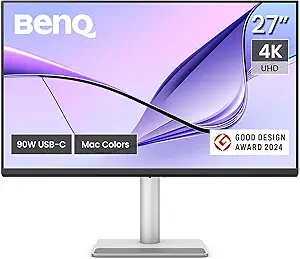
BenQ MA270U 27” 4K Monitor for MacBook – USB-C, 90W Power, P3 Color, Adjustable Stand
The BenQ MA270U stands out for delivering a crisp 4K resolution paired with a wide P3 color gamut, calibrated specifically for MacBook users who prioritize color accuracy. Its USB-C port supports 90W power delivery, simplifying connections by combining display, charging, and data transfer in a single cable. Compared with portable options like the Cocopar, it’s larger and less portable but offers a more professional setup and better color fidelity, ideal for creative work. The adjustable stand enhances ergonomics, making long work sessions more comfortable. The main tradeoff is its size and higher price, which might deter those needing portability or a smaller footprint. This monitor makes the most sense for desktop use where image quality and seamless MacBook integration are priorities.Pros:- Vivid 4K display calibrated for MacBook needs
- Single USB-C connection for display and power
- Adjustable ergonomic stand
- Integrated controls for brightness and volume
Cons:- Size and weight limit portability
- Higher cost compared to portable options
- No built-in speakers mentioned
Best for: Creative professionals or MacBook users who need a high-resolution, color-accurate display for desktop work
Not ideal for: Travel or remote workers needing lightweight, portable solutions
- Screen Size:27 inches
- Resolution:3840×2160 (4K)
- Color Gamut:P3
- Connectivity:2 HDMI, 2 USB-C
- Power Delivery:90W
- Adjustments:Height, tilt, swivel, pivot
Bottom line: This monitor suits professionals seeking high-quality visuals and seamless MacBook integration in a dedicated workspace.
Cocopar 15.6 Inch Portable Monitor with 1080P FHD Display, 60Hz, sRGB 85%, HDMI & USB-C, VESA Mountable, with Cover Stand
The Cocopar 15.6-inch portable monitor offers a crisp 1080P FHD image with an 85% sRGB color gamut, making it suitable for general productivity and media consumption. Its lightweight design and VESA compatibility enhance portability, especially compared to larger, bulkier options like the BenQ. The inclusion of multiple connectivity options, including USB-C and HDMI, simplifies setup with MacBook Pros. However, the 60Hz refresh rate limits its use for fast-paced gaming or high-end video editing. The magnetic cover adds convenience but slightly increases weight, which might be a concern for ultra-light travel. Overall, this monitor balances decent visual quality with portability, ideal for remote workers on the go or casual use.Pros:- Full HD 1080P display with vibrant colors
- Lightweight and slim design for portability
- Multiple connectivity options including USB-C and HDMI
- VESA mountable for flexible setup
Cons:- Limited to 60Hz refresh rate, not suitable for gaming
- Requires device support for optimal performance
- Magnetic cover may add slight weight
Best for: Travelers, remote workers, and students needing a lightweight, versatile secondary display
Not ideal for: High-end creative professionals or gamers requiring high refresh rates and color accuracy
- Size:15.6 inches
- Resolution:1080P FHD
- Refresh Rate:60Hz
- Color Gamut:85% sRGB
- Viewing Angle:178°
- Ports:2 USB-C, 1 HDMI
Bottom line: This portable monitor strikes a good balance for on-the-go use but isn’t designed for high-demand creative or gaming applications.
KYY 15.6-inch 1080P FHD Portable Monitor with HDR, IPS Screen, USB-C & HDMI, Smart Cover, Speakers
This KYY portable monitor excels in delivering vibrant visuals thanks to its 1080p IPS display with HDR support. Compared with larger or more feature-rich options like the Dell 27 Plus 4K, it prioritizes portability and ease of use, making it ideal for mobility but sacrificing some color accuracy and screen size. Its ultra-lightweight design (1.7 lbs) and included smart cover enhance convenience for users constantly on the move. However, the smaller 15.6-inch size may limit productivity for those needing more screen real estate, and the built-in speakers are basic, not audiophile-grade. The dual USB-C ports and HDMI support offer broad compatibility, but require compatible devices. This pick makes the most sense for users prioritizing portability and quick setup over larger or more color-accurate displays.
Pros:- Vibrant 1080P IPS display with HDR enhances visual quality
- Slim, lightweight design ideal for portability
- Broad device compatibility via USB-C and HDMI
- Includes a durable smart cover that doubles as a stand
Cons:- Limited to 15.6 inches, which may feel restrictive for multitasking
- Built-in speakers are basic and may not satisfy audiophile needs
Best for: Frequent travelers and remote workers who need a lightweight, portable display that works with multiple devices
Not ideal for: Professional colorists or gamers who require high-fidelity visuals and larger screens for detailed work
- Display Size:15.6 inches
- Resolution:1920×1080 (FHD)
- Panel Type:IPS
- Viewing Angle:178°
- Weight:1.7 lbs
- Connectivity:USB-C (2 ports), Mini-HDMI
- Built-in Speakers:Yes
- Smart Cover:Yes, PU leather
Bottom line: This monitor is perfect for users who need a portable, easy-to-carry display for casual use and on-the-go productivity.
14.2-Inch FHD Portable Dual Monitor for Laptops – Ultra-Slim & Lightweight
This 14.2-inch dual monitor significantly boosts productivity by extending your MacBook Pro display, making multitasking seamless. Its 1080p IPS screen offers vivid visuals and wide viewing angles, comparable to the single 15.6-inch KYY but with the added benefit of a second screen. Weighing just 1.87 lbs and with a thickness of only 0.27 inches, it’s designed for portability, ideal for remote work or travel. Unlike larger external displays, this dual setup provides more screen space without sacrificing mobility. However, it requires a compatible laptop with sufficient ports and no built-in battery, so it’s less suited for those seeking a wireless or all-in-one solution. This pick is perfect for users who want to maximize on-the-go multitasking without carrying bulky equipment.
Pros:- Doubles workspace with a vivid 1080P IPS display
- Ultra-lightweight and easy to carry
- No driver setup needed, compatible with multiple OS
- Supports mirror, extend, and portrait modes
Cons:- Requires connection to a power source; no built-in battery
- Limited to 14-17.3 inch laptops
Best for: Remote workers and students who need dual screens to enhance productivity while traveling
Not ideal for: Users requiring larger, higher-resolution screens or those with limited port options
- Display Size:14.2 inches
- Resolution:1080P FHD
- Brightness:300 nits
- Viewing Angles:226°
- Weight:1.87 lbs
- Connectivity:USB-C, HDMI, USB-A
- Compatibility:Laptops 14-17.3 inches, Windows, macOS, ChromeOS, Linux, Android
Bottom line: This dual-screen portable monitor is ideal for multitasking on the go, especially for users who need extra screen real estate without bulk.
Dell 27 Plus 4K USB-C Monitor – S2725QC
The Dell S2725QC stands out for delivering stunning 4K clarity on a 27-inch display, surpassing smaller or lower-resolution options like the KYY or dual monitors in detail and color accuracy. Its 120Hz refresh rate and AMD FreeSync make it suited not just for work but also for light gaming or multimedia editing. The seamless USB-C connection simplifies setup with MacBook Pro, providing up to 65W power delivery and a clutter-free single-cable experience. However, the 65W power limit might be insufficient for charging some larger MacBook Pro models under heavy load, and the absence of additional ports or a built-in USB hub could constrain connectivity options. This monitor makes the most sense for professionals seeking high resolution and color accuracy, especially for creative work.
Pros:- Vivid 4K visuals with 99% sRGB coverage
- Smooth performance with 120Hz refresh rate
- Single-cable USB-C setup with 65W power delivery
- Low blue light technology reduces eye strain
Cons:- Limited to 65W power delivery, which may be insufficient for some MacBook Pro models
- No mention of additional USB ports or hub functionality
Best for: Creative professionals who prioritize high resolution, color fidelity, and smooth visuals
Not ideal for: Users needing more than 65W power delivery or multiple peripheral connections
- Size:27 inches
- Resolution:3840 x 2160 (4K)
- Refresh Rate:120Hz
- Response Time:0.03ms
- Color Coverage:99% sRGB
- Connectivity:USB-C (up to 65W)
Bottom line: This monitor suits professionals demanding high-resolution visuals and accurate color reproduction for detailed creative work.

How We Picked
I evaluated each monitor based on performance, build quality, compatibility with MacBook Pro, and overall value. Priority was given to USB-C ports supporting power delivery, display resolution, color accuracy, and ergonomic features. Portability and size were also critical factors, especially for users who need mobility. The ranking reflects a balance between these aspects, favoring models that deliver both quality and versatility at different price points. Monitors that excelled in multiple categories earned higher placement, while those with notable tradeoffs or niche appeal were ranked accordingly.Factors to Consider When Choosing Best External Monitor For Macbook Pro
Choosing the best external monitor for your MacBook Pro requires understanding your primary use case, workspace constraints, and preferences. Several factors influence which monitor will serve you best, from display quality to connectivity options. Making informed decisions helps avoid common pitfalls like incompatibility or overpaying for unnecessary features. Here are key considerations to keep in mind when shopping.Display Resolution and Quality
For professional work, especially in creative fields, a 4K resolution with high color accuracy is essential. This ensures crisp images and true-to-life colors, which is critical for editing photos or videos. If your tasks are more general or you need portability, a Full HD display might suffice, but beware of sacrificing detail and color depth. Keep in mind that higher resolutions demand more powerful graphics, which can impact performance or compatibility with older MacBook models.
Connectivity and Power Delivery
USB-C with Thunderbolt 3 or 4 support is the gold standard for MacBook Pro users, enabling single-cable connections for video, data, and charging. Monitors lacking this feature may require additional adapters or cables, complicating your setup. Prioritize models that offer at least 60W charging to power your MacBook Pro efficiently, especially during intensive tasks. Compatibility issues are common when ports are limited or non-standard, so verify that the monitor’s connectivity aligns with your MacBook’s ports.
Size and Portability
The choice between a portable or desktop-sized monitor depends on your workflow. Portable models like the Cocopar or KYY are lightweight and easy to carry, ideal for remote work or travel. Larger monitors, such as 27-inch displays, provide more workspace and are better suited for stationary setups. Consider your environment—small desks or frequent travel may favor compact screens, but ensure they still meet your display quality needs.
Ergonomics and Adjustability
Good ergonomics can reduce fatigue during long work sessions. Adjustable stands, tilt, height, and swivel features are worth investing in, especially if you plan to use the monitor for extended periods. Some portable monitors lack stand adjustments, which can limit comfortable viewing angles. Think about your workspace setup and whether the monitor supports your preferred ergonomic positions to prevent strain.
Additional Features and Budget
Extras like HDR support, built-in speakers, VESA compatibility, and color calibration tools add value but often increase cost. Determine which features genuinely improve your workflow and whether they justify the price premium. Budget constraints may mean sacrificing some bells and whistles for a reliable, no-frills display, but avoid compromises that undermine core functionality or compatibility with your MacBook Pro.
Frequently Asked Questions
Will all USB-C monitors work seamlessly with my MacBook Pro?
Most recent USB-C monitors are designed to work well with MacBook Pros, but compatibility isn’t universal. Verify that the monitor supports Thunderbolt 3 or 4 if you want full functionality, including power delivery and high data transfer rates. Some cheaper or older models may lack proper macOS support or may not deliver sufficient power, leading to connectivity issues or slower charging. Reading user reviews and manufacturer specs can help confirm compatibility before purchase.
Is 4K resolution necessary for my MacBook Pro workspace?
While 4K provides sharper images and better color detail, it isn’t always essential for every user. If your work involves detailed graphic editing or video production, a 4K monitor offers clear benefits. For general use, browsing, or office tasks, a high-quality Full HD or 1440p display might be sufficient and more budget-friendly. Consider your specific needs and whether your MacBook Pro’s GPU can handle higher resolutions smoothly.
How important is color accuracy when choosing a monitor for MacBook Pro?
Color accuracy is vital for creative professionals who rely on precise visuals, such as photographers, designers, and video editors. Look for monitors calibrated to standards like P3 or Adobe RGB; these can display a broader color spectrum that matches or exceeds MacBook Pro screens. Less color-accurate displays might be fine for casual use but can hinder professional workflows. Investing in a color-accurate monitor ensures your work looks consistent across devices.
Should I prioritize portability or larger size for my external monitor?
This depends on your workflow. Portability is key if you frequently work remotely or travel, making lightweight, compact monitors the best choice. However, larger screens provide more workspace and can improve productivity, especially for multitasking or detailed tasks. Consider your typical environment and how often you’ll need to move your setup. For most on-the-go users, balancing size with weight is essential to avoid sacrificing usability for portability.
Are high refresh rates necessary for a MacBook Pro monitor?
High refresh rates, such as 120Hz or higher, benefit gaming and fast-paced video editing, providing smoother motion. For regular productivity tasks or photo editing, standard 60Hz displays are usually sufficient. MacBook Pro users focused on creative work or general use can prioritize resolution, color accuracy, and connectivity over high refresh rates. However, if you also plan to game or do video editing, a monitor with a higher refresh rate can enhance your experience.
Conclusion
For most users, the BenQ MA270U offers the best balance of 4K resolution, color accuracy, and seamless MacBook Pro compatibility, making it the top overall pick. Those who need a budget-friendly yet reliable option might prefer a high-quality Full HD portable monitor like the KYY or Cocopar. Creatives seeking maximum color fidelity and larger screens should consider premium models like the Dell 27 Plus or similar high-end displays. Beginners or casual users benefit from straightforward setups, while professionals should prioritize features like HDR, calibration, and ergonomic adjustments. Ultimately, your specific use case and environment will determine the best fit. As an affiliate, we earn on qualifying purchases.Halloween Picks
halloween