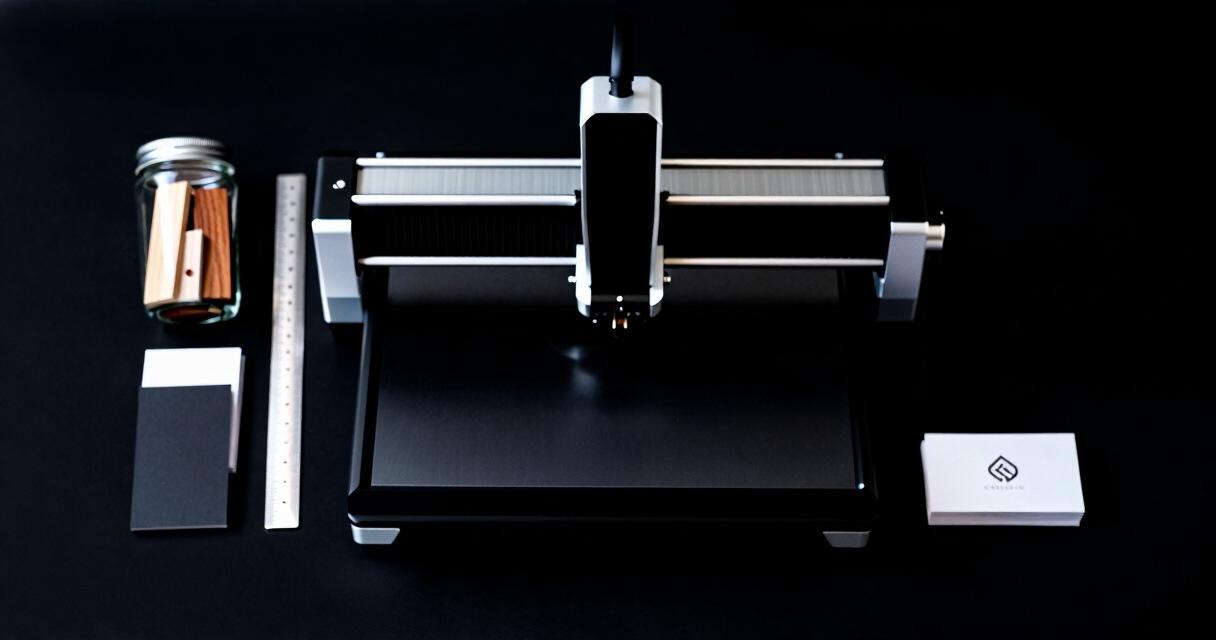

Choosing the best laser engraver for a small business requires balancing power, precision, ease of use, and affordability. The Raymoto R1 Pro 20W stands out as the best overall choice for its combination of reliability and versatility. For those on a tighter budget, the ACMER S1 2500mW offers solid performance at a lower price point. Meanwhile, the xTool F1 provides a portable, multi-material solution for entrepreneurs needing flexibility. With tradeoffs in speed, size, and complexity, understanding what matters most for your business will guide your decision. Continue reading for detailed comparisons and recommendations tailored to different needs.

Get business pricing on monitors, keyboards and dev gear
- Business-only prices and quantity discounts
- Tax-exempt purchasing
- Multiple users, one account, clear invoices
Key Takeaways
- Power-to-precision balance is key; higher wattage models like the A20 PRO V2 deliver faster cutting but cost more.
- Size and portability matter; compact models like ACMER S1 2500mW fit smaller spaces but may have limited work areas.
- Material versatility varies; some engravers handle metals effectively, while others excel with wood and leather.
- Ease of use and setup are critical for small teams; simpler interfaces reduce training time.
- Price ranges widely; investing more generally yields better durability and performance, but budget options can suffice for basic tasks.




More Details on Our Top Picks
Raymoto R1 Pro 20W Portable Laser Engraver for DIY, Personalized Gifts & Small Business
The Raymoto R1 Pro stands out as the best overall choice for small businesses needing portability and ease of use. Its lightweight design, weighing just over 3 pounds, makes it highly portable, unlike bulkier options like the ATOMSTACK A20 PRO V2. Its 20W laser strikes a good balance between power and safety, suitable for engraving on a variety of materials including metal, wood, and leather. The multiple connectivity options, such as Bluetooth and Wi-Fi, add to its convenience for small shops or mobile setups. However, it’s limited to smaller projects, and features like tilt shutdown are off by default, requiring manual activation. Compared to larger, more industrial models, it sacrifices some scale and throughput but compensates with flexibility and safety.
Pros:- Lightweight and portable with carry handle
- High-speed engraving up to 2000 mm/s
- Multiple connectivity options including Bluetooth and Wi-Fi
- Comprehensive safety features for secure operation
Cons:- Tilt and lid-opening emergency stop functions need manual activation
- Limited to small projects and batch engraving
Best for: Small business owners who need a portable, easy-to-set-up laser engraver for custom gifts and small batch projects.
Not ideal for: Businesses requiring high-volume production or larger work areas, as its size and capacity are limited.
- Laser Power:20W
- Weight:3.22 lbs (1.46 kg)
- Engraving Speed:up to 2000 mm/s
- Materials Supported:Metal, wood, leather, acrylic, and more
- Connectivity:USB, Bluetooth, Wi-Fi, Mobile App
- Safety Features:Protective cover, hall sensor cutoff, emergency stop, tilt shutdown, child lock
Bottom line: This model is perfect for small business owners who prioritize portability, safety, and versatility over large-scale production.
ACMER S1 Laser Engraver 3500mW – Compact Desktop Engraving & Cutting Machine for DIY Crafts and Small Business
The ACMER S1 3500mW offers remarkable precision with its 0.04mm laser spot, making it ideal for detailed engraving on tiny items or intricate designs. Its compact, preassembled design simplifies setup, similar to the Artilume U1, but with a slightly larger work area of 130×130mm. The high engraving speed of up to 10,000mm/min allows for efficient work, yet the small size limits larger batch production. Its safety classification as Class 4 demands careful handling, like other powerful diode lasers. Compared to the Raymoto R1 Pro, it sacrifices portability for precision, which is perfect for hobbyists or small businesses focused on fine detail rather than volume.
Pros:- Exceptional 0.04mm laser precision
- Preassembled for quick setup
- Supports multiple software platforms and materials
- Lightweight and portable at just over 4 pounds
Cons:- Limited work area size of 130×130mm
- Requires careful handling due to Class 4 laser safety standards
Best for: Small craft businesses or hobbyists requiring high detail in a compact footprint for personalized items or prototypes.
Not ideal for: Businesses that need larger work areas or higher throughput, as its 130×130mm limit restricts bigger projects.
- Laser Power:3500mW
- Work Area:130×130mm
- Laser Wavelength:455±5nm
- Focal Length:2mm
- Engraving Speed:up to 10,000mm/min
- Certification:NRTL, IEC 60825-1
Bottom line: This engraver excels in detailed small-scale work for hobbyists and small businesses prioritizing precision over volume.
xTool F1 2-in-1 Dual Laser Engraver, Portable HD Laser Engraving Machine for Metal, Wood, Leather
The xTool F1 stands out for supporting a wide range of over 300 materials, including metals, wood, and leather, making it highly versatile for small business artisans. Its dual laser setup with a 2000mW infrared and 10,000mW diode laser enables fast, precise work, rivaling industrial machines in speed—up to 4000mm/s. The fully enclosed design helps contain smoke and odors, a step above open systems like the Raymoto R1 Pro. While it needs an additional air purifier for optimal smoke removal, its portability and high accuracy make it a strong choice for craft shows or on-the-go projects. The primary tradeoff involves its limited cutting depth, which restricts thicker materials, and the need for safety precautions due to the Class 4 laser.
Pros:- Supports over 300 materials including metals
- High-speed engraving up to 4000mm/s
- Enclosed design for smoke and odor control
- Portable and lightweight for mobile use
Cons:- Requires separate purchase of air purifier for smoke removal
- Limited cutting depth for thick materials
Best for: Small business owners or artisans who need fast, high-quality engravings on diverse materials and value portability.
Not ideal for: Large-scale manufacturing or projects involving thicker cuts, as its cutting depth is limited and safety precautions are essential.
- Laser Power (infrared):2000mW
- Laser Power (diode):10000mW
- Max Cutting Thickness:10mm wood, 6mm acrylic
- Speed:4000mm/s
- Weight:4.6kg
- Motion Accuracy:0.00199mm
Bottom line: This engraver balances speed, versatility, and portability, making it ideal for small-scale, multi-material projects.
ATOMSTACK 20W Laser Engraver A20 PRO V2
The ATOMSTACK A20 PRO V2 delivers powerful performance with a 20W laser, suitable for fast engraving and cutting on wood, metal, and acrylic. Its advanced dot compression technology allows for detailed, high-quality results, surpassing the Raymoto R1 Pro in speed and cutting capacity. Easy to assemble and built with durable aluminum, its safety features, like a removable magnetic cover, add confidence during operation. However, as a Class 4 laser, it demands strict safety measures, and its potentially higher price point might be a barrier for small startups on tight budgets. Compared to the ACMER S1, it offers higher throughput but with similar safety considerations and a need for more careful handling.
Pros:- High-precision engraving with dot compression
- Powerful laser for fast cutting and engraving
- Easy assembly with durable aluminum frame
- Multiple control options including app and software
Cons:- Requires strict safety measures due to Class 4 status
- Potentially higher cost for advanced features
Best for: Small business operators who prioritize speed, precision, and versatility for a variety of materials with a focus on productivity.
Not ideal for: Businesses with limited safety resources or those not comfortable managing Class 4 lasers, as safety precautions are essential.
- Laser Power:20,000mW
- Laser Class:4
- Engraving Speed:up to 400mm/s
- Dot Compression Technology:0.08 x 0.1mm
- Material Compatibility:Wood, Metal, Acrylic, Leather
- Lifespan:up to 10,000 hours
Bottom line: This engraver suits small businesses that need rapid, precise work on diverse materials while managing safety carefully.
Artilume U1 Laser Engraver 12000mW, WiFi, 0.01mm Precision, 150x200mm Working Area
The Artilume U1 offers an impressive combination of a large 150x200mm work area and ultra-fine 0.01mm engraving precision, making it suitable for detailed small business projects like jewelry or custom signage. Its 12000mW laser provides enough power to engrave on metals and thicker materials, rivaling higher-end industrial models. WiFi connectivity and nearly assembled design streamline setup and operation, similar to the Raymoto R1 Pro, but with a focus on accuracy and larger projects. The main tradeoff involves its laser power requiring strict safety protocols typical of Class 4 lasers, and its size, although manageable, is less portable than handheld models. This engraver makes a compelling choice for those needing precision over speed.
Pros:- Ultra-fine 0.01mm engraving precision
- Large 150x200mm working area
- Supports multiple materials including metals
- WiFi and app control for ease of use
Cons:- Laser power requires strict safety procedures
- Relatively larger size limits portability
Best for: Small business owners who need high-precision, large-area engravings on diverse materials, especially metals and complex designs.
Not ideal for: Those seeking a compact, portable unit or high-volume production, as its size and safety requirements add complexity.
- Laser Power:12000mW
- Working Area:150 x 200mm
- Precision:0.01mm
- Laser Module Lifespan:>10,000 hours
- Connectivity:WiFi, USB, App
- Supported Software:LaserGRBL, LightBurn, CutLabX
Bottom line: This engraver excels in detailed, large-area projects for small businesses that prioritize accuracy and material versatility.
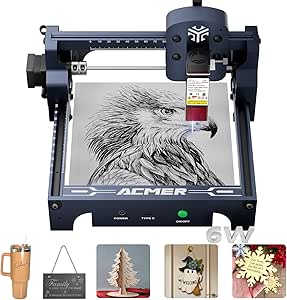
ACMER S1 Laser Engraver 2500mW, Compact Desktop Engraving & Cutting Machine for DIY Crafts, Small Business & Makers, 130×130mm Work Area, 0.04mm Detail Engraving
The ACMER S1 stands out for its exceptional detail with a 0.04mm laser spot, making it perfect for small, intricate projects. Compared to the larger work area of the T1 Foldable, this model sacrifices size for higher precision, which is ideal for detailed craft work but limits larger designs. Its preassembled, lightweight design allows for quick setup, making it highly accessible for small business owners focused on quality rather than volume. However, the limited 130×130mm workspace and Class 4 laser safety considerations mean it’s best suited for careful, small-scale tasks rather than heavy production. This pick is perfect for artisans and makers who prioritize fine detail over capacity.Pros:- High-precision engraving with a 0.04mm laser spot
- Compact, lightweight, and easy to move or store
- Preassembled for quick setup and use
Cons:- Limited work area of 130×130mm restricts larger projects
- Class 4 laser safety demands careful handling
- Primarily suitable for small-scale jobs rather than high-volume production
Best for: Small business owners and hobbyists needing precise, detailed engraving on small items.
Not ideal for: Businesses requiring larger engraving areas or higher throughput, due to its limited work size.
- Laser Power:2500mW
- Work Area:130×130mm
- Laser Wavelength:455±5nm
- Focal Length:2mm
- Engraving Speed:up to 10,000mm/min
- Material Compatibility:wood, acrylic, metal, leather, plastic, PCB, ceramic-coated items
Bottom line: This engraver is best for small, detailed projects where precision outweighs size, ideal for artisans and DIY enthusiasts.
Zonon 200 Pack Engraving Aluminum Plates for CNC, Laser Crafting, and DIY Gift Cards, 86 x 54 x 0.21 mm (Black Matte)
The Zonon aluminum plate set excels in delivering durable, professional-looking surfaces for engraving, especially suited for creating business cards, gifts, or bulk items. Compared with laser engravers, these plates don’t require equipment but are ideal for adding engraving in a manual or semi-automated process, making them a cost-effective choice for small businesses producing multiple items. The stylish black matte finish enhances the professional look of finished products, and the large quantity of 200 pieces supports ongoing projects. However, without a dedicated laser engraver, this product is limited to manual or compatible CNC processes and isn’t suitable for heavy-duty or intricate engraving without additional tools, which could be a drawback for some users.Pros:- Durable, long-lasting aluminum material
- Stylish black matte finish enhances professional appearance
- Large quantity supports bulk production
Cons:- Requires additional tools or equipment for engraving
- Limited to flat, rigid surfaces—no intricate designs or detailed engraving
- Not suitable for heavy-duty or complex engraving jobs
Best for: Small businesses or craft sellers needing bulk material for personalized items or gift cards.
Not ideal for: Businesses looking for integrated engraving solutions or those requiring detailed, on-demand customizations directly on products.
- Material:Aluminum
- Color:Black Matte
- Size:86 x 54 x 0.21 mm
- Quantity:200 pieces
Bottom line: This set is perfect for small businesses that need to produce large quantities of engraved gift or business cards efficiently.
T1 Foldable Laser Engraver, 7000mW Portable Engraving Machine with 0.01mm Accuracy, 200x150mm Working Area for Wood, Leather, Acrylic, Coated Metal
The T1 Foldable Laser Engraver shines as a portable, space-saving option with impressive accuracy at 0.01mm, making it ideal for on-the-go projects or small workshops. Compared to stationary models like the ACMER S1, its foldable design prioritizes mobility, which is perfect for entrepreneurs who need to work across different locations. Its 200x150mm work area supports a variety of materials, and the safety features make it accessible for beginners. However, its size and limited capacity mean it’s less suited for larger production runs or complex, high-volume tasks. This pick makes the most sense for micro-businesses, artisans, or hobbyists who value flexibility and precision over large-scale manufacturing.Pros:- Foldable, portable design for easy transport
- High accuracy with 0.01mm detail
- Pre-assembled, straightforward operation
Cons:- Limited to small projects due to size constraints
- Requires removal of protective tape before use
- Somewhat basic feature set for advanced users
Best for: Small-scale artisans, hobbyists, and mobile entrepreneurs needing precise engraving on various materials while on the move.
Not ideal for: Businesses requiring large volume production or larger work areas, due to its limited size and capacity.
- Laser Power:7000mW
- Working Area:200x150mm
- Accuracy:0.01mm
- Material Compatibility:wood, leather, acrylic, coated metal, paper, fabric
- Dimensions:145.28 x 141.73 x 57.87 inches
- Weight:4.75 pounds
Bottom line: This engraver is ideal for small businesses or individuals who need portable, precise engraving on a variety of materials.
ACMER S1 Laser Engraver, 6000mW, 130x130mm Working Area, High Precision Laser Cutter and Engraving Machine
The ACMER S1 with 6000mW laser offers a compelling balance of power and precision, supporting detailed engraving and cutting on a variety of small-scale projects. Its preassembled setup simplifies initial use, making it accessible for both hobbyists and professionals. Compared with the 2500mW version, this model provides more cutting capability and better handling of thicker or harder materials, though it still shares the same limited 130×130mm work area. Its versatility across multiple OS platforms makes it suitable for varied workflows. However, its lightweight build might impact durability under heavy use, and safety protocols remain essential due to the laser’s power.Pros:- High-precision with 0.01mm accuracy
- Preassembled for quick, easy setup
- Supports a range of materials and software
Cons:- Limited workspace of 130×130mm restricts larger projects
- Requires adherence to laser safety protocols
- Lightweight design may affect long-term durability
Best for: Small business operators and hobbyists needing a versatile, precise laser for detailed work across multiple materials.
Not ideal for: Users requiring larger engraving areas or heavy-duty, high-volume production capabilities.
- Laser Power:6000mW
- Work Area:130x130mm
- Laser Wavelength:455±5nm
- Focal Length:2mm
- Engraving Speed:up to 10,000mm/min
- Material Compatibility:wood, bamboo, leather, plastic, PCB, ceramics
Bottom line: This laser engraver is best for small-scale, detailed projects where versatility and precision are prioritized over size.
ACMER Laser Engraver Machine K1, 3500mW Compact Desktop Laser Cutter for Wood, Acrylic, Plywood, DIY Crafts & Small Business
The ACMER K1 with 3500mW laser offers a solid entry point for small businesses and hobbyists just starting out. Its 150×150mm work area makes it suitable for small projects on wood, acrylic, and leather, with high precision supported by a fine laser spot. Compared with higher-powered models like the ACMER S1 2500mW, the K1 provides enough power for basic cutting and engraving without the complexity or safety concerns of more powerful lasers. Its enclosed safety design and support for multiple OS platforms make it accessible for beginners. On the downside, its small work area and limited power restrict larger or more demanding projects, making it best suited for newcomers rather than established small businesses with bigger needs.Pros:- Compact, portable, and easy to set up
- High precision with fine laser spot
- Enclosed safety design with exhaust fan
Cons:- Limited to small work area of 150×150mm
- Lower laser power may limit cutting thicker materials
- Requires some technical setup and familiarity with software
Best for: Hobbyists or small business owners new to laser engraving seeking an affordable, easy-to-use device for small projects.
Not ideal for: Businesses requiring larger work areas or deeper, more complex cuts on thicker materials.
- Laser Power:3.5W, 7W, 12W options
- Work Area:150×150mm
- Laser Spot Size:0.08×0.08mm
- Repeat Positioning Accuracy:0.01mm
- Supported OS:macOS, Windows, Linux
- Compatible Formats:NC, DXF, BMP, JPG, PNG
Bottom line: This model is ideal for beginners or small-scale creators starting their laser engraving journey with simple projects.
Metal Business Card Blanks – 300 Pcs Black Aluminum, 3.4 x 2.2 inches, 0.01 inch Thickness
This set of black aluminum business card blanks stands out for small businesses aiming to create high-end, durable branding materials. Compared with laser engravers, these blanks are a passive product that relies on your own laser engraver for customization, making them ideal for businesses with existing equipment. Their main advantage is the professional appearance and resistance to scratches, but they require a compatible laser machine and are limited to thin, lightweight applications. These blanks are perfect for branding or personalized gifts, but aren’t suitable if you need thicker or more complex engraving options.
Tradeoff: You get an elegant, professional surface but must have a laser engraver to customize them yourself, so they’re less flexible for those without equipment.
Pros:- Highly durable and resistant to scratches
- Elegant, professional appearance
- Compatible with most laser engraving machines
- Great for branding, gifts, and crafts
Cons:- Requires existing laser engraver for customization
- Limited thickness suitability for heavy-duty uses
- Not a standalone product—needs additional equipment
Best for: Small business owners who already own a laser engraver and want to produce professional-quality branded cards or gifts.
Not ideal for: Beginners without laser engraving equipment or those seeking ready-to-use personalized items without additional tools.
- Material:Aluminum
- Color:Black
- Quantity:300 pieces
- Size:3.4 x 2.2 inches
- Thickness:0.01 inch
Bottom line: This product is ideal for small businesses with laser engraving tools aiming for high-quality, professional branding on lightweight materials.
WIZMAKER Wand 12W Laser Engraver, 300×300mm Diode Laser Cutter for Wood, Leather, Paper, MDF, Felt, Coated Metals, Dark Acrylic, DIY, Small Business Projects
The WIZMAKER Wand 12W offers a compact, preassembled solution that appeals to small business owners looking for versatility across multiple materials. Unlike the simpler laser engraver options, it provides a 12W diode laser with a sizable 300×300mm workspace, making it suitable for a wide range of projects from wood signage to metal etching. It excels in delivering high precision and speed, especially compared to entry-level models like the ACMER S1, but its class 4 laser requires careful handling and safety precautions. This model makes the most sense for small businesses ready to handle a more involved setup that values material flexibility and faster turnaround times. However, its limited workspace and safety considerations mean it’s less suitable for absolute beginners or those with tight space constraints.
Tradeoff: You gain high versatility and speed but must manage safety protocols and a limited workspace.
Pros:- Preassembled, easy to set up
- Wide material compatibility
- High precision and fast engraving speed
- Multi-device connectivity
Cons:- Class 4 laser requires safety precautions
- Limited workspace size for larger projects
- More complex setup process
Best for: Small business owners needing a versatile, high-precision laser engraver capable of working on multiple materials with speed.
Not ideal for: Beginners or those with limited space who prefer a simple, plug-and-play device or only work on small projects.
- Power:12W
- Working Area:300×300mm
- Material Compatibility:Wood, Leather, Paper, MDF, Felt, Coated Metals, Dark Acrylic
- Connectivity:Wi-Fi, Hotspot, USB
- Accuracy:0.1mm
- Max Speed:10,000 mm/min
Bottom line: This pick makes the most sense for small business owners ready to invest in a versatile and fast laser engraver with high-quality output across various materials.

How We Picked
These products were evaluated based on performance, build quality, ease of use, material versatility, and value for small business owners. Priority was given to engravers that balance power and precision with affordability and straightforward operation. We compared specifications like wattage, engraving area, and software compatibility, alongside user feedback on reliability and maintenance. The ranking reflects which models best meet the demands of small businesses, considering real-world tradeoffs between cost and capability. Products that offered a clear advantage in one or more key areas earned higher positions, ensuring the list caters to different business sizes and skill levels.Factors to Consider When Choosing Best Laser Engraver For Small Business
When selecting a laser engraver for your small business, it’s important to evaluate several factors beyond just price. Understanding these considerations can help you choose a machine that fits your current needs and scales as your business grows. Here are the main points to consider:Power and Speed
Laser wattage directly impacts how quickly and effectively you can engrave or cut materials. Higher wattage models, like those with 20W or more, handle thicker materials and larger projects with ease, but they come at a higher cost. Lower wattage engravers may be sufficient for detailed work on thin materials and are often more budget-friendly. Consider your typical workload: if speed and versatility are priorities, investing in a more powerful unit makes sense. However, for hobby-level or low-volume tasks, a lower wattage machine could be enough.
Work Area Size
The engraving area determines how large your projects can be. Small workspaces favor compact models, which are easier to fit into tight shops or home setups. Larger work areas enable more ambitious projects but usually mean a bigger, more expensive machine. Think about your typical project size and future needs. Overestimating can lead to unnecessary expense, while underestimating may limit your capabilities. Balance your available space with your project requirements for the best fit.
Material Compatibility
Not all laser engravers handle the same range of materials equally well. Some models excel with wood, leather, and acrylic, while others can also engrave metals or coated surfaces. If your business involves diverse products, select a machine with broad material support. Conversely, if you focus on specific crafts, a specialized engraver might perform better for your niche. Always verify the machine’s compatibility with your primary materials to avoid frustration and ensure quality results.
Ease of Use and Software
Simplicity in setup and operation saves time and reduces errors, especially for small teams or solo entrepreneurs. Look for machines with intuitive interfaces, straightforward software, and good customer support. Some models include user-friendly apps or plugins that streamline design and engraving. Avoid overly complex systems if your technical skills are limited, as steep learning curves can delay productivity. Remember, a machine that’s easy to operate today will save headaches tomorrow.
Budget and Long-Term Value
Price is a significant factor, but it should be weighed against durability, performance, and potential upgrades. Cheaper models often compromise on build quality or features, leading to higher maintenance or replacement costs. Investing more initially can yield a more reliable, precise, and versatile machine that supports your business growth. Consider total cost of ownership, including software licenses, replacement parts, and service plans. A higher upfront investment may pay off through increased productivity and fewer disruptions.
Frequently Asked Questions
Can a laser engraver handle both small-scale and large-scale projects?
Yes, but the ability to handle both depends on the engraver’s power and work area. Higher wattage machines with larger engraving zones can accommodate bigger projects, while more compact units are suited for smaller, detailed work. If you anticipate needing both, look for a versatile model that offers adjustable settings and a sizable work area. Keep in mind that larger engravers tend to be more expensive and require more space, so weigh these factors carefully based on your typical project size.
Is it better to buy a diode laser or a CO2 laser for small business use?
Diode lasers are generally more affordable, compact, and easier to operate, making them a good choice for beginners or low-volume production. CO2 lasers tend to offer higher power and better quality for cutting thicker materials or larger projects, but they come at a higher cost and require more space and maintenance. For small business owners just starting out or focusing on engraving rather than heavy cutting, a high-quality diode laser often provides sufficient performance. However, if your work involves frequent cutting of denser materials, investing in a CO2 system might be more appropriate.
How important is software compatibility when choosing a laser engraver?
Software compatibility is crucial because it determines how easily you can create, edit, and send designs to your machine. Most modern engravers support popular design programs like CorelDRAW, Adobe Illustrator, or proprietary software. Ensure the software is user-friendly and offers the features you need, such as vector editing or raster engraving. Compatibility issues can lead to frustrating delays or limitations in design complexity. Investing in a machine with flexible, well-supported software will save time and enable you to produce higher-quality work.
What maintenance is typically required for a small business laser engraver?
Routine maintenance usually involves cleaning the lens and mirrors, checking and replacing filters if applicable, and ensuring the cooling system functions properly. Regular calibration ensures consistent engraving quality, especially for detailed work. Some models may require software updates or replacement of consumables like laser tubes or diodes over time. Proper maintenance extends the lifespan of your machine and maintains engraving precision, making it a worthwhile investment of time and resources.
When should I consider upgrading my laser engraver?
If your current machine no longer meets your project demands — whether due to insufficient power, small work area, or frequent malfunctions — it’s time to upgrade. As your business grows, investing in a more capable, durable, and feature-rich model can improve productivity and product quality. Additionally, technological advances may introduce features like improved software, faster engraving speeds, or broader material compatibility worth considering. Upgrading at the right time ensures your equipment supports your evolving needs without becoming a bottleneck.
Conclusion
For small business owners seeking the best overall performance, the Raymoto R1 Pro 20W offers a reliable balance of power, size, and ease of use. Budget-conscious entrepreneurs will find the ACMER S1 2500mW a capable starter without breaking the bank. Those wanting a premium, feature-rich experience might consider the ATOMSTACK 20W A20 PRO V2 for its advanced capabilities. Beginners should lean toward models with intuitive interfaces like the WIZMAKER Wand, while businesses requiring versatility across materials should prioritize models like the xTool F1. Your choice depends on your specific project scope, budget, and growth plans — but this list aims to match your needs precisely.
Halloween Picks
halloween
As an affiliate, we earn on qualifying purchases.