
Teams comparing Playwright and Selenium are choosing how much they value an integrated, modern test workflow versus broad compatibility and an established ecosystem. Both automate browsers for end-to-end testing, but they make different tradeoffs: Playwright bundles features such as automatic waiting, browser contexts, and trace-based debugging, while Selenium supports more languages and a wider range of browser and vendor setups.

Get business pricing on monitors, keyboards and dev gear
- Business-only prices and quantity discounts
- Tax-exempt purchasing
- Multiple users, one account, clear invoices
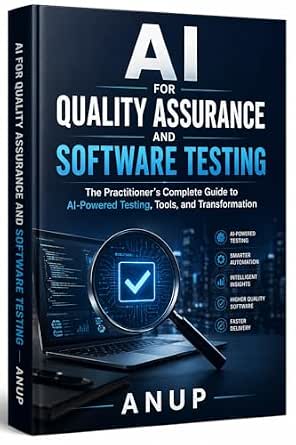
AI for Quality Assurance and Software Testing: The Practitioner’s Complete Guide to AI-Powered Testing, Tools, and Transformation
- ✔ Format: Book
- ✔ Primary focus: AI in quality assurance and software testing
- ✔ Coverage: Concepts, tools, methodologies, and transformation

Spec-Driven Software Testing with AI
- ✔ Format: Book
- ✔ Series: Spec-Driven AI Engineering Series
- ✔ Primary focus: Spec-driven software testing with AI

All You Need to Know About Software Testing: From Beginner to Job-Ready QA Engineer
- ✔ Format: Book
- ✔ Primary focus: Software testing foundations and QA career preparation
- ✔ Audience: Beginners aiming toward QA engineering roles
For a team starting a new web application suite, Playwright is usually the easier choice when its supported languages and browsers meet the project’s needs. Selenium makes more sense when an organization already has a substantial Selenium suite, depends on a specific browser or language combination, or needs to connect with existing grid infrastructure. The practical question is whether Playwright’s smoother default workflow outweighs Selenium’s flexibility and accumulated compatibility.
At a Glance
| Criteria | Playwright | Selenium | Winner |
|---|---|---|---|
| Browser and platform coverage | Chromium, Firefox, and WebKit automation through Playwright’s supported browser builds; focused on web browsers. | Broad browser support through WebDriver implementations and vendors; also supports mobile automation through Appium. | B |
| Reliability and waiting | Built-in auto-waiting and browser-context isolation reduce common timing and state problems. | Explicit and implicit waits are available, but teams must design synchronization carefully to avoid flaky tests. | A |
| Languages and integrations | Official support for JavaScript/TypeScript, Python, Java, and .NET, with a cohesive API. | A wider set of language bindings and a long-standing ecosystem of libraries and integrations. | B |
| Setup and test authoring | Integrated test runner, assertions, fixtures, parallel execution, and reporting are available in Playwright Test. | Core browser automation is mature, but teams often assemble a runner, assertions, reporting, and fixtures separately. | A |
| Debugging | Trace Viewer, screenshots, video, and inspector tools provide a connected debugging workflow. | Debugging support depends on the chosen language bindings, runner, browser, and third-party tools. | A |
| Scaling and infrastructure | Parallel execution and isolated contexts are built in; teams can also connect to hosted browser services. | Selenium Grid and commercial providers support distributed runs and varied browser fleets; configuration can take work. | Depends |
| Cost and value | Open-source tooling has no per-seat license fee; reduced setup and debugging effort can improve value for new suites. | Open-source core has no per-seat license fee; existing suites and infrastructure can make migration costs outweigh benefits. | Depends |
AI for Quality Assurance and Software Testing: The Practitioner’s Complete Guide to AI-Powered Testing, Tools, and Transformation
This is the broadest choice for readers trying to understand what AI adoption in quality assurance involves beyond selecting a tool. Its stated coverage spans AI testing concepts, practical tools, implementation methods, and organizational transformation. That breadth makes it more suitable for QA leads and experienced practitioners assessing how a team might change its workflow than for someone seeking a first introduction to software testing.Compared with Spec-Driven Software Testing with AI, this guide appears to devote more attention to the larger transformation around AI, while the latter narrows in on specifications, automation, APIs, and CI/CD. That makes this book a stronger starting point for evaluating the landscape, but potentially a less direct route for engineers who already know they need to improve an automated test pipeline. Its described practical examples and step-by-step implementation guidance are a useful signal for readers who want to move from concepts toward adoption.The main caution is audience fit. The supplied description says it may be too advanced for beginners without QA or AI knowledge, and that its industry emphasis may limit how well examples transfer to other fields. Choose it for strategic breadth and implementation context; skip it if you need a beginner-friendly primer or a narrowly scoped engineering playbook.
Pros:
- Covers AI testing concepts, tools, and methods.
- Includes practical examples and implementation guidance.
- Addresses organizational change as well as technical workflows.
Cons:
- May be too advanced for readers new to QA or AI.
- Its industry emphasis may limit the transferability of some guidance.
Best for: QA leads and experienced practitioners evaluating AI adoption across testing workflows and team practices.
Not ideal for: Newcomers without QA or AI background, or readers who need examples tailored to a broad range of industries.
Bottom line: We rank it first for readers who need the widest view of AI-enabled QA, provided they already have enough background to follow an advanced guide.
“We rank it first for readers who need the widest view of AI-enabled QA, provided they already have enough background to follow an advanced guide.”
Spec-Driven Software Testing with AI
When the main question is how to make AI part of an engineering test workflow, this is the most focused pick. The stated topics connect spec-driven development with test automation, test-driven development, API testing, and CI/CD. That combination makes the book a plausible fit for engineers who want to think about test suites in the context of how software is specified and shipped, instead of treating testing as a separate phase.Its narrowness is also its advantage over AI for Quality Assurance and Software Testing. The broader book is the more natural choice for readers considering organizational change or looking for a wider introduction to AI in QA. This one is better suited to an engineer with a concrete workflow in mind, especially one working on automated coverage and continuous delivery. The supplied information identifies useful methodologies, but does not specify language support or integrations, so teams should check the full contents before expecting guidance for a particular stack.We would not make it a first testing book for someone starting from zero: the description itself flags the niche focus as a challenge for beginners. AI tooling also changes quickly, so any specific tool instructions may age; the more durable value is likely to come from the testing methods and workflow principles. It earns second place because it has the clearest engineering focus, while the broader first pick serves more kinds of AI adoption questions.
Pros:
- Connects AI with test automation and spec-driven work.
- Covers TDD, API testing, and CI/CD.
- Focuses on building reliable automated test suites.
Cons:
- Its specialized scope may be difficult for testing beginners.
- Specific AI tool guidance can become outdated as the tooling evolves.
Best for: Software engineers and QA automation practitioners building or refining spec-based automated test suites and CI/CD workflows.
Not ideal for: Readers who are new to software testing or who want broad coverage of manual QA and career foundations.
Bottom line: Choose this focused guide when your priority is AI-supported automation within an engineering pipeline, not a broad introduction to QA.
“Choose this focused guide when your priority is AI-supported automation within an engineering pipeline, not a broad introduction to QA.”
All You Need to Know About Software Testing: From Beginner to Job-Ready QA Engineer
For a newcomer, foundations matter more than AI specialization. This title is explicitly aimed at readers building skills for QA engineering roles and spans manual testing, automation, APIs, Selenium, Playwright, and CI/CD. That range can help a beginner see how testing work expands from checking behavior by hand to using automation and delivery pipelines. It is the most approachable fit in this lineup based on its stated audience, although the description alone does not establish how much depth the book gives each topic.Compared with the two AI-centered books, this guide places less emphasis on AI-enabled testing and more on a progression through core QA subjects. That makes it a better starting point for people still learning the field’s vocabulary and common tools, but a weaker match for a team actively designing an AI testing strategy. Readers who already have testing fundamentals may prefer the more targeted workflow coverage of Spec-Driven Software Testing with AI.The range of technologies is useful, but it can also mean readers should verify the contents align with their learning plan: Selenium and Playwright, for example, represent distinct automation approaches, while APIs and CI/CD broaden the scope further. Pick this for a general QA learning path; look elsewhere if you need advanced implementation guidance for AI in an established testing organization.
Pros:
- Designed for people starting out in QA.
- Covers both manual testing and automation.
- Includes APIs, Selenium, Playwright, and CI/CD.
Cons:
- Its broad beginner scope may not provide the specialized AI focus of the other two books.
- The supplied description does not detail depth, exercises, or language coverage for each topic.
Best for: Beginners who want a broad introduction to QA topics while building toward an entry-level QA engineering role.
Not ideal for: Experienced QA teams seeking advanced AI transformation guidance or engineers looking for a narrowly scoped spec-driven workflow.
Bottom line: This is the clearest starting point for aspiring QA engineers, while readers focused on AI adoption should move to one of the other two guides.
“This is the clearest starting point for aspiring QA engineers, while readers focused on AI adoption should move to one of the other two guides.”
As an Amazon Associate we earn from qualifying purchases.
Key Differences
The central difference is how much each framework provides as one coherent workflow. Playwright includes a test runner and features designed to limit common browser-test problems, such as waiting for page actions to become ready and creating isolated browser contexts. This can help a new team get from first test to a useful, diagnosable suite with fewer separate choices. Selenium remains capable, but teams commonly select additional components and establish their own conventions for waiting, reporting, and test isolation.
Selenium’s advantage is reach and continuity. It supports more programming languages, has a long history across browser automation projects, and works with a broad range of WebDriver implementations, grids, and service providers. That flexibility matters when the test environment is unusual or an organization already depends on Selenium. Playwright’s coverage is strong for mainstream web testing, including Chromium, Firefox, and WebKit, but it does not replace every specialized browser, mobile, or legacy setup.
Both tools can be used without paying a framework license fee. Value depends on the full cost of adoption: engineering time, infrastructure, maintenance, and migration. A new team will often get more immediate value from Playwright’s integrated defaults. A team with reliable Selenium tests and established grid capacity may get better value by extending what it already owns.
Detailed Comparison
Browser and platform coverage (Selenium wins — moderate)
Selenium wins on breadth. Its WebDriver ecosystem and vendor integrations cover a wide range of browsers and environments, and Selenium-based Appium setups extend automation to mobile apps. Playwright covers Chromium, Firefox, and WebKit, which addresses many web application needs but is not a universal substitute for every browser vendor or mobile workflow. The gap is moderate: most teams testing mainstream desktop web apps can use either, while teams with specialized or mobile coverage requirements should verify Selenium’s ecosystem against their target matrix.
Reliability and waiting (Playwright wins — moderate)
Playwright has a meaningful advantage for common synchronization issues. Its actions wait for relevant conditions, and its isolated browser contexts make it easier to keep user state from leaking between tests. Selenium can be reliable, but teams need consistent wait strategies and careful state management. The gap is moderate in day-to-day maintenance: Playwright’s defaults reduce routine timing work, while disciplined Selenium suites can still achieve strong results.
Languages and integrations (Selenium wins — moderate)
Selenium wins when teams need the widest language choice or must fit into an established automation stack. Its bindings and integrations have accumulated across years of use. Playwright supports four major language families and offers a consistent experience within them, which is enough for many teams but not every organization. This is a moderate gap for mixed-language companies and a minor one for a team already standardized on a Playwright-supported language.
Playwright wins for most new web test suites because its test runner, assertions, fixtures, parallel execution, and reporting fit together. Selenium supplies browser automation primitives, leaving teams more freedom but also more assembly work around the core. The gap is moderate: a small team can begin with a productive Playwright setup quickly, while Selenium may be preferable when an organization already has a standard runner and shared libraries it wants to keep.
Debugging (Playwright wins — moderate)
Playwright has the clearer built-in debugging path. Its traces can show actions, page state, and related artifacts in one place, helping an engineer investigate intermittent failures. Selenium debugging varies more with the selected runner, language tooling, browser, and reporting add-ons. The gap is moderate for teams responsible for frequent failures; teams with a mature Selenium reporting setup may see a smaller difference.
Scaling and infrastructure (moderate difference)
This criterion depends on the environment. Selenium Grid has a long-established role in distributed browser testing and connects to a wide selection of hosted browser services. Playwright includes parallel test execution and works with hosted providers, which can be simpler for a focused suite. Selenium has an advantage where a company already operates a large WebDriver grid; Playwright has an advantage when a team wants a cohesive setup without building as much around the framework. The difference is major only when infrastructure is already a central constraint.
Cost and value (moderate difference)
Neither open-source framework requires a per-seat license fee, so the useful comparison is engineering and infrastructure cost. Playwright can be better value for a new project when its defaults lower setup and maintenance effort. Selenium can be better value when tests, team knowledge, and grid resources are already in place. The gap is minor at the license level and potentially major once migration effort or hosted browser usage enters the budget.
Playwright: Pros and Cons
Pros:
- Integrated test runner and browser automation workflow
- Automatic waiting and isolated contexts help reduce common flaky-test causes
- Strong trace, inspector, screenshot, and video debugging tools
- Good fit for new web suites using a supported language
Cons:
- Fewer language bindings than Selenium
- Does not cover every browser vendor, legacy environment, or mobile testing need
- Switching from an established Selenium suite carries migration and retraining costs
Selenium: Pros and Cons
Pros:
- Broad language and browser ecosystem
- Mature WebDriver and grid options for distributed testing
- Works well with existing Selenium suites and organizational tooling
- Can support mobile automation through related Appium tooling
Cons:
- Teams often need to select and maintain more components around browser automation
- Wait strategies and test isolation require deliberate conventions
- Debugging experience varies with the chosen runner and supporting tools
Who Should Choose What
Choose Playwright if:
- You are creating a new end-to-end suite for a web application and use JavaScript/TypeScript, Python, Java, or .NET.
- You want integrated test running, browser contexts, and failure traces with less initial assembly.
- Your target browsers are covered by Playwright and reducing routine flaky-test investigation is a priority.
Choose Selenium if:
- Your team already has a substantial, maintainable Selenium suite and working WebDriver infrastructure.
- You need language bindings, browser vendors, or grid arrangements beyond Playwright’s practical coverage.
- Your strategy includes mobile automation through an Appium-based setup.
Skip both if: If you only need fast checks of isolated functions or API behavior, use unit or API testing for those checks and reserve browser automation for flows that need a real browser.
Value for Money
There is no framework license premium to justify: Playwright and Selenium are both available as open-source tools. The cost question is whether a paid browser service or internal infrastructure is needed, and how much engineering time the suite consumes. For a new project with mainstream browser needs, Playwright often delivers better value because the runner, waiting behavior, and debugging tools reduce the number of separate decisions and recurring setup tasks.
Paying for hosted browsers can be worthwhile when a team needs broad browser coverage, parallel capacity, or managed infrastructure without operating its own fleet. That decision applies to either framework. Selenium may offer better total value when the organization has already paid the cost of building and maintaining a working grid and suite. Replacing it solely to adopt a newer framework is rarely a value gain unless maintenance or coverage problems justify the migration.
Final Verdict
Choose Playwright for a new web testing suite unless your browser matrix, language requirements, or infrastructure point elsewhere. Its integrated workflow, waiting behavior, and trace debugging make it the stronger default for teams that want to build and maintain modern browser tests without assembling as many supporting parts.
Choose Selenium when broad ecosystem flexibility is the deciding factor: an existing suite, a required language or browser setup, or a mature WebDriver grid. The biggest deciding factor is not which tool can automate a browser; both can. It is whether Playwright’s streamlined defaults fit your target environment well enough to outweigh Selenium’s reach and the value of what your team already runs.
Frequently Asked Questions
Is Playwright better than Selenium for a new project?
Usually, for a new web application suite with supported languages and browsers. Playwright provides an integrated runner, automatic waiting, and connected debugging tools. Selenium may be the better start if the project needs an unusual browser, language, grid, or mobile setup.
Is Selenium more reliable than Playwright?
Neither framework guarantees reliable tests. Playwright’s automatic waiting and isolated contexts help avoid common timing and state issues by default. Selenium can be reliable when teams apply consistent wait patterns, isolation, and maintenance practices.
Can Playwright replace Selenium?
It can replace Selenium for many web suites, especially when the target browsers and languages fit Playwright. Check browser vendor requirements, mobile coverage, integrations, and migration costs before switching an established suite.
Do Playwright or Selenium cost money?
The frameworks are open source and do not charge a per-seat license fee. Teams may still pay for hosted browser infrastructure or spend engineering time operating grids, maintaining tests, and integrating reports.