
📊 Full opportunity report: How to Reduce Heat and Noise in a High-Power AI Workstation on ThorstenMeyerAI.com — validation score, market gap, and execution plan.

Get monitors, keyboards and dev gear delivered free — and shop member deals
- Fast, free delivery on millions of items
- Access to Prime Big Deal Days deals on October 6–7
- Prime Video, Amazon Music and more included
TL;DR
High-power AI workstations generate significant heat and noise due to sustained GPU loads. Key solutions include undervolting GPUs, improving airflow, and optimizing component cooling. This helps maintain performance while reducing operational noise and temperature.
High-power AI workstations produce excessive heat and noise due to sustained GPU loads, impacting workspace comfort and hardware longevity. Experts confirm that targeted cooling strategies and power management can significantly mitigate these issues, making AI setups more practical for long-term use.
AI workstations operating under continuous load generate more heat and noise than typical gaming PCs because their GPUs run at or near full capacity for hours. The main sources of heat are the GPU, CPU, power supply, and VRMs, with GPU fans typically being the loudest component. To address these issues, undervolting GPUs and capping power limits are highly effective, often reducing heat output by tens of watts without sacrificing performance, especially in memory-bound inference tasks.
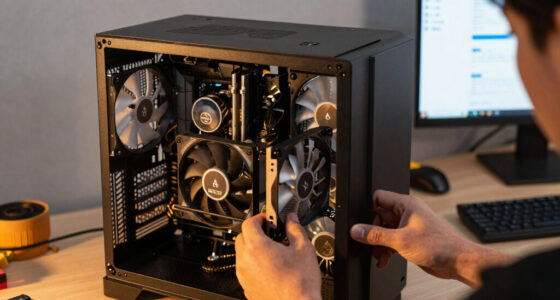
Improving case airflow is also critical. Proper ventilation prevents recirculation of hot air, lowering overall component temperatures and reducing fan speeds. Additionally, choosing high-quality power supplies and managing vibrations from fans and coils can further decrease noise levels. These strategies, when combined, can transform a noisy, overheated AI workstation into a quieter, more stable system suitable for prolonged operation.
An AI workstation isn’t a gaming PC —
and that’s why it runs hot.
Local inference is a sustained load: the GPU sits near full power for hours with no loading screens, so the heat never dissipates and the fans never get a break. Here’s where the heat comes from — and the five levers that reduce it.
Targeted Cooling and Power Management Are Key
Implementing these proven techniques allows AI practitioners to operate high-power workstations more comfortably and reliably. Lowering heat extends hardware lifespan, reduces energy consumption, and minimizes noise pollution in work environments. As AI workloads grow more demanding, these strategies become essential for maintaining efficiency and workspace quality.
GPU undervolting software for high-performance workstations
As an affiliate, we earn on qualifying purchases.
As an affiliate, we earn on qualifying purchases.
Understanding the Unique Thermal Profile of AI Workstations
Unlike gaming PCs, AI workstations handle continuous, sustained GPU loads, often running at or near maximum capacity for hours. This leads to higher thermal output and fan noise, especially when multiple GPUs are involved. Common issues include throttling due to heat buildup, increased power draw, and vibrations from cooling components. While many guides focus on gaming PC cooling, AI workloads require tailored solutions emphasizing power capping, undervolting, and airflow optimization.
“Undervolting GPUs and improving airflow are the most effective ways to reduce heat and noise in high-power AI workstations without sacrificing performance.”
— Thorsten Meyer, AI hardware expert
high airflow PC case for AI workstations
As an affiliate, we earn on qualifying purchases.
As an affiliate, we earn on qualifying purchases.
Remaining Questions on Long-Term Effectiveness
While undervolting and airflow improvements are proven to reduce heat and noise, the long-term effects of aggressive power capping on hardware lifespan and performance consistency are still being studied. Additionally, the optimal configurations may vary across different GPU models and workloads, making universal solutions challenging.
quiet power supply for gaming and AI PCs
As an affiliate, we earn on qualifying purchases.
As an affiliate, we earn on qualifying purchases.
Next Steps in AI Workstation Cooling Optimization
Future developments will likely include more sophisticated software tools for real-time power and temperature management, as well as hardware innovations like quieter cooling solutions and more efficient power supplies. Users should stay updated on firmware updates and new cooling technologies to further enhance system stability and silence.
CPU cooling fan for high load workstations
As an affiliate, we earn on qualifying purchases.
As an affiliate, we earn on qualifying purchases.
Key Questions
Can undervolting GPUs affect performance?
In memory-bound inference tasks, undervolting typically reduces heat and noise without impacting performance significantly. However, for compute-bound workloads, some performance loss may occur if undervolted too aggressively.
What is the best way to improve case airflow?
Use high-quality fans with proper placement for intake and exhaust, ensure unobstructed airflow paths, and consider positive pressure setups to prevent dust buildup and hot air recirculation.
Are liquid coolers necessary for AI workstations?
Not necessarily. High-quality air coolers and optimized airflow can suffice for many setups. Liquid cooling can offer lower noise levels and better thermal performance but involves higher cost and maintenance.
Does power supply quality impact noise levels?
Yes. A high-quality, efficient PSU with adequate wattage and good fan control produces less heat and operates more quietly, contributing to overall system noise reduction.
Source: ThorstenMeyerAI.com
Fall Picks
fall essentials
As an affiliate, we earn on qualifying purchases.