
Disclosure: Gewerkton is built by our publisher — we build it ourselves and write down what we learn.

Get monitors, keyboards and dev gear delivered free — and shop member deals
- Fast, free delivery on millions of items
- Access to Prime Big Deal Days deals on October 6–7
- Prime Video, Amazon Music and more included
Construction runs on drawings that keep changing. A revision index jumps from D1 to D2, an IFC model lands in someone’s inbox, and the people who have to act on it, site managers, foremen and trades, rarely sit at a CAD workstation. Gewerkton Studio, part of a construction documentation platform currently in beta, uses the browser as that workstation. According to its website, Studio “opens plan sets in the browser and attaches evidence in the right place.” A test run with sample files on 3 October 2026 shows what that looks like in practice, and where the limits are.
Two revisions, one overlay
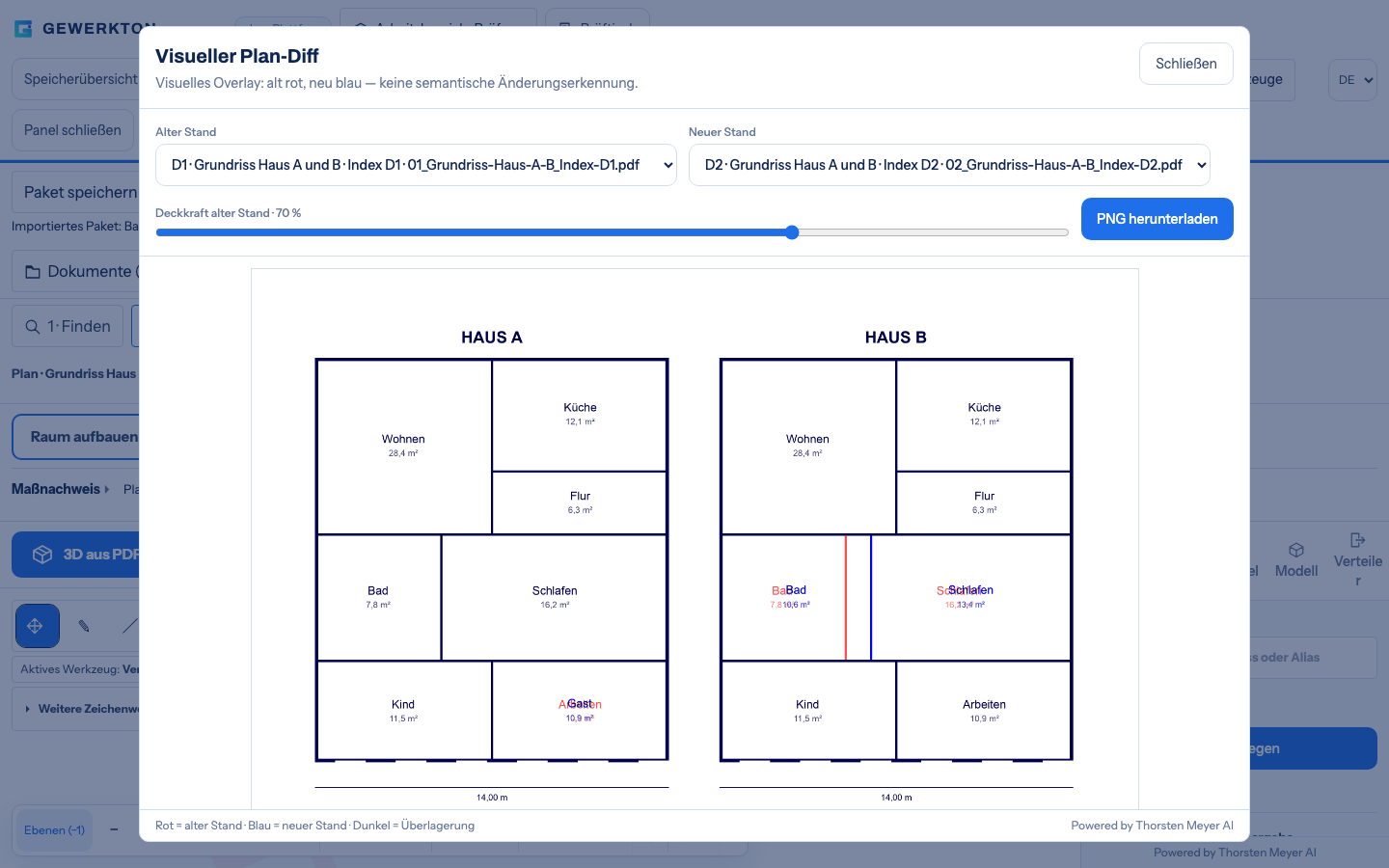
Both PDF revisions are imported together, and Studio reads the revision index from the file name. In the visual plan diff the user picks the old and the new revision. The result is an overlay: the old revision in red, the new one in blue, matching lines dark, with a slider for the opacity of the older revision. Studio itself calls it a visual overlay with no semantic change detection. It shows where lines differ; what a difference means is left to the people who know the project.
The sample project, a fictional housing scheme with a house A and a house B, contains three deliberate changes. In house B the wall between bathroom and bedroom sits 1.00 m further right, in house A a study becomes a guest room, and the title block now reads “Index D2”. All three show up in red and blue. The overlay can be downloaded as a PNG and filed as a record. The same comparison answers a second question as well: whether a scan matches its original. A vector PDF and its scanned twin overlay almost exactly.
Scale first, then measure
Raster plans and plans labelled in English carry no recognised scale. Until someone calibrates, Studio works with an assumed scale of 1:100 and marks the result as a preview only. Calibration runs along a known dimension chain: trace it, enter the length, and in the sample the plan is set to 1:100. From then on, length and area measurements give real dimensions. The sample plan includes a small trap to show why this matters: the living room area written on the fictional plan does not match the drawing, exactly the kind of error that surfaces when someone measures.
In the review desk, trades can capture their own takeoff on the calibrated plan, for example as a polygon area tagged with a trade, and export the list as CSV. One honest caveat: the website still lists measuring to scale under “In progress”. In the live Studio the calibration tool can already be used and carries a Beta label.
IFC without an install
For PDF plan sets the website says: “No extra program and no installation on the site manager’s machine.” In the live Studio the same holds for models. The user picks an IFC file under “Import model”, and a few seconds later the building stands in 3D; in the test that was true for the larger office building as well. Under “Model structure and rooms” any room or component can be clicked and is highlighted in 3D. “Inspect model data” opens a property table and component sets, which show properties and quantities and can be grouped by storey or type to compare quantities.
On machines without graphics acceleration, Studio reports software graphics and lowers the resolution on its own; pausing the 3D view speeds up data inspection.
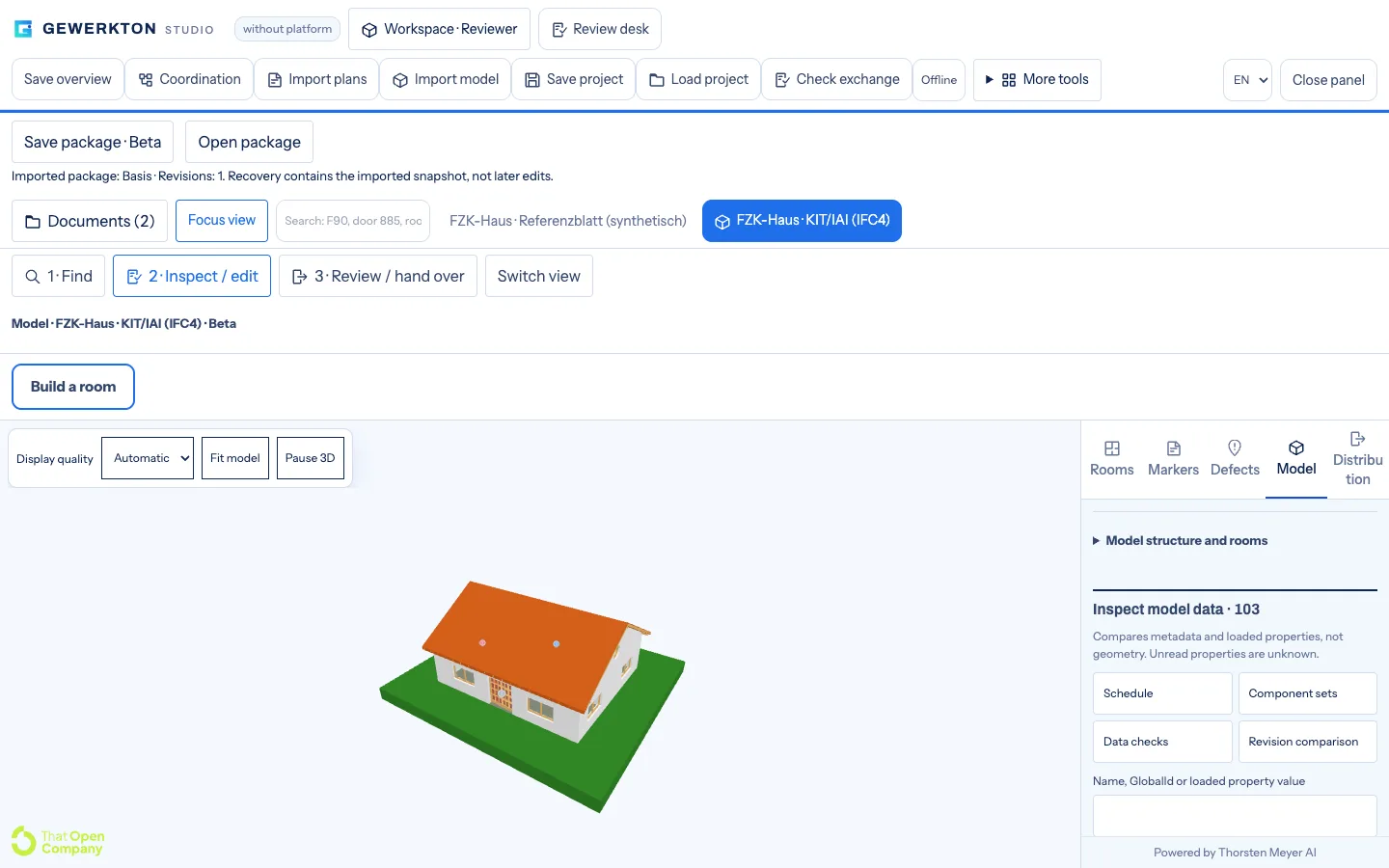
Before a model is handed on, “Check exchange” shows the checksum of the original files and the key facts of the model. For the small sample house it reports schema IFC4, metres as the length unit, 103 components and 0 duplicate GlobalIds. A revision comparison stores a model state and holds it against a later version. Here, too, Studio names its own limit: it compares metadata and loaded properties, not geometry.
Evidence that knows where it belongs
The point of all this is attachment. According to the website, Studio reads the labels on a plan and suggests rooms; once they are confirmed or corrected, evidence hangs in the right place, and a dictated defect is assigned to the room it came from. The website sums up how this fits with the field app: “Outside it is dictated, inside it is assigned. Field and Studio work on the same project, not on two copies of it.”
In a model the link goes down to the component. A defect created with a component selected is attached to that IFC component, and its pin floats above the building in 3D. Clashes from a clash detection run arrive as a BCF file and appear as defects on the respective components, with priority and deadline. In “Coordination” they are distributed and tracked through a work list and a status board. Studio does not compute clashes itself; it takes them over from other programs.
How it was tested
The basis for this article is a test run by the Gewerkton team on 3 October 2026 against the live Studio, started with “Continue without platform”. Every run began in a fresh browser profile and was automated with Playwright and Chromium, at 1440 and 390 pixels wide, in light and dark mode. Across all 66 runs there was no horizontal page overflow, no page error and not a single write request to the server. The work stayed in the browser. That matches a capability the website lists under “Already built”: the project sits as a file with the company, and there is no cloud obligation.
“Save project” writes a project file without the original PDFs and IFC files, which are reassigned on loading. A package, also labelled Beta, bundles project, review and originals, so nothing has to be reassigned. On phones and narrow windows, a focus view gives the plan or model the full screen. The sample files were fictional demo plans, synthetic test files and freely released IFC samples from the Institute for Automation and Applied Informatics (IAI) at the Karlsruhe Institute of Technology (KIT). No customer material or real construction drawings were involved.
What Studio is not
- Not a replacement for architect CAD: the website says detailed and working drawings remain there.
- Not finished truth: whatever is recognised automatically arrives as a proposal to check. On the test plan, wall recognition from the PDF did not reliably find a diagonal outer wall and a thin partition; this is known and kept as a test case.
- Not all of it is “Today” yet: the website lists IFC mode, BCF exchange, plan distribution with revisions and imported clashes under “In progress”. The live Studio already shows early versions of some of these, labelled Beta.
The website states the rule behind this: “What stands under Today runs. Everything beyond that is a direction and not a commitment, and it appears here as a function only once it runs.”
Beta status
Gewerkton is in beta. The website lists Studio, like Cloud, as a public beta, while Field is in beta ahead of the public beta. 2026 is the beta year, and general availability is planned for 2027, not promised. Capabilities listed under “Already built” are built and tested but have not been in use at a customer yet.
What Studio does today and where it is heading is on the Gewerkton Studio page. How defects are dictated on site is shown on the Gewerkton Field page. Access opens step by step through a waitlist; requests go through gewerkton.com.
Evergreen bestsellers Picks
bestsellers
As an affiliate, we earn on qualifying purchases.