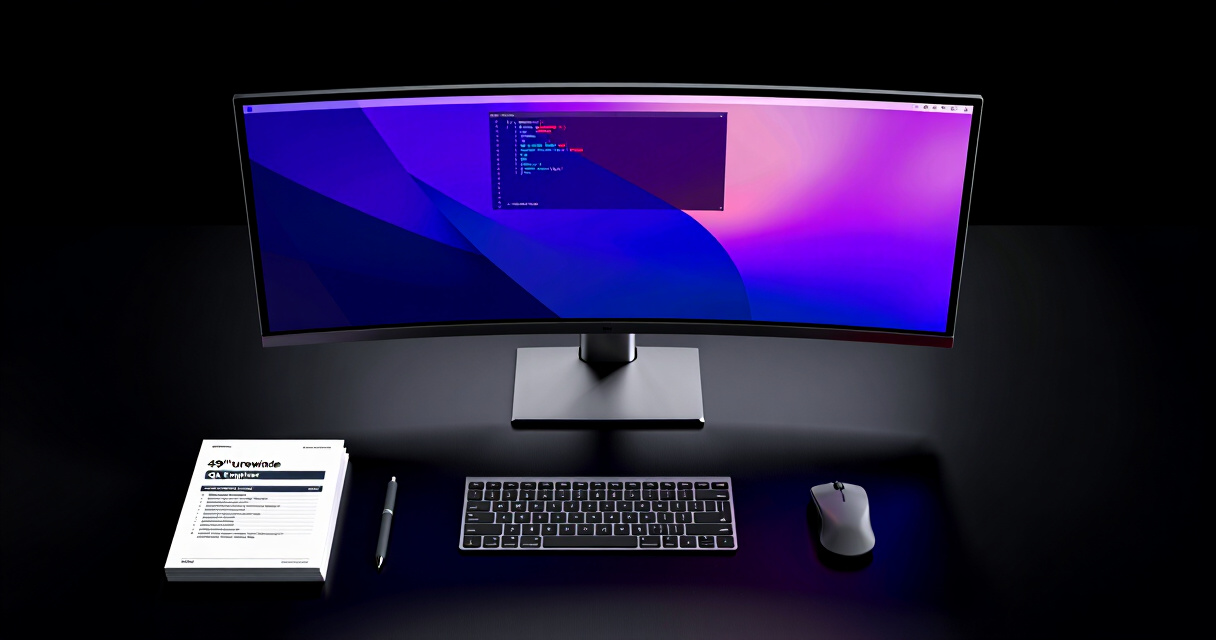
Finding the best 49 inch ultrawide monitor for QA engineers involves balancing screen real estate, color accuracy, refresh rates, and ergonomic features. The Samsung Odyssey G9 stands out as the overall top pick for its impressive curve, HDR quality, and smooth performance. For those prioritizing color precision, the Samsung Odyssey OLED G9 offers stunning visuals despite a higher price tag. Budget-conscious buyers might prefer the CRUA 49-inch Curved Gaming Monitor with solid performance at a lower cost. The main tradeoffs in this category often involve balancing high-end specs with affordability or ergonomic flexibility. Continue reading for a detailed breakdown of the top options that meet different priorities and budgets.
Key Takeaways
- The best monitors in this roundup excel in balancing screen size with high refresh rates suitable for QA workflows.
- High color accuracy and HDR support are key features for QA engineers needing precise visual validation.
- Curved designs dominate this category, offering immersive experiences but sometimes complicating desk placement.
- Premium models like OLED and G-Sync/FreeSync compatibility deliver smoother visuals at a higher cost.
- Budget options tend to compromise on features like HDR or adjustable stands but still provide ample screen space.



More Details on Our Top Picks
The Samsung Odyssey G9 stands out as the best choice for QA engineers who prioritize an ultra-wide view combined with high-quality visuals. Its 1000R curvature mimics the natural shape of the eye, providing an immersive experience ideal for multitasking across multiple windows without losing focus. The 144Hz refresh rate and 1ms response time ensure smooth interactions, especially when testing interactive applications or running simultaneous tasks. While its large size and premium price can be drawbacks, the combination of DisplayHDR 600 support and deep blacks make it well-suited for detailed visual inspections. Compared to the Gawfolk monitor, it offers slightly better contrast but at a higher cost and with a more demanding setup. This monitor is best for QA teams needing expansive real estate and high fidelity, but less ideal for those with limited desk space or budget constraints.
Pros:- Immersive 1000R curved ultra-wide display enhances multitasking
- High contrast with DisplayHDR 600 for detailed visual analysis
- Fast 144Hz refresh rate and 1ms response for smooth interactions
- Supports split-screen and Picture-in-Picture for multitasking
Cons:- Requires significant desk space due to large size
- Premium price point limits accessibility for some users
- Limited to high-end gaming and professional use, less suited for basic tasks
Best for: QA engineers working in environments where multitasking, high contrast, and immersive visuals improve productivity.
Not ideal for: Users with small desks or those seeking a more affordable, space-efficient option for basic testing.
- Screen Size:49 inches
- Resolution:DQHD (5120×1440)
- Refresh Rate:144Hz
- Response Time:1ms
- DisplayHDR:600
- Curvature:1000R
Bottom line: This monitor is ideal for QA engineers who need expansive, high-contrast visuals and can accommodate its size and cost.
Gawfolk 49 inch Ultra-Wide Curved Gaming Monitor, DQHD (5120×1440), 165Hz, 1MS, FreeSync, Height Adjustable, HDMI 2.1 & DP 1.4, Black
The Gawfolk 49-inch monitor offers a compelling mix of high refresh rate, adjustable ergonomics, and robust connectivity, making it a strong choice for QA engineers who need versatility. Its 165Hz refresh rate and 1ms response time enable smooth interactions, beneficial during testing of interactive applications or high-speed workflows. The adjustable height and tilt features, along with HDMI 2.1 and DisplayPort 1.4, provide flexibility for various setups, although its inclusion of RGB ambient lighting and eye protection tech adds extra comfort during long hours. Compared with the Samsung G9, it might lack some HDR depth but compensates with broader adjustability and connectivity options. It’s an excellent pick for those who want a high-performance monitor that adapts to different workflows and ergonomic preferences.
Pros:- High refresh rate of 165Hz with 1ms response time for smooth testing
- Extensive ergonomic adjustments for comfort
- Multiple connectivity options including HDMI 2.1 and DP 1.4
- Additional features like RGB lighting and eye protection
Cons:- Size may require a spacious desk
- Premium features come at a higher price point
- Lack of specific HDR certifications limits contrast depth
Best for: QA professionals needing a high-performance, adjustable display for diverse testing environments.
Not ideal for: Users seeking a non-curved, budget-friendly monitor or those with limited desk space for extra adjustability.
- Screen Size:49 inches
- Resolution:5120×1440 (DQHD)
- Refresh Rate:165Hz
- Response Time:1ms
- Connectivity:HDMI 2.1 & DP 1.4
- Adjustments:Height and tilt adjustable
Bottom line: This monitor is best suited for QA engineers who value flexibility, high refresh rates, and a feature-rich setup for demanding tasks.
GamePower 49-inch Curved Ultrawide Gaming Monitor, 1ms, 120Hz, 5K 5120x1440p, HDR400, FreeSync, G-Sync, Height & Tilt Adjustable
The GamePower 49-inch monitor emphasizes fast response and vivid visuals, making it an appealing option for QA teams involved in testing gaming applications or graphics-intensive software. Its 5K resolution provides highly detailed imagery, while the 120Hz refresh rate and 1ms response ensure minimal lag during interactive testing. Support for HDR400, FreeSync, and G-Sync enhances visual fidelity and tear-free performance, although the slightly lower refresh rate compared to the Gawfolk might be a compromise for some users. The adjustable height and tilt add ergonomic comfort, but the scarcity of additional features or connectivity options could be limiting. This monitor makes the most sense for QA professionals focused on visual accuracy and responsiveness in gaming or high-end graphics testing, but less so for those needing HDR certification or extensive connectivity.
Pros:- High 5K resolution for detailed visuals
- Fast 1ms response time with 120Hz refresh rate for smooth testing
- Supports HDR400, G-Sync, and FreeSync for tear-free, vivid visuals
- Adjustable height and tilt for ergonomic comfort
Cons:- Slightly lower refresh rate than some competitors like Gawfolk
- Limited additional features or ports for extended connectivity
- Potentially high price given its advanced specs
Best for: QA engineers testing gaming or graphics applications where responsiveness and vivid visuals are critical.
Not ideal for: Users needing advanced HDR certifications or comprehensive connectivity options for diverse workflows.
- Screen Size:49 inches
- Resolution:5120x1440p (5K)
- Refresh Rate:120Hz
- Response Time:1ms
- HDR:HDR400
- Connectivity:HDMI, DisplayPort
Bottom line: This monitor is best for QA teams prioritizing responsiveness and visual clarity in gaming or graphics testing environments.
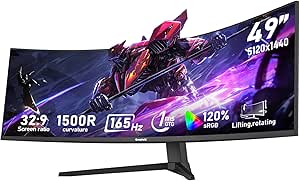
CRUA 49-inch Curved Gaming Monitor, DQHD 5120×1440, 144Hz/165Hz, 1500R, 32:9, AMD FreeSync, 120% sRGB, Height Adjustable, HDMI 2.1 & DP 1.4, Wall Mountable
This CRUA monitor stands out for delivering a highly immersive experience with its 1500R curvature and DQHD resolution, making it an excellent choice for QA engineers who need to view multiple windows or codebases simultaneously. Compared with the Samsung Odyssey G9, it offers a similar ultra-wide size but at a more accessible price point, though it lacks built-in speakers and has fewer premium features. Its high refresh rate and AMD FreeSync support ensure smooth visuals during video playback or occasional testing scenarios. The adjustable stand and wall-mount compatibility enhance ergonomic flexibility, but the absence of integrated audio and limited port information might be a drawback for those seeking a fully integrated setup. For QA engineers prioritizing value and basic multitasking, this makes a compelling option.
Pros:- Immersive 1500R curved display enhances multitasking and viewing comfort
- High DQHD resolution provides sharp, detailed visuals for coding and testing
- Adjustable ergonomic stand and wall-mount support offer flexible setups
Cons:- Lacks built-in speakers, requiring external audio devices
- Limited information on additional ports and USB connectivity
Best for: QA engineers needing a budget-friendly, large, curved display for multitasking and coding.
Not ideal for: Users seeking advanced gaming features like HDR1000 or OLED technology, or those requiring extensive port options.
- Screen Size:49 inches
- Resolution:5120 x 1440 (DQHD)
- Refresh Rate:144Hz/165Hz
- Curvature:1500R
- Color Coverage:120% sRGB
- Stand Features:Height adjustable, tilt, wall mountable
Bottom line: This monitor is ideal for QA professionals who want a large, curved screen at an affordable price for multitasking and coding.
Acer Nitro 49” Gaming Monitor – UltraWide DQHD 5120 x 1440, 1000R Curved, AMD FreeSync, 120Hz, 3ms, HDMI & DisplayPort
The Acer Nitro 49” excels in providing a comfortable viewing experience thanks to its 1000R curvature and adjustable tilt and height, making it well-suited for QA engineers who spend hours analyzing data or debugging. While it doesn’t match the ultra-wide 1500R curvature of the CRUA, its slightly lesser curve still offers immersive benefits without overwhelming some users. Its 120Hz refresh rate and 3ms response time deliver smooth visuals, comparable to gaming-focused monitors like the Samsung Odyssey G9, but with more modest connectivity options—mainly HDMI and DisplayPort. The ergonomic adjustments are a plus, but the relatively limited port selection may restrict peripheral setup for those with extensive accessories. Best suited for QA engineers prioritizing comfort and moderate multitasking over cutting-edge gaming features.
Pros:- Adjustable tilt and height for personalized comfort over long hours
- Good resolution and smooth refresh rate for multitasking and testing
- Curved design reduces eye strain during prolonged use
Cons:- Limited port selection may hinder extensive peripheral connectivity
- Less aggressive curvature compared to ultra-gaming models like Odyssey G9
Best for: QA professionals who need ergonomic comfort during extended testing or debugging sessions.
Not ideal for: Those looking for ultrawide monitors with the highest refresh rates or HDR capabilities for gaming or color-critical work.
- Display Size:49 inches
- Resolution:5120 x 1440 (DQHD)
- Curvature:1000R
- Refresh Rate:120Hz
- Response Time:3ms
- Ports:HDMI & DisplayPort
Bottom line: This monitor makes sense for QA engineers seeking ergonomic features and sufficient performance for daily multitasking.
Z-Edge 49 inch IPS Curved Gaming Monitor, 5120×1440, 144Hz, 1ms, HDMI, DP, USB-C, Adjustable Stand
The Z-Edge 49-inch IPS monitor combines vibrant color reproduction with a wide array of ports, including USB-C, making it a flexible choice for QA engineers who need crisp visuals and multiple device connections. Its 3800R curvature offers a less aggressive but still immersive experience, especially beneficial for users sensitive to heavy curves, unlike the more intense 1500R or 1000R options. The 144Hz refresh rate and 1ms response time ensure smooth performance during testing or content creation. The inclusion of PIP/PBP and KVM switch features adds versatility for multitasking across different systems. However, the larger size demands significant desk space, and the premium feature set may come at a higher cost. This pick suits those valuing color accuracy and connectivity options in a professional setting.
Pros:- Vivid IPS panel with wide viewing angles and accurate colors
- Multiple connectivity options including USB-C and HDMI
- Features like PIP/PBP and KVM switch enhance multitasking capabilities
Cons:- Large size requires ample desk space
- Higher price point given advanced features
Best for: QA engineers needing vibrant visuals, multiple device support, and flexible connectivity for multitasking.
Not ideal for: Users with limited desk space or those seeking more straightforward, budget options without extra features.
- Screen Size:49 inches
- Resolution:5120 x 1440 (DQHD)
- Refresh Rate:144Hz
- Response Time:1ms
- Panel Type:IPS
- Features:PIP/PBP, KVM switch
Bottom line: Ideal for QA professionals who need a color-accurate, versatile monitor with comprehensive connectivity options.
Samsung 49” Odyssey G9 Series DQHD Curved Gaming Monitor, 240Hz, 1ms(GtG), HDR1000, Height Adjustable, Ultrawide
The Samsung Odyssey G9 offers a dual QHD resolution with a 240Hz refresh rate, making it a powerhouse for immersive gaming and detailed visual analysis. Its 1500R curvature closely matches the CRUA’s, but with the added benefits of HDR1000 and a contrast ratio of 1,000,000:1, which translates into striking visuals and deep blacks—valuable for QA engineers working with color-sensitive applications. The height adjustment and VESA compatibility support ergonomic setups, but the monitor’s high price and size could be limiting for those with smaller desks. While primarily designed for gamers, its visual fidelity and adjustable features also appeal to QA professionals needing top-tier display quality.
Pros:- High contrast and HDR1000 support for vivid, true-to-life visuals
- Ultra-wide 49-inch curved design enhances immersion
- Ergonomic stand with height adjustment for comfortable long-term use
Cons:- Premium price may be prohibitive for some users
- Size could be challenging in smaller workspaces
Best for: QA engineers who demand high resolution, HDR, and exceptional contrast for color-critical testing or immersive multitasking.
Not ideal for: Budget-conscious users or those with limited desk space, as its premium features come with a steep price and large footprint.
- Screen Size:49 inches
- Resolution:Dual QHD (5120×1440)
- Refresh Rate:240Hz
- Response Time:1ms (GtG)
- HDR:HDR1000
- Stand Adjustments:Height, tilt, VESA
Bottom line: This monitor is best suited for QA professionals prioritizing visual fidelity and high-end features over cost or space constraints.
Samsung 49″ Odyssey G93SC Series Curved Gaming Monitor, QD-OLED, 240Hz, 0.03ms, DQHD, G-Sync Compatible, FreeSync Premium Pro, Adjustable Stand
The Samsung Odyssey G93SC with QD-OLED technology redefines ultrawide displays through its vivid color palette and exceptionally deep blacks, making it highly suitable for QA engineers working in color-sensitive environments. The 0.03ms response time and 240Hz refresh rate ensure ultra-smooth visuals, rivaling high-end gaming monitors like the G9 but with enhanced color accuracy and contrast. Its 1800R curvature offers a slightly less aggressive immersive experience, which some users prefer over the more intense 1500R. Connectivity options include HDMI 2.1 and DisplayPort, supporting modern devices and high-resolution workflows. Its premium price and large size may be limiting factors, but for those needing peak visual performance, this monitor delivers.
Pros:- Vivid colors and deep blacks thanks to QD-OLED technology
- Fast 0.03ms response time and 240Hz for exceptional smoothness
- Adjustable stand and multiple modern connectivity options
Cons:- High price may be out of reach for some users
- Large size requires ample workspace
Best for: QA professionals requiring exceptional color accuracy, contrast, and fast response times for detailed testing and visual tasks.
Not ideal for: Users with tighter budgets or limited desk space, as the high-end OLED technology and size come at a premium cost.
- Screen Size:49 inches
- Display Type:QD-OLED
- Resolution:DQHD
- Refresh Rate:240Hz
- Response Time:0.03ms
- HDR:DisplayHDR True Black 400
Bottom line: This monitor is best for QA engineers who need the highest color fidelity and response speed in an ultrawide format.
INNOCN 49-Inch OLED Ultrawide Curved Monitor 5K2K 5120x1440p 144Hz
The INNOCN 49-inch OLED stands out for its stunning 5K2K resolution and vibrant colors, making it ideal for content creators and QA engineers who need detailed visuals. Its 144Hz refresh rate and 0.03ms response time deliver smooth, flicker-free images, surpassing many LCD options like the Samsung G9 G91F in color accuracy and contrast. The curved design and HDR 400 support help reduce eye strain during long sessions, while extensive connectivity—including USB-C 90W—facilitates seamless device integration. However, the high price tag and large footprint may not suit budget-conscious or space-limited setups. Compared with the Samsung G9 G91SD, this monitor offers better color reproduction but sacrifices some gaming versatility due to its higher cost and complexity. This pick makes the most sense for QA engineers prioritizing image fidelity, multitasking, and ergonomic flexibility.
Pros:- Stunning 5K2K resolution with vibrant, accurate colors
- Extensive connectivity including USB-C 90W and HDMI 2.1
- Adjustable stand for personalized comfort
- Curved design reduces eye fatigue
Cons:- Premium price may be a barrier for some users
- Large size demands significant desk space
- Setup complexity with multiple input options
Best for: QA engineers who need precise visuals, color accuracy, and multitasking in a single high-end display
Not ideal for: Budget-conscious users or those with limited desk space, as the OLED model is costly and sizable
- Screen Size:49 inches
- Resolution:5120 x 1440 (5K2K)
- Refresh Rate:144Hz
- Response Time:0.03ms
- Panel Technology:QD-OLED
- Connectivity:2 x HDMI 2.1, 1 x USB-C 90W, HDMI 1.4, 2 x USB A, USB-B, RJ45, 3.5mm Audio Jack
Bottom line: Best suited for QA professionals who prioritize color accuracy, multitasking, and high-end visual fidelity over cost and space concerns.
CRUA 49-Inch White Curved Monitor with DQHD Resolution, 120Hz, and Adjustable Stand
The CRUA 49-inch DQHD curved monitor offers a compelling balance of size, resolution, and price, making it appealing for QA engineers on a budget who need ample screen real estate. Its 5120×1440 resolution delivers sharp images comparable to more expensive models like the Samsung Odyssey G9, while its 120Hz refresh rate and AMD FreeSync support ensure smooth performance during testing or multitasking. The 1500R curvature enhances immersion, though it may not match the ultra-vivid colors of OLED options. Its ergonomic stand with height and tilt adjustments improves comfort, but lacking built-in speakers could be limiting for some users. Compared with the Amzfast monitor, CRUA’s price advantage makes it a sensible choice for those prioritizing affordability, though it offers fewer advanced features. This monitor is ideal for QA engineers seeking a large, crisp display without the premium price tag.
Pros:- Large 49-inch curved display for immersive multitasking
- High resolution comparable to premium models
- Affordable price point
- Adjustable stand for ergonomic comfort
Cons:- Lacks built-in speakers
- Limited connectivity options compared to premium models
- Color accuracy and HDR support are basic
Best for: QA professionals needing a large, sharp display with ergonomic adjustments on a tight budget
Not ideal for: Gamers or content creators who require high color accuracy or HDR support, as the color coverage is more modest
- Size:49 inches
- Resolution:5120×1440 (DQHD)
- Refresh Rate:120Hz
- Curvature:1500R
- Color Coverage:120% sRGB
- Stand Adjustments:Height, tilt
Bottom line: A strong choice for QA engineers prioritizing size and clarity at a lower cost, with some compromises on advanced features.
Amzfast 49 Inch Curved Ultrawide Gaming Monitor, 120Hz, DQHD 5120×1440, HDR, Adaptive Sync, Height Adjustable, HDMI 2.0/DP 1.4
The Amzfast 49-inch curved ultrawide offers a flexible balance of gaming performance and productivity features. Its 5120×1440 resolution and 1500R curvature deliver an immersive experience, comparable to pricier options like the Samsung Odyssey G9. The 120Hz refresh rate combined with a 1ms MPRT response time ensures smooth visuals during fast-paced tasks, making it a solid choice for QA testing that involves dynamic content. Support for HDR and a wide 120% sRGB gamut provide vibrant images, while multiple ergonomic adjustments—including height, tilt, and rotation—enhance comfort. However, it requires DisplayPort 1.4 for full 120Hz performance, and its size may demand a substantial desk space. Compared with the CRUA, this model offers more comprehensive connectivity and versatile adjustments, but at a slightly higher cost. It is best suited for QA engineers seeking a blend of gaming and multitasking capabilities in one monitor.
Pros:- Immersive 49-inch curved display with high resolution
- Fast 120Hz refresh rate and 1ms response for smooth visuals
- Supports HDR and wide color gamut for vibrant images
- Multiple ergonomic adjustments for comfort
Cons:- Requires DisplayPort 1.4 for full performance
- Large footprint demands significant desk space
- No built-in speakers
Best for: QA engineers who need a versatile display for testing high-speed visuals and multitasking with ergonomic flexibility
Not ideal for: Users with limited desk space or those seeking a monitor with premium color accuracy for professional content creation
- Size:49 inches
- Resolution:5120×1440 (DQHD)
- Refresh Rate:120Hz
- Response Time:1ms MPRT
- Panel Type:VA
- Connectivity:HDMI 2.0 x2, DisplayPort 1.4 x2
Bottom line: An excellent choice for QA professionals needing a flexible, immersive monitor for testing and multitasking with gaming-like responsiveness.
Samsung 49″ Odyssey OLED G9 (G91SD) Curved Gaming Monitor, Dual QHD, 144Hz, 0.03ms, G-Sync Compatible, FreeSync Premium Pro
The Samsung Odyssey OLED G9 is designed for users who prioritize ultra-rapid response times, vibrant visuals, and adaptive sync technology. Its dual QHD resolution and OLED panel deliver unmatched contrast and color precision, surpassing traditional LCDs like the CRUA in visual quality. The 144Hz refresh rate and 0.03ms response time make it ideal for fast-paced QA testing and gaming, with G-Sync and FreeSync Premium Pro compatibility ensuring tear-free experiences. The ergonomic stand offers height and tilt adjustments, but the high price and potential burn-in risk for static images are notable considerations. Compared to the LG QD-OLED series, the Samsung G9 G91SD offers a more refined gaming experience with superior black levels and response times. This monitor is best for QA engineers needing top-tier visual fidelity and responsiveness, especially in graphics-intensive tasks.
Pros:- Vivid OLED contrast with deep blacks and vibrant colors
- Fast 0.03ms response time and 144Hz refresh rate
- G-Sync and FreeSync Premium Pro compatible
- Adjustable ergonomic stand
Cons:- High price point limits accessibility
- Potential burn-in with static images over time
- Large size may not fit all desks
Best for: QA engineers requiring the fastest response times, best contrast, and adaptive sync tech for testing dynamic visuals
Not ideal for: Budget-conscious users or those with static workloads prone to burn-in, due to higher cost and OLED risks
- Screen Size:49 inches
- Resolution:Dual QHD (5120 x 1440)
- Refresh Rate:144Hz
- Response Time:0.03ms
- Panel Technology:QD-OLED
- G-Sync Compatible:Yes
Bottom line: Ideal for QA professionals who need premium visual quality, rapid response, and adaptive sync in a high-end gaming-grade monitor.
How We Picked
Our evaluation focused on performance metrics such as resolution, refresh rate, and response time, which directly impact visual clarity and responsiveness. Build quality and ergonomic features like height adjustment and swivel were essential for long-term comfort during extended QA sessions. We also prioritized color accuracy, HDR support, and compatibility with adaptive sync technologies, as these influence visual fidelity. Value was a key factor, balancing high-end features with affordability. The ranking reflects a combination of technical specs, user reviews, and the overall versatility of each monitor for QA engineers working with detailed and color-critical content.Factors to Consider When Choosing Best 49 Inch Ultrawide Monitor For Qa Engineers
Choosing the right 49 inch ultrawide monitor for QA engineers requires understanding several key factors that influence usability and performance. While specifications like resolution and refresh rate are vital, ergonomics, color accuracy, and connectivity options often make or break the user experience. Knowing what to prioritize based on your workflow and workspace setup can help you avoid common pitfalls and ensure long-term satisfaction.Resolution and Screen Clarity
For QA engineers, a high-resolution display like DQHD (5120×1440) or 5K2K ensures sharp, detailed visuals, which are essential for precise testing and validation. Lower resolutions may save costs but can lead to pixelation or less clarity, hampering detailed work. Opting for a monitor with at least 120Hz refresh rate ensures smoother interactions, especially when multitasking or reviewing dynamic content. Beware of overly high refresh rates on models with lower resolution, as the benefits may be less noticeable in typical QA tasks.
Color Accuracy and HDR Support
For QA professionals working with visual validation, color accuracy is paramount. Monitors supporting sRGB 100% or higher, along with HDR capabilities, help ensure that colors are represented faithfully. While HDR can enhance detail in certain scenarios, it adds to the cost and complexity, so consider whether your workflow truly benefits from it. Budget models often lack robust color profiles, so investing in higher-end options pays off if color precision is critical to your tasks.
Ergonomics and Adjustability
Prolonged screen time makes ergonomic features like height adjustment, tilt, and swivel essential. A monitor that can be tailored to your eye level reduces strain and improves productivity. Wall-mountable options increase flexibility, especially in tight or cluttered workspaces. Avoid models with fixed stands or limited adjustability, as they can lead to discomfort over extended periods, impacting accuracy and focus.
Connectivity and Compatibility
Multiple input options such as HDMI 2.1, DisplayPort 1.4, and USB-C support enhance versatility, allowing seamless integration with various devices. For QA engineers using laptops or specialized hardware, these connections facilitate quick switching and reduce cable clutter. G-Sync and FreeSync support can benefit work involving dynamic content or testing multimedia, though they are less critical than color and resolution. Always check that your hardware aligns with the monitor’s connectivity features.
Price and Value Tradeoffs
While high-end monitors with OLED panels, HDR1000, and G-Sync provide premium visuals, they come with steep price tags. Budget options may omit features like extensive adjustability or high color accuracy but still deliver ample workspace for general QA tasks. It’s important to match your needs with your budget, avoiding overpaying for features you won’t use. Consider future-proofing by investing slightly more if your workflow demands higher precision or smoother performance.
Frequently Asked Questions
Is a curved monitor better for QA engineering tasks?
Curved monitors enhance immersion and can reduce eye strain by maintaining a consistent focal distance across the screen. For QA engineers, this means easier multitasking and more natural viewing angles when working with wide spreadsheets, logs, or visual content. However, they can sometimes be more challenging to position precisely and may not fit well in all desk setups. If your workflow involves detailed visual validation and you have space, a curved monitor often offers a more comfortable experience over long periods.
How important is HDR support for QA work?
HDR support can be beneficial if your QA tasks involve testing content with high dynamic range or color grading. It provides a broader color palette and better contrast, making nuances easier to detect. However, HDR also increases the cost and power consumption of monitors. For most QA engineers focusing on layout, functionality, and basic visual checks, high-quality SDR monitors with good color accuracy may suffice. Prioritize HDR only if your specific work requires it.
Should I prioritize refresh rate over resolution for QA testing?
In most cases, resolution and color fidelity matter more for QA work, especially when verifying fine details. A refresh rate of 120Hz or higher improves responsiveness, which is beneficial if your tasks involve reviewing motion-heavy content or multitasking across multiple windows. However, for static or layout-based testing, a standard 60-100Hz refresh rate is typically enough. Balance your choice based on the nature of your testing—higher refresh rates are a bonus but not a necessity for most QA roles.
Are ultrawide monitors suitable for all types of QA testing?
Ultrawide monitors excel at providing extensive workspace, making them ideal for simultaneous multi-application use, layout testing, and visual comparisons. However, they may not be suitable for tasks requiring strict aspect ratios or pixel-perfect precision, as some applications and testing tools are optimized for standard resolutions. Be aware that some software may not fully support ultrawide aspect ratios, leading to display issues. Evaluate whether your specific QA environment benefits from the extra screen real estate or if a more traditional monitor better fits your workflow.
What is the most cost-effective way to get a high-quality 49 inch ultrawide monitor?
To get good value, focus on monitors offering a balance of resolution, color accuracy, and ergonomic features without unnecessary extras. Models like the CRUA or Gawfolk provide solid performance at a lower price point, making them suitable for budget-conscious QA engineers. Consider waiting for sales or refurbished units of higher-end models, which often drop in price but still deliver excellent quality. Prioritize core features relevant to your tasks, such as resolution and adjustability, rather than premium bells and whistles that won’t significantly impact your workflow.
Conclusion
For general-purpose QA engineers seeking a reliable, high-performance display, the Samsung Odyssey G9 offers a superb blend of size, resolution, and advanced features. If color precision and visual fidelity are your top priorities, the Samsung Odyssey OLED G9 stands out as the premium choice. Budget buyers or those just starting out will find the CRUA 49-inch Curved Monitor provides ample workspace without breaking the bank. For users needing ergonomic flexibility, monitors like the Gawfolk or Z-Edge deliver excellent adjustability. Ultimately, your choice depends on your specific workflow, budget, and workspace constraints—match the monitor’s strengths to your needs for the best experience.